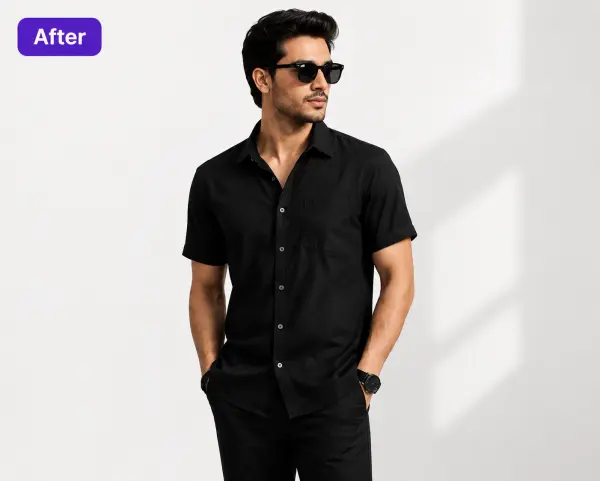
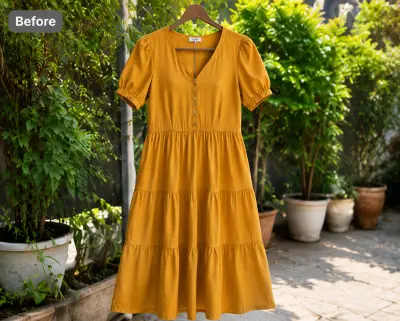
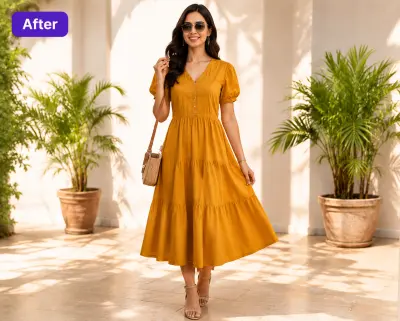
You photographed the garment flat on the floor because that's the fast way to shoot inventory. The problem: buyers can't see fit, and Amazon won't take a flat lay as the main image for adult clothing. Upload the flat lay you already have, pick a model, and get a photorealistic on-model photo in about 30 seconds — print, color, and construction preserved exactly.
There's a reason flat lays are the default for anyone selling clothing online: no model to book, no mannequin to buy, no studio. Lay the t-shirt on the floor, smooth it out, shoot from above, done. For shooting a hundred SKUs in an afternoon, nothing beats it. The trouble starts when the photo has to do its real job — convincing a stranger to buy clothing they can't touch.
A flat lay answers "what is this garment?" but not the question the buyer is actually asking: "what will this look like on?" Laid flat, a dress has no drape, a hoodie has no volume, and a skirt gives no clue where the hem lands. Fabric weight, how the shoulders sit, whether the cut runs boxy or fitted — none of it survives being pressed against a floor. Buyers who can't judge fit either skip the listing or buy with low confidence, and low-confidence apparel purchases are the ones that come back as returns.
Then there's eligibility. Amazon US requires the MAIN image for adult apparel to show the product on a standing human model. Flat lays — like mannequin and hanger shots — are not accepted as the main image for adult clothing at all. If your whole catalog is flat lays, every adult-apparel listing on Amazon is blocked at the front door before ranking even matters. (Full rules on our Amazon seller page and in our guide to Amazon's apparel photo requirements.)
Even where flat lays are allowed — Etsy, Poshmark, Depop, your own store — they compete in a results grid against on-model photos, and the on-model photo is the one that lets a shopper imagine wearing the item. That's why established fashion marketplaces are wall-to-wall model imagery, and why the practical question isn't whether to get on-model photos but how — a reshoot with a hired model, or an AI conversion from the flat lay you already have. We've written up the full trade-off in flat lay vs model shots; the short version is that the flat lay you already shot contains everything the AI needs.
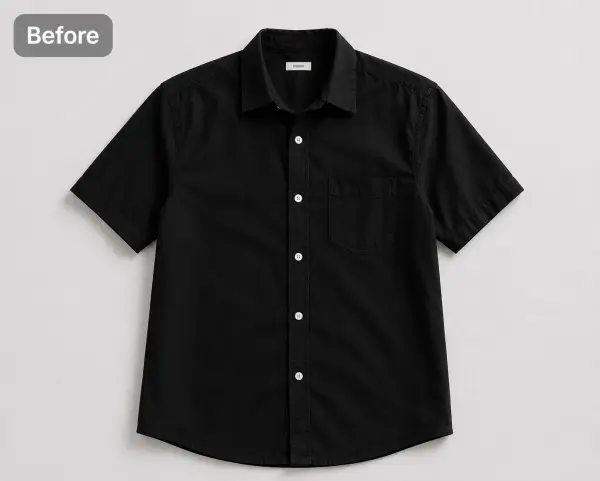
No new equipment, no reshoot. The flat lay is the only input — a phone photo is enough if it's shot cleanly.
Even light, no harsh shadows, and the full garment in frame — collar to hem, both sleeves visible. Smooth the big wrinkles. A plain floor, bed sheet, or table is a fine background.
40+ models across skin tones and body types, 50+ backgrounds. A standing pose on pure white for Amazon and TikTok Shop, or a lifestyle scene for Etsy and Poshmark.
Download a high-resolution, watermark-free on-model photo you own outright. Commercial use is included on every plan, even the free one.
The AI reads shape, print, and construction straight from your photo, so the photo is the ceiling on quality. Shoot from directly above so the garment isn't foreshortened, keep it flat rather than artfully scrunched, and don't crop off cuffs or hems — the AI uses sleeve and hem lines to place them correctly on the body. Styled flat lays with props work, but a clean, boring flat lay converts best.
A conversion is only useful if the buyer receives the garment they saw. CatalogX treats your flat lay as the source of truth — the model is generated, the product isn't.
Chest graphics, stripes, florals, and embroidery stay where your flat lay shows them. Nothing is redrawn, mirrored, or invented — a plain garment stays plain.
The exact shade in your flat lay carries through to the on-model image, so the listing photo matches the item you ship — the difference between a sale and a "not as pictured" return.
Neckline shape, sleeve length, hem length, and silhouette are read from your photo and respected on the model. A midi stays a midi; a crew neck doesn't become a V-neck.
The one thing your flat lay can't show — how fabric falls on a body — is exactly what the conversion adds. Gravity at the shoulders and hem, natural volume, real fit information.
T-shirts, dresses, hoodies, skirts, shirts, co-ords — 14+ garment types, each mapped from a flat lay onto the model you pick.
The everyday western catalog is the core use case: see our dedicated pages for t-shirt model photos, dress model photos, and hoodie model photos. One specialty worth knowing about: CatalogX is also purpose-built for South Asian garments — saree pleat and pallu direction, border continuity, lehenga flare, hem-length accuracy — the failure modes where generic AI try-on tools fall apart. If that's your niche, start at saree model photos for US sellers.
All three formats have a job. The mistake is using the cheap-to-shoot one where the marketplace or the buyer expects on-model.
| Flat lay | Ghost mannequin | On-model | |
|---|---|---|---|
| Shows | Print, color, and outline — no volume or drape | 3D shape of the garment, no body or fit context | Fit, drape, hem position, proportions on a real body |
| Cost to produce | Nearly free — phone + floor | Mannequin + retouching, or AI ghost effect | $50–150/image at a studio, or ~$0.50/image AI-converted |
| Amazon adult apparel MAIN image | Not eligible | Not eligible | Required — standing model, pure white |
| Buyer confidence | Lowest — buyer guesses at fit | Middle — shape yes, fit no | Highest — buyer can picture wearing it |
| Best used as | Shooting format & secondary detail shots | Secondary images, clean catalog look | Main image everywhere |
The good news is these aren't three photoshoots — they're one photo and two conversions. Your flat lay converts to on-model (this page) or to the invisible-mannequin look. Already shooting on a dress form instead? The same conversion works from those inputs too: see ghost mannequin to model for invisible-mannequin photos and mannequin to model for visible-mannequin shots. Whatever you shot, on-model is one upload away.
Each platform has its own image rules. Generate once, export to each spec.
Standing model on pure white, ~85% frame fill, 1600px+ (2000px recommended) — the adult-apparel MAIN image spec, met by default. Amazon guide →
2000px on the shortest side, up to 20 photos per listing — room for the on-model hero plus your flat-lay detail shots. Etsy guide →
Covershots are 3:4 portrait (since March 2026) — an on-model portrait fills the taller frame far better than a floor-shot flat lay. Poshmark guide →
Pure white background, 1080×1080 or larger — generate the standing-model shot on white and it's compliant as-is.
The traditional route from flat lay to on-model is a reshoot: book a studio, hire a model, ship samples, wait for retouching. In the US that runs $300+ per studio session, or $50–150 per finished image from a product-photography service. For a 40-SKU catalog, that's a four-to-six-figure line item before a single sale.
CatalogX starts free: 5 credits, no card required — enough to convert your five best sellers today and judge the quality yourself. The Starter plan is $9.99/month for 20 credits, about $0.50 per on-model image. Pro is $19.99/month for 60 credits with 4K output, and Business is $49.99/month for 250 credits plus API access. One-time packs at the same prices are available if you'd rather not subscribe. Every plan includes full ownership, no watermarks, and commercial use. Full details on the pricing page, and a deeper cost breakdown in AI photoshoot vs studio costs in the US.
Not for adult apparel. Amazon US requires the MAIN image for adult clothing to show the product on a standing human model — flat lays, mannequin shots, and hanger shots are not accepted as the main image. Flat lays can still be used as secondary images. Converting your flat lay to an on-model photo makes it eligible as the main image. Details on our Amazon page.
Even lighting with no harsh shadows, the full garment in frame from collar to hem with both sleeves visible, and a reasonably plain background. Smooth out major wrinkles. A phone camera is fine — the AI reads the garment's shape, print, and construction directly from the photo, so a clean flat lay converts best.
No. CatalogX reproduces the garment exactly as photographed — prints stay where they are, colors and colorways are preserved, and construction details like necklines, sleeve length, and hem length carry over to the model. Nothing is invented that your photo doesn't show.
The AI reads the garment's cut and proportions from the flat lay — shoulder width, sleeve length, hem line, silhouette — and drapes the fabric onto the model with natural gravity and fit. You choose the model, pose, and background; the garment itself is mapped from your photo.
14+ garment types: t-shirts, shirts, dresses, hoodies, sweaters, skirts, trousers, co-ords, and more — plus South Asian garments like sarees and kurtis, which CatalogX handles as a specialty. Accessories such as bags and jewelry are supported too.
You start with 5 free credits, no card required. Starter is $9.99/mo for 20 credits — about $0.50 per on-model image. Pro is $19.99/mo for 60 credits plus 4K output; Business is $49.99/mo for 250 credits plus API access. A US studio shoot runs $300+ per session, or $50–150 per finished image. See pricing.
Yes. You own every output on every plan, including the free tier. No watermarks, commercial use included — list on Amazon, Etsy, eBay, Poshmark, TikTok Shop, Shopify, or your own store.
Yes. Mannequin photos — visible or the invisible ghost-mannequin effect — work as inputs too, and often give the AI an even stronger shape signal. See mannequin to model and ghost mannequin to model for those workflows.
Take the phone photos you've already shot and turn them into model photos that meet Amazon's rules and win the click on every marketplace.