Real Output
One flat photo in, one main image out
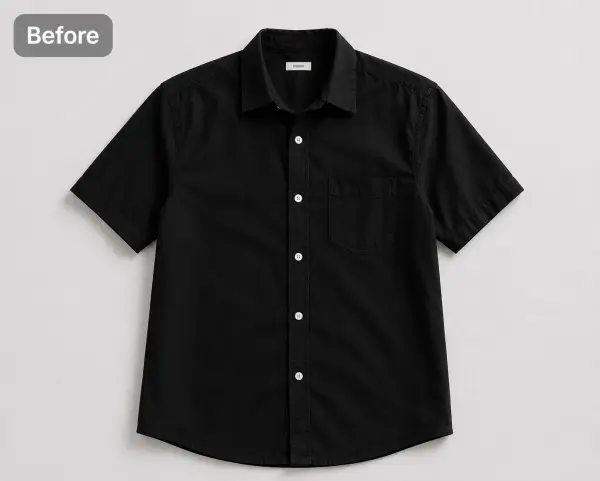 Before — flat photo
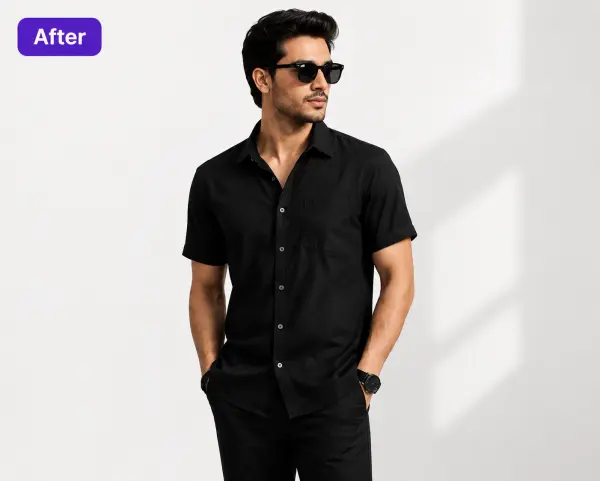 After — CatalogX
The same shirt, 30 seconds later — standing model, clean studio scene, the exact garment. Flatten to pure white and it's main-image ready.
Adult apparel main images on Amazon must show the garment on a model, standing, on pure white — flat-lays get suppressed. CatalogX turns the flat photo you already have into a compliant on-model main image in 30 seconds.
Before — flat photoAfter — CatalogXThe same shirt, 30 seconds later — standing model, clean studio scene, the exact garment. Flatten to pure white and it's main-image ready.
Main-image compliance is checked at listing time — miss one rule and the listing can be suppressed from search.
Amazon's current apparel image standards — and how CatalogX output measures up against each one.
| Amazon rule | How CatalogX complies |
|---|---|
| Adult apparel MAIN images must show the product on a standing human model — no mannequins, hangers or flat-lays | Standing on-model poses are the default output: front, angled and back views built for exactly this rule. |
| Pure white background (RGB 255, 255, 255) on the MAIN image | Generate on a studio-white scene, then use the background remover to flatten to exact pure white. |
| Product should fill about 85% of the frame | Full-body framing keeps the garment dominant in frame; crop to the 85% fill before upload. |
| 1600px+ on the longest side recommended (2000px is better; 1000px is the hard floor for zoom) | Exports are high resolution on every plan, with 4K output on Business — comfortably past the zoom threshold. |
| No text, watermarks, logos or graphics on the MAIN image | Every output is clean and watermark-free on every plan, including the free tier. |
| Kids' and baby apparel is the exception: MAIN images must be flat, off-model | Keep your flat photo as the kids' MAIN image and use CatalogX on-model shots in the secondary slots. |
Selling on more than one platform? The same upload also meets TikTok Shop's pure-white image spec. Browse everything on the CatalogX US home page.
One download per shoot: every approved shot exported at Amazon’s spec, each one already checked against the garment you photographed.
Each image in the Listing Pack is sized to Amazon’s canvas with the background filled and the garment scaled to fill the frame — nothing to crop or pad in a photo editor, and every file carries AI-provenance metadata.
The pack’s spreadsheet carries Amazon’s image column headers (main_image_url and the rest, in slot order) with one row per SKU, so you paste straight into the bulk template instead of retyping 9 cells per product.
Before a shot reaches the pack an AI reviewer scores it against your original photo — print, colour, neckline, hem length — and flags a miss. Pro and Business re-render a flagged shot automatically, so what you upload is the garment you sell.
Free on every plan, no credits. How to upload the pack on Amazon →
No model booking, no studio, no suppression risk.
A flat-lay, a hanger shot, or your supplier's photo — tags, pins and packaging are removed automatically.
Front, angled or back view on a clean white scene — the pose and background rules are the default, not an accident.
High-resolution output stays sharp beyond 1000px, with HD upscale for detail shots in your secondary slots.
The single hardest Amazon apparel requirement is the model. CatalogX gives every SKU an on-model main image from the flat photo you already have — no casting, no studio day.
Standing pose, clean white scene, no watermarks, high resolution — the output is shaped by Amazon's checklist, so what you upload is what passes.
New inventory doesn't wait for a shoot. Photograph it flat when it arrives and its main image is live the same afternoon.
Fill the rest of the gallery with angled views, detail close-ups and lifestyle scenes — zoomable, consistent, one brand look across your catalog.
Yes — for adult apparel, Amazon requires the main image to show the product on a model; flat-lays and mannequins are not permitted and can get the listing suppressed. Kids' and baby clothing is the exception: those main images must be flat, off-model.
Pure white — RGB 255, 255, 255 exactly. Off-white or light grey backgrounds fail compliance checks. CatalogX generates on clean studio-white scenes, and the background remover produces a transparent PNG you can flatten to pure white.
At least 1000 pixels on the longest side to enable zoom, and the product should fill 85% or more of the frame. Higher resolution is rewarded — zoom is one of the strongest converters on Amazon.
Models must stand upright — no sitting, kneeling, leaning or lying down. CatalogX's standing poses with front, angled and back views are built for exactly this requirement.
The usual causes are a flat-lay main image, a non-white background, text or watermarks, or low resolution. Generate an on-model shot on studio white, upload it as the main image, and keep your flat and detail photos in the secondary slots.
Amazon's image standards govern what the image shows — standing model, pure white background, an accurate depiction of the actual product — not how it was produced. Photorealistic AI images that faithfully show the real garment meet those standards; accuracy is the seller's responsibility, so the product depicted must match what ships, and follow Amazon's disclosure requirements where it asks about AI-generated content.
Upload a garment, pick a standing pose on white, and upload a main image that passes.