Real Output
One flat photo in, one covershot out
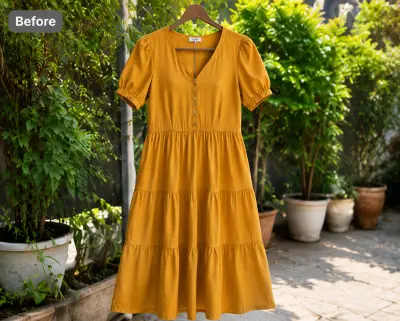 Before — flat photo
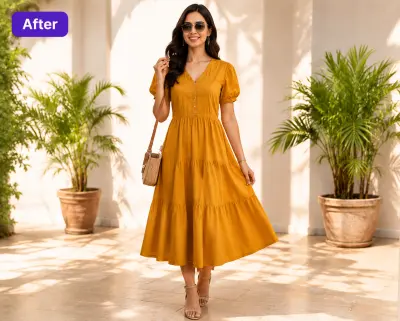 After — CatalogX
The same dress, 30 seconds later — on a model, honest to the piece, ready to fill the covershot tile.
Poshmark's feed now shows 3:4 portrait covershots — square photos sit padded and small. CatalogX turns a flat photo of your item into a portrait on-model covershot that fills the tile and wins the tap.
Before — flat photoAfter — CatalogXThe same dress, 30 seconds later — on a model, honest to the piece, ready to fill the covershot tile.
The covershot is the listing — everything else is backup. Here is what to hit.
Poshmark's current photo requirements — and how CatalogX output measures up against each one.
| Poshmark rule | How CatalogX complies |
|---|---|
| Covershots display 3:4 portrait since March 2026 (1200×1600 sweet spot); square 1080×1080 uploads are still accepted but show padded | Full-body generations come out portrait by default — shaped for the covershot tile, no awkward crop. |
| Up to 16 photos per listing, plus one video | One run generates the on-model covershot plus angled and back views; your own close-ups fill the tag and condition slots. |
| Photos must be well lit and accurately show the actual item | CatalogX reproduces the exact piece photographed in clean, even studio lighting — prints, hardware and wear stay put, nothing is invented. |
Cross-listing? The same upload also meets TikTok Shop's pure-white image spec. Browse everything on the CatalogX US home page.
One download per shoot: every approved shot exported at Poshmark’s spec, each one already checked against the garment you photographed.
Each image in the Listing Pack is sized to Poshmark’s canvas with the background filled and the garment scaled to fill the frame — nothing to crop or pad in a photo editor, and every file carries AI-provenance metadata.
Poshmark takes images in the listing form rather than from a bulk template, so the pack carries the sized files under a poshmark/ folder, named by SKU and slot, up to 16 per product — drag them in, in order.
Before a shot reaches the pack an AI reviewer scores it against your original photo — print, colour, neckline, hem length — and flags a miss. Pro and Business re-render a flagged shot automatically, so what you upload is the garment you sell.
Free on every plan, no credits. What the Listing Pack contains →
No mannequin, no self-timer gymnastics, no borrowed model.
One clear flat shot of the actual piece — tags, pins and hangers are removed automatically.
40+ models and 50+ backgrounds. Portrait full-body output is the default — shaped for the new covershot tile.
Angled and back views from one run, your own close-ups for tags and flaws, and a video if you have one.
Full-body generations come out portrait — made for the 3:4 tile, not squeezed into it. Square-era photos in your closet can be refreshed one flat photo at a time.
Wearing, shooting and steaming every piece caps how many listings you make a day. A flat photo per item removes the cap.
Same model, same scene, every listing — your closet page reads like a boutique, and boutiques get follows.
The AI reproduces the exact item photographed — nothing invented, nothing smoothed away. Your covershot matches what arrives in the box.
Poshmark switched covershot display from square to 3:4 portrait in March 2026 — 1200×1600px is the sweet spot. Old square photos still show, but padded; portrait photos fill the full tile and win more taps.
Up to 16 photos plus one video. Use the covershot for the on-model portrait shot, then fill the rest with front, back, label, fabric and flaw close-ups.
Yes — the covershot is the only thing buyers see in the feed, and a garment on a body beats a garment on a hanger for taps. The detail photos behind it still show the actual item's condition.
Yes — photograph the actual item flat, and CatalogX puts that exact piece on a model without redrawing it. Keep your own close-ups of tags and any flaws in the detail slots, as Poshmark buyers expect.
No. The item is reproduced exactly as photographed — prints, stitching, hardware and trims stay put. The covershot stays an honest picture of what ships. Start with 5 free credits, no card required.
Poshmark's rules ask for well-lit photos that accurately show the actual item you're selling — they govern what the photo shows, not how it was made. Photorealistic AI images of your real piece meet that bar when they stay true to the item. Accuracy is the seller's responsibility, so keep real close-ups of tags and any flaws in the detail slots, and disclose AI use wherever Poshmark asks.
One flat photo per item — portrait, on-model, feed-ready.