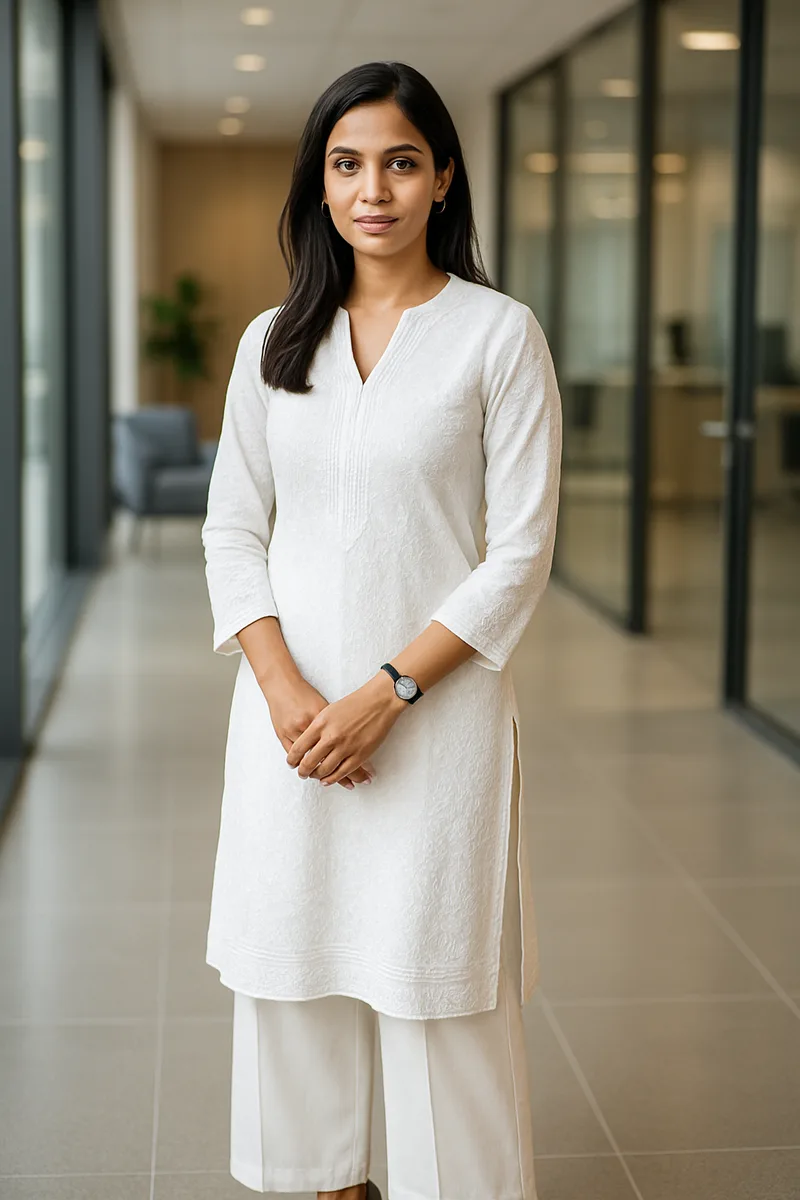
If you're an Indian fashion seller trying to list on Flipkart, Myntra, Amazon, or Meesho, you already know the pain: every marketplace demands professional product images with models, white backgrounds, and studio lighting. But getting those images costs more than most new sellers can afford.
AI product photo generators have changed this equation entirely. In 2026, you can upload a flat-lay or mannequin shot of your garment and get back a photorealistic image of a model wearing it — in under a minute, and in some cases, completely free. This guide walks through the options available to Indian fashion sellers, with a detailed look at CatalogX's free tier and an honest comparison of costs.
The Problem — Product Photography Is Expensive in India
Let's break down what a traditional product photography shoot actually costs for an Indian fashion brand. These numbers are based on industry averages across tier-1 and tier-2 cities:
- Model fees: Rs 5,000 - 15,000 per day. Professional fashion models charge based on experience and the type of shoot. For ethnic wear, you often need models experienced with saree draping and dupatta styling, which commands a premium.
- Studio rental: Rs 3,000 - 8,000 per day. A properly equipped studio with seamless white backgrounds, lighting rigs, and changing areas. In Mumbai or Delhi, expect the higher end of this range.
- Photographer: Rs 5,000 - 20,000 per day. This includes the photographer's time, equipment, and basic post-production. Fashion-specialized photographers with marketplace experience charge more.
- Post-production: Rs 200 - 500 per image. Background cleanup, color correction, retouching, and resizing for marketplace specifications. This is often outsourced to editing studios and adds up quickly across a large catalog.
For a typical D2C brand with 100 SKUs needing 4-5 images each, you're looking at Rs 2-5 lakhs for a complete catalog shoot. And that's before accounting for re-shoots when marketplace QC teams reject images for technical issues.
This creates a chicken-and-egg problem that kills many new fashion businesses before they start. You can't sell without professional images — marketplaces will reject your listings or bury them in search results. But you can't afford professional images without sales revenue to fund them. The result: thousands of Indian fashion sellers with great products sitting in warehouses because they can't get past the photography barrier.
Even for established sellers, photography costs eat into margins. Fashion e-commerce in India operates on thin margins to begin with — after marketplace commissions (15-25%), shipping, returns, and GST, many sellers are working with net margins of 8-15%. Spending Rs 500-2,000 per image on photography makes the unit economics even tighter, especially for lower-priced products where the per-SKU photography cost might exceed the profit from the first 10-20 units sold.
What Is an AI Product Photo Generator?
An AI product photo generator takes a source image of your garment — a flat-lay on a table, a mannequin shot, or even a well-lit hanger photo — and generates a new image of a realistic-looking model wearing that garment. The output is a photorealistic photograph that looks like it was taken in a professional studio with a real model.
This is fundamentally different from tools you might already be using:
- Background removal tools (like Remove.bg) only change the background. They don't put your garment on a model. You still need a model-on photo to start with.
- Photoshop editing requires manual work by a skilled designer. You're still paying someone to composite images, and the results often look unnatural — lighting mismatches, awkward shadows, garments that don't drape correctly on the body.
- AI product photo generators use image generation models specifically trained on fashion photography. They understand how fabric drapes on a body, how light interacts with different materials, and how garments should look when worn naturally. The AI generates a completely new image — it's not pasting your garment onto a model photo.
The output from a good AI generator is indistinguishable from traditional photography to the average online shopper. Marketplaces including Myntra have confirmed that AI-generated model images are accepted, as long as they meet the platform's technical and quality specifications.
The technology behind these tools has improved dramatically in the last two years. Early AI fashion generators produced images with obvious artifacts — distorted hands, unnatural fabric folds, blurred prints. Current-generation tools like CatalogX use models specifically fine-tuned on fashion photography, producing results that even experienced photographers struggle to distinguish from real shoots.
Free AI Product Photo Tools Available in India
Several tools offer free tiers or free usage that Indian fashion sellers can use. Here's an honest comparison:
| Tool | Free Tier | Best For | Limitations |
|---|---|---|---|
| CatalogX | 5 free credits on signup | Indian marketplace optimization (Flipkart, Myntra, Amazon, Meesho) | Limited to 5 free images; paid plans for larger catalogs |
| ChatGPT / DALL-E | Free tier available | General-purpose image generation | Not fashion-specific; no marketplace export; inconsistent garment accuracy |
| Canva | Limited AI features on free plan | Social media graphics and marketing creatives | Cannot generate model-on images; AI features are for backgrounds and elements only |
| Remove.bg | Free background removal (limited resolution) | Background removal for existing photos | No model generation at all; only changes backgrounds on existing images |
Why Generic AI Tools Fall Short for Fashion
You might wonder: if ChatGPT can generate images, why not just use that? The answer comes down to specialization. Generic AI image generators have several critical shortcomings when it comes to fashion product photography:
- Garment accuracy: General-purpose tools don't preserve the exact details of your garment — the print pattern, the embroidery placement, the neckline shape, the color. They generate something that looks "similar" but isn't your actual product. For a product listing, this is unacceptable.
- Fabric and draping: AI models trained on general photography don't understand how chiffon falls differently from cotton, how a silk saree catches light differently from a polyester one, or how a lehnga flares from the waist. Fashion-specific tools are trained on these nuances.
- Marketplace export: Every Indian marketplace has different image specifications — Flipkart wants 1:1 square, Myntra requires 3:4 portrait, Amazon has its own rules. Generic tools give you a random-sized image that you then need to manually resize and reformat.
- Indian fashion categories: General AI tools have very limited understanding of sarees, kurtas, lehengas, salwar suits, sherwanis, and other Indian garment types. They don't know how a pallu should be draped or where a dupatta should fall. Purpose-built tools are trained specifically on these categories.
- Color accuracy: For fashion e-commerce, the color in your listing image must match the actual product. Generic generators frequently shift colors — a maroon becomes a red, a teal becomes a blue. Fashion-specific tools prioritize color fidelity.
CatalogX Free Tier — Step-by-Step Walkthrough
CatalogX offers 5 free credits on signup — no credit card required. Here's exactly how to use them to create your first marketplace-ready product images:
Sign up: Go to catalogx.app and sign in with your Google account. Your 5 free credits are available instantly — no verification, no waitlist, no onboarding calls.
Step 1: Upload Your Garment Photo
Upload a photo of the garment you want to generate a model image for. CatalogX works with flat-lay photos (garment laid flat on a surface), mannequin shots, or hanger photos. The cleaner and better-lit your source image, the better your results will be.
Step 2: Choose Your Garment Type
Select the garment category — T-shirt, kurta, saree, dress, lehnga, shirt, jeans, and more. This tells the AI how the garment should be worn and draped on the model. Choosing the correct category is important: a kurta drapes differently from a T-shirt, and the AI needs this information to generate a realistic result.
Step 3: Select an AI Model and Pose
Choose from a range of AI models. Then select a pose that works for your garment type. For western wear, a standard front-facing pose works well. For ethnic wear like sarees or lehengas, select poses that show the full drape of the garment.
Step 4: Choose Your Background
For marketplace listings, select a white or off-white background — this is mandatory for primary images on Myntra, Amazon, and most other platforms. For social media content or lifestyle shots, you can choose from contextual backgrounds like studio settings, outdoor environments, or solid colors.
Step 5: Generate
Hit the generate button. CatalogX processes your image in approximately 30-60 seconds (1 credit per image).
Step 6: Download or Export
Once your image is generated, you can download it directly or use the marketplace export feature to get platform-specific formats — 1:1 for Flipkart, 3:4 for Myntra, and so on. The export handles resizing, aspect ratio cropping, and format conversion automatically.
Cost Comparison — AI vs Traditional Photography
Here's a direct comparison between traditional product photography and AI-generated images using CatalogX's Pro plan pricing. The difference in cost, speed, and flexibility is significant:
| Cost Factor | Traditional Photography | CatalogX (Pro Plan) |
|---|---|---|
| Per-image cost | Rs 500 - 2,000 | Rs 15 - 40 |
| Setup time | 1-2 weeks to book studio, model, photographer | Instant — sign up and start generating |
| Turnaround | 3-7 days including post-production | Under 60 seconds per image |
| Minimum order | Full day shoot (Rs 15,000+) | 1 image at a time |
| Re-shoots | Full cost again — rebook studio, model, photographer | Generate again using same credit |
| Marketplace export | Manual resizing per platform | One-click export for each marketplace |
For a catalog of 100 SKUs with 4 images each (400 total images), traditional photography costs Rs 2-8 lakhs. The same catalog on CatalogX Pro would cost Rs 6,000-16,000 — a reduction of 90-95%. And if you're just starting out, the 5 free credits let you test the concept before spending anything at all.
The hidden cost advantage goes beyond the per-image price. Traditional photography requires coordination — aligning schedules with models, photographers, and studio availability. For sellers outside metro cities, the logistics are even harder. You may need to travel to Mumbai or Delhi for a quality shoot, adding travel and accommodation costs. AI generation eliminates all of this. You can create images from anywhere in India, at any time, with nothing more than a phone and an internet connection.
There's also the iteration cost. If a marketplace rejects your images for technical reasons — wrong background shade, model cropped too tight, insufficient resolution — a traditional re-shoot costs almost as much as the original. With AI, you adjust your settings and regenerate in seconds at the cost of a single credit.
Tips for Getting the Best Results with AI Product Photos
AI product photo generators are only as good as the source images you provide. Here are practical tips to maximize quality with minimal effort:
- Use clean, well-lit source images: Natural daylight near a window works surprisingly well. If you're shooting indoors, use even lighting from two sides to minimize shadows. You don't need studio equipment — a well-lit room and a steady hand will do.
- Flat-lay on a white or light surface: Lay your garment flat on a white sheet, light-colored table, or even a clean white bedsheet on the floor. The AI can separate the garment from the background more accurately when there's strong contrast.
- Remove wrinkles and style the garment before photographing: Iron or steam the garment before shooting. Wrinkles in the source image will carry over to the generated output. Fold collars neatly, arrange sleeves symmetrically, and button up shirts.
- For ethnic wear, drape properly on a mannequin: Sarees, lehengas, and dupattas look best when the AI can see the full garment shape. A mannequin or dress form gives the AI more information about how the garment should look when worn.
- Shoot at the highest resolution your phone camera allows: More pixels give the AI more detail to work with. Use your phone's maximum resolution setting. Most modern phones (even budget models) shoot at 12MP or higher, which is more than sufficient.
- Avoid busy backgrounds in source images: While the AI can separate garments from backgrounds, a cluttered background introduces noise. A clean, simple background lets the AI focus entirely on your garment's details, prints, and textures.
- Capture the full garment in frame: Don't crop any part of the garment — sleeves, hemline, collar, and all details should be fully visible. The AI needs to see the complete garment to generate an accurate model-on image. Cropped source images lead to AI "guessing" what the missing parts look like, which often produces inaccurate results.
- Take multiple source photos: Shoot 2-3 versions of the same garment from slightly different angles or lighting conditions. You can try each as a source image and compare the AI outputs to find the best result. One extra minute of source photography can significantly improve your final image quality.
When AI Product Photos Make Sense (and When They Don't)
AI-generated product images are transformative for many use cases, but they're not the right choice for every situation. Here's an honest assessment:
AI Product Photos Are Great For
- New sellers testing the market: You have products but no sales data to justify a photography budget. AI lets you create professional listings with zero upfront investment and validate demand before spending on traditional shoots.
- Seasonal catalogs and fast fashion: When you're adding 50-100 new SKUs every season, the speed and cost of AI generation makes it feasible to photograph everything. Traditional photography at this volume would be prohibitively expensive and slow.
- Marketplace listings: For primary product images on Flipkart, Myntra, Amazon, and Meesho, AI-generated model shots meet the technical requirements and look professional to shoppers browsing through hundreds of listings.
- Color variants: If you sell a kurta in 8 colors, you don't need 8 separate model shoots. Generate once and create variations — the AI handles the color change while keeping the model, pose, and composition consistent.
- Social media content: Instagram, Facebook, and WhatsApp catalog images need to be produced quickly and in high volume. AI generation lets you create fresh content daily without scheduling shoots.
AI Product Photos Are Less Ideal For
- Luxury and designer brands: If your brand identity depends on editorial photography with specific art direction, locations, and celebrity models, AI generation won't replicate that level of creative control. Luxury buyers also expect and appreciate the authenticity of real photoshoots.
- Detailed construction shots: Close-up images showing stitching quality, button details, zipper hardware, or lining construction are better done with real macro photography. AI can generate these images, but a real close-up photograph captures the actual construction of your specific product.
- When buyers need exact fabric texture: For premium fabrics where the weave, texture, or hand-feel is a major selling point, a well-shot fabric close-up with real macro photography communicates quality more effectively than an AI-generated image.
The practical approach for most Indian fashion sellers is this: use AI for 80% of your catalog — the standard product images, model shots, and marketplace listings that need to be produced at scale. Reserve traditional photography for hero products, lookbook content, and the close-up detail shots that showcase specific construction or fabric qualities. This hybrid approach gives you the best of both worlds: AI efficiency for volume and traditional quality for your flagship products.
Getting Started — Your First 5 Free Images
If you've read this far, you're likely considering whether AI-generated product photos could work for your business. The best way to find out is to try it with real products from your catalog. Here's a suggested approach for using your 5 free CatalogX credits strategically:
- Pick your best-selling or most representative product. Choose the garment that you're most confident about — the one you know looks good and sells well (or would sell well with better images).
- Take 2-3 source photos. Shoot your garment as a flat-lay on white background, plus one on a mannequin if you have one. This gives you options to see which source type produces the best AI output.
- Generate a front-facing model shot first. Use 1 credit on a standard-quality, white-background, front-facing image. This is the primary image every marketplace requires.
- Try a different pose or background. Use another credit to generate a lifestyle or alternate-pose version of the same garment. Compare the two and see what works better for your brand aesthetic.
- Test with a different garment category. If your first images were western wear, try a kurta or ethnic piece with your remaining credits. AI performance can vary by category, and you want to know how it handles your specific product types.
After you've used your free credits, you'll have a clear picture of whether AI-generated images meet your quality bar. Most sellers who try it don't go back — the cost savings, speed, and consistency are too significant to ignore. But the free tier exists specifically so you can make that judgment for yourself, with your own products, before spending a single rupee.
Related Articles
- How to Remove Background from Fashion Product Photos -- Free AI Tool
- How to Upscale Product Photos to HD for E-Commerce Listings
- The Exact Image Sizes Every Indian Marketplace Requires in 2026
Frequently Asked Questions
Yes, CatalogX offers 5 free credits on signup with no credit card required. Each credit generates one model-on product image. The free tier includes marketplace export for Flipkart, Myntra, Amazon, and Meesho formats. This is enough to create a complete listing for one product.
Traditional photography costs Rs 500-2,000 per image, while CatalogX Pro plan costs Rs 15-40 per image. For 100 SKUs with 4 images each, traditional photography costs Rs 2-8 lakhs versus Rs 6,000-16,000 with AI. That is a 90-95% cost reduction, with images ready in seconds instead of weeks.
Yes, marketplaces including Myntra accept AI-generated model images as long as they meet technical and quality specifications. The images must be photorealistic with correct backgrounds, dimensions, and aspect ratios. CatalogX includes one-click marketplace export that formats images to each platform's exact requirements.
Generic AI tools don't preserve exact garment details like print patterns, embroidery placement, and neckline shape. They also lack understanding of Indian garment types like sarees and lehengas, produce inconsistent colors, and output random-sized images that need manual resizing for each marketplace.
Use clean, well-lit flat-lay photos on a white or light surface. Remove wrinkles, style the garment neatly, and capture the full garment without cropping any part. Shoot at your phone camera's maximum resolution. Natural daylight near a window works well. Multiple source photos at slightly different angles give you options.
CatalogX gives 5 free credits on signup. Each generated image costs 1 credit, so you can generate 5 images for free. Background removal, HD upscale, and marketplace export tools are free with no credit limits.