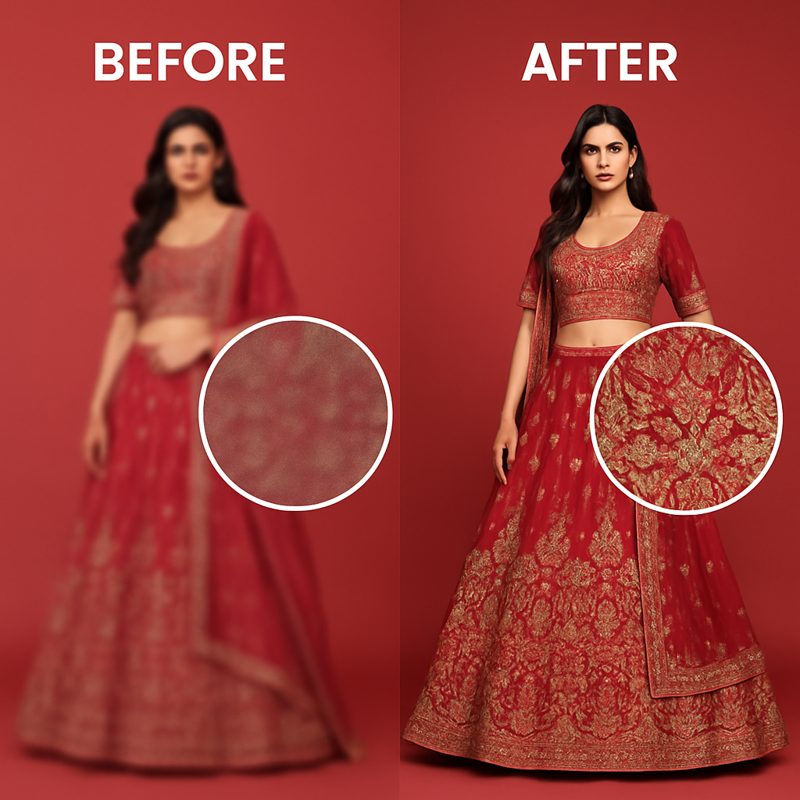
You've shot your products, edited the images, and you're ready to list them — then the marketplace rejects your photos for being too low resolution. Or worse, the images go live but look blurry and unprofessional next to competitors with crisp, HD photos.
This is one of the most common problems in fashion e-commerce. Reshooting isn't always practical — especially for products already in the warehouse or sold out. AI upscaling solves this by increasing image resolution without the artifacts and blur that come from simple resizing.
Why Image Resolution Matters for E-Commerce
Resolution isn't just a technical requirement — it directly affects sales:
- Marketplace minimums: Amazon requires at least 1000px on the longest side (1600px+ recommended for zoom). Flipkart requires 1000x1000px minimum. Images below these thresholds get rejected.
- Zoom functionality: Higher resolution images enable the zoom-on-hover feature on Amazon and Flipkart. Products without zoom see lower engagement — customers can't inspect fabric texture, print quality, or stitching.
- Mobile experience: On high-DPI phone screens, a 500px image looks noticeably blurry. You need at least 1000px width for images to look sharp on modern devices.
- Customer trust: Blurry or pixelated images signal low quality. Customers associate image quality with product quality — even subconsciously.
Minimum Image Requirements by Platform
| Platform | Minimum | Recommended | Max File Size |
|---|---|---|---|
| Amazon India | 1000 x 1000 px | 2000 x 2000 px | 10 MB |
| Flipkart | 1000 x 1000 px | 1500 x 1500 px | 10 MB |
| Myntra | 1080 x 1440 px | 1500 x 2000 px | 5 MB |
| Ajio | 1080 x 1440 px | 1500 x 2000 px | 5 MB |
| 1080 x 1080 px | 1080 x 1350 px | 30 MB | |
| Shopify | No minimum | 2048 x 2048 px | 20 MB |
Simple Resize vs AI Upscale — What's the Difference?
When you resize an image to a larger size in a basic editor, the software has to invent new pixels. The two common approaches have very different results:
Basic resize (bicubic/bilinear interpolation):
- Averages neighboring pixels to fill in gaps
- Result: image gets larger but looks blurry and soft
- Fine details (fabric texture, embroidery, print patterns) become muddy
- Technically meets size requirements, but looks worse than the original
AI upscale (Lanczos + neural enhancement):
- Uses trained algorithms that understand image structure
- Reconstructs sharp edges, preserves fabric texture, maintains color accuracy
- Result: genuinely looks like a higher-resolution original
- Works especially well on fashion images (fabric patterns, stitching, garment edges)
Upload any image, get a 2x higher resolution version in seconds. No watermark, no per-image fees.
Upscale Free Now →
How to Upscale Images Using CatalogX
- Log in to CatalogX and click "HD Upscale" in the sidebar under Tools.
- Upload your image — drag and drop or click to browse. Supports PNG and JPG up to 10MB.
- Wait a few seconds — the AI processes your image and shows a side-by-side comparison with the original and upscaled dimensions displayed (e.g., 600x800 → 1200x1600).
- Download — click "Download HD Image" to get the upscaled PNG.
The tool doubles your image dimensions (2x upscale). A 500x700 image becomes 1000x1400. A 800x1200 image becomes 1600x2400. This is enough to meet every major marketplace's requirements.
Tips for Best Upscaling Results
- Start with the best original you have: Upscaling works best when the source image is reasonably sharp. A 400px sharp image upscales better than a 600px blurry one.
- Remove noise first: If your source image has visible noise or grain (common with phone cameras in low light), the upscaler will amplify it. Clean up noise before upscaling if possible.
- Don't upscale more than 2x: Going from 500px to 1000px works well. Going from 200px to 1000px (5x) will produce poor results regardless of the algorithm. If your source is very small, a reshoot may be necessary.
- Check fabric detail after upscaling: Zoom in to 100% on the upscaled image and verify that fabric texture, prints, and embroidery look natural. This is the area where upscaling quality matters most for fashion.
- Combine with background removal: Upscale first, then remove the background. This gives the background removal AI more pixels to work with, producing cleaner edges.
When to Upscale vs When to Reshoot
Upscaling is the right choice when:
- The original image is sharp but just too small (under 1000px)
- The product is sold out or unavailable for reshooting
- You need to update existing listings quickly
- You're working with supplier-provided images that are low resolution
Reshooting is better when:
- The original image is blurry, poorly lit, or badly composed
- The source image is extremely small (under 300px on any side)
- You need entirely new angles or styling
Related Articles
- How to Remove Background from Fashion Product Photos -- Free AI Tool
- Free AI Product Photo Generator for Indian Fashion Sellers
- The Exact Image Sizes Every Indian Marketplace Requires in 2026
Frequently Asked Questions
Use an AI upscaling tool like CatalogX HD Upscale instead of basic image resizing. AI upscaling uses neural networks that understand image structure to reconstruct sharp edges and preserve fabric texture. Basic resizing just averages neighboring pixels, making images blurry. AI upscaling produces genuinely sharper results.
Amazon India requires minimum 1000x1000 pixels with 2000x2000 recommended for zoom functionality. Flipkart also requires minimum 1000x1000 pixels with 1500x1500 recommended. Myntra requires minimum 1080x1440 pixels in a 3:4 portrait ratio. Images below these thresholds get automatically rejected.
Basic resize uses bicubic or bilinear interpolation, which averages neighboring pixels and produces blurry results. AI upscaling uses trained neural networks that reconstruct sharp edges, preserve fabric textures, and maintain color accuracy. The difference is especially visible in fashion images with fabric patterns and stitching detail.
AI upscaling works best on sharp images that are simply too small. It cannot fix fundamentally blurry or poorly focused photos. If your source image is blurry from camera shake or bad focus, upscaling will amplify the blur. For blurry images, reshooting is the better option.
A 2x upscale works well for most images, doubling both dimensions. For example, a 500x700 image becomes 1000x1400. Going beyond 2x (like 5x from 200px to 1000px) produces poor results regardless of the AI algorithm. If your source image is under 300 pixels on any side, reshooting is recommended.