
Every fashion brand selling online faces the same problem: marketplaces require clean product images with white or transparent backgrounds, but getting those images is time-consuming and expensive. Whether you're listing on Amazon, Flipkart, Myntra, or your own D2C store, background quality directly affects whether your listing gets approved — and whether customers click.
The traditional approach involves Photoshop, a skilled editor, and 5-15 minutes per image. At scale, this adds up fast. If you're uploading 100 products a month, that's 25+ hours just on background removal.
AI background removal changes this entirely. Here's how it works, when to use it, and how to get the best results.
Why Background Removal Matters for Fashion E-Commerce
Clean backgrounds aren't just an aesthetic choice — they're a business requirement:
- Marketplace compliance: Amazon, Etsy, Shopify, Flipkart and Myntra all require white or transparent backgrounds for primary product images. Non-compliant images get rejected.
- Higher conversion rates: Products with clean, professional images see 20-40% higher click-through rates compared to cluttered or inconsistent backgrounds.
- Brand consistency: When every product has the same clean background, your store looks professional and trustworthy. Mixed backgrounds make your catalog look disorganized.
- Flexibility: A transparent PNG can be placed on any background — white for Amazon, styled for Instagram, colored for seasonal promotions. One image, unlimited uses.
Traditional Methods vs AI Background Removal
Here's how the two approaches compare for fashion product images:
Manual editing (Photoshop / GIMP):
- 5-15 minutes per image depending on complexity
- Requires skilled editor familiar with pen tool, masking, and edge refinement
- Best results on complex edges (sheer fabric, intricate embroidery)
- Cost: $0.50-$3.00 per image if outsourced
AI background removal:
- Under 10 seconds per image
- No design skills needed — upload and download
- Handles solid fabrics, garments on hangers, and flat-lay shots well
- Free with CatalogX — no per-image cost
Upload any product image and get a transparent PNG in seconds. No credit card, no watermark on background removal.
Remove Background Free →
How to Remove Background Using CatalogX
CatalogX includes a dedicated background removal tool built right into the app. Here's how to use it:
- Log in to CatalogX and click "Remove Background" in the sidebar under Tools.
- Upload your image — drag and drop or click to browse. Supports PNG and JPG up to 10MB.
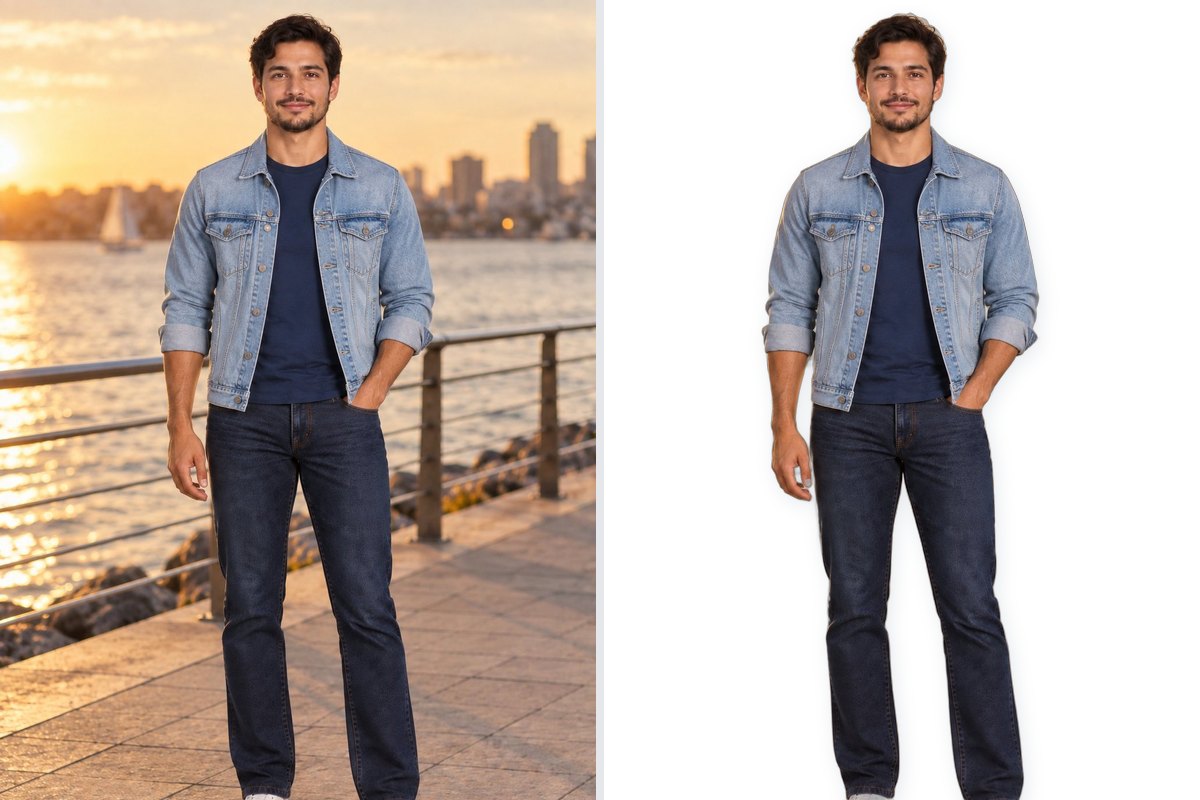
- Wait a few seconds — the AI processes your image and shows a side-by-side comparison of the original and the result with the background removed.
- Download — click "Download PNG" to get a transparent PNG file ready for any marketplace.
That's it. No manual selection, no edge cleanup, no export settings to worry about. The tool works on any image — product photos, model shots, flat-lays, or even AI-generated mockups from CatalogX itself.
Tips for Best Background Removal Results
AI background removal works best when the input image is clean. Here's how to set yourself up for success:
- Use high-contrast backgrounds: A garment on a white or light-colored surface is easier for AI to separate than a garment on a patterned or dark background.
- Avoid shadows on the garment: Heavy shadows can confuse the AI about where the garment ends and the background begins. Diffused lighting works best.
- Shoot the full garment: Make sure no part of the garment is cropped or cut off. The AI needs to see the complete outline to make a clean cut.
- Minimize clutter: Remove tags, hangers (unless intentional), and any props that overlap with the garment. The cleaner the shot, the cleaner the result.
- Use good resolution: Higher resolution images produce better edge quality. Aim for at least 1000px on the shorter side.
Transparent vs White Background: Which Do You Need?
Different platforms have different requirements. Here's a quick reference:
- Amazon: Pure white background (RGB 255,255,255) for main image. CatalogX's Marketplace Export tool can place your transparent PNG on a white background at the exact dimensions Amazon requires.
- Flipkart: White or light grey background. Same approach — remove background, then export at the required dimensions.
- Myntra: White background for primary image, styled backgrounds allowed for secondary images.
- Instagram / Social Media: Transparent PNGs let you place products on branded backgrounds, seasonal themes, or lifestyle scenes.
- Your own D2C store: Transparent PNG gives you maximum flexibility. Place on white for product pages, on colored backgrounds for collection pages, on lifestyle images for hero banners.
Background Removal + AI Mockups: The Full Workflow
Background removal is even more powerful when combined with CatalogX's other tools:
- Upload your garment and generate an AI mockup with a model wearing it.
- Remove the background from the generated mockup to get a clean, transparent model shot.
- Export for marketplace — resize the transparent image to Amazon, Flipkart, or Instagram dimensions with the correct background.
- Generate color variants — create the same mockup in different garment colors to show your full collection.
This end-to-end workflow replaces what used to require a photographer, a model, a studio, a Photoshop editor, and a production manager. Now one person can do it in minutes.
Related Articles
- How to Upscale Product Photos to HD for E-Commerce Listings
- Free AI Product Photo Generator for Indian Fashion Sellers
- The Exact Image Sizes Every Indian Marketplace Requires in 2026
Frequently Asked Questions
Upload your product image to CatalogX's free background removal tool. The AI processes it in under 10 seconds and produces a clean transparent PNG. No Photoshop skills needed, no per-image fees, and no watermarks. The tool works on flat-lays, model shots, and mannequin images.
Keep the transparent PNG as your master file for maximum flexibility. Amazon requires pure white (RGB 255,255,255), Flipkart accepts white or light gray, and Instagram allows any background. From one transparent PNG, you can generate any background variation using marketplace export tools.
AI background removal works well on solid fabrics like cotton, denim, and silk. It handles garments on hangers, flat-lays, and model shots reliably. For very sheer or translucent fabrics like organza dupattas or net sarees, manual Photoshop masking still produces better edge quality.
Download your background-removed image as a transparent PNG file. PNG supports transparency, which lets you place the product on any colored background later. For marketplace uploads, convert to JPEG with a white background at each platform's required dimensions using a marketplace export tool.
Photoshop requires manual selection using pen tools, masking, and edge refinement, taking 5-15 minutes per image by a skilled editor. AI background removal processes images in under 10 seconds with no design skills needed. For most fashion products, the quality is comparable, though Photoshop still wins on complex edges.