Amazon Leggings Image Requirements
Selling leggings and activewear bottoms to US apparel shoppers who filter hard on image quality? Here is what Amazon expects from your leggings images in 2026:
| Requirement | Amazon specification |
|---|
| MAIN image | Adult apparel MUST be shown on a standing human model — no mannequins, no flat-lays, no hangers |
| Background | Pure white, RGB 255,255,255 — off-white gets flagged |
| Frame fill | Product fills roughly 85% of the frame |
| Resolution | 1600px+ on the longest side to enable zoom (2000px recommended) |
| Extras | No text, logos or watermarks on the MAIN image |
The rule that matters most: for adult apparel, the Amazon MAIN image must show the garment on a standing human model — mannequins, flat-lays and hanger shots are not accepted in the MAIN slot. Every photo CatalogX generates for Amazon starts from that requirement.
How to Shoot Leggings for Amazon
Leggings are adult apparel, so Amazon's MAIN image rule applies in full: standing human model, pure white RGB 255,255,255, roughly 85% fill, 1600px+ (2000px recommended). This rule bites leggings sellers hardest — leggings flat on a table look like empty fabric tubes, but a compliant model shot normally means a fitting session per style.
CatalogX puts your leggings on a standing model from the flat photo, preserving the fabric's sheen and any panel seams or prints. Use secondary slots for the details that convert activewear buyers: a waistband close-up and a side view showing the seam lines. Same model across your size-color grid keeps the storefront consistent.
One Flat Photo In, One Listing Shot Out
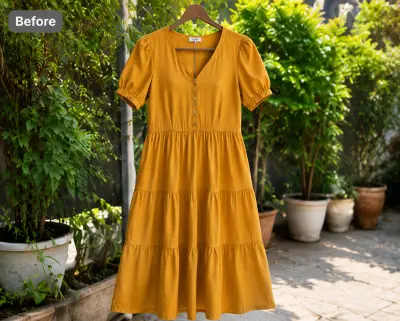 Before — flat photo
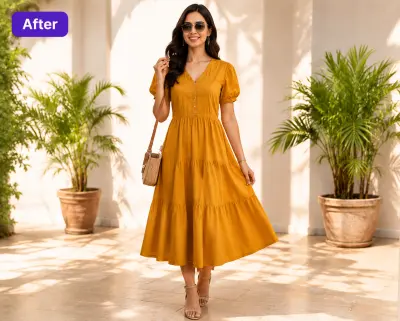 After — CatalogX
Shown on a dress from our public gallery — we don't have a leggings pair published yet, but the same flow applies: your flat product photo becomes a standing on-model shot.
From Photo to Live Listing
1. Upload your leggings — a flat-lay, hanger shot or supplier photo works. Tags and pins are removed automatically.
2. Pick a model — 40+ models across skin tones and body types. The AI respects your garment's construction; it doesn't guess.
3. Set the scene — pure white for the compliant MAIN image, lifestyle scenes for secondary slots.
4. Generate and export — about 30 seconds per image, sized for Amazon's specs. You own every output; commercial use is included on all plans, no watermarks.
On cost: a US studio photoshoot runs $300+ per session, or $50–150 per finished image. CatalogX starts free (5 credits, no card) and paid plans start at $9.99/month — see USD pricing or the full AI vs studio cost breakdown.