Real Output
One flat photo in, one scroll-stopper out
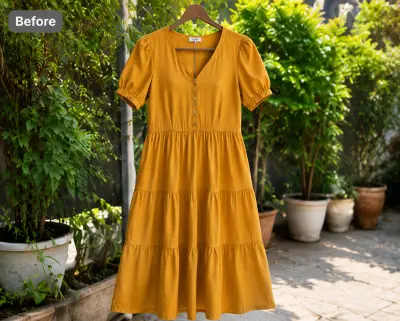 Before — flat photo
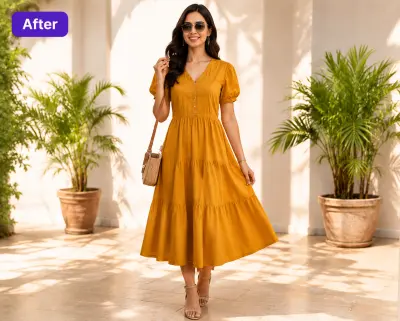 After — CatalogX
The same dress, 30 seconds later — on a body, honest to the piece, ready to take the first slot.
Depop gives every listing four square slots, and the first one decides whether anyone stops scrolling. CatalogX turns a flat photo of your piece into an on-body shot — the exact garment, on a model, styled like your shop.
Before — flat photoAfter — CatalogXThe same dress, 30 seconds later — on a body, honest to the piece, ready to take the first slot.
A tight canvas rewards deliberate photos. Here is the spec.
Depop's current photo requirements — and how CatalogX output measures up against each one.
| Depop rule | How CatalogX complies |
|---|---|
| Square 1:1 photos — 1080×1080 recommended, 640×640 minimum; non-square uploads get auto-cropped | Model shots keep the garment centred in frame, so a deliberate 1:1 crop before upload keeps the whole piece visible — no surprise auto-crop. |
| Up to 4 photos per listing, plus one video — the first photo is the one the feed shows | One generation gives the on-body first photo; your own flats and a real close-up fill the remaining slots. |
| Photos must accurately show the actual piece for sale | CatalogX reproduces the exact garment photographed — graphics, fading and hardware stay put, nothing is invented or airbrushed away. |
Cross-listing? The same upload also meets TikTok Shop's pure-white image spec. Browse everything on the CatalogX US home page.
One download per shoot: every approved shot exported at Depop’s spec, each one already checked against the garment you photographed.
Each image in the Listing Pack is sized to Depop’s canvas with the background filled and the garment scaled to fill the frame — nothing to crop or pad in a photo editor, and every file carries AI-provenance metadata.
Depop takes images in the listing form rather than from a bulk template, so the pack carries the sized files under a depop/ folder, named by SKU and slot, up to 8 per product — drag them in, in order.
Before a shot reaches the pack an AI reviewer scores it against your original photo — print, colour, neckline, hem length — and flags a miss. Pro and Business re-render a flagged shot automatically, so what you upload is the garment you sell.
Free on every plan, no credits. What the Listing Pack contains →
No tripod, no mirror selfies, no waiting for daylight.
One clear flat shot — tags, pins and hangers are removed automatically.
40+ models and 50+ backgrounds — keep one aesthetic across every listing so your shop page has a look.
On-body shot first, flats behind it, and a real close-up of the label or fabric last.
The difference between a sale and a scroll-past is the first photo. Every piece gets an on-body shot — even the ones that don't fit you.
The AI reproduces the exact piece photographed — graphics, fading and wear included. Nothing invented, nothing airbrushed away.
Same model, same backdrop, every listing — your shop reads like a curated label instead of a camera roll.
A day's sourcing becomes a day's listings: photograph each piece flat once and generate while you write descriptions.
Square, 1:1 — 1080×1080px is the recommended resolution and 640×640 the accepted minimum. Depop auto-crops non-square uploads, so compose square or crop deliberately before uploading.
Four. The proven split: an on-body shot first, then front flat, back flat, and one close-up of the label, fabric or flaw.
Yes — Depop is a fashion feed before it is a marketplace, and pieces shown on a body stop the scroll where hanger shots don't. The first photo does almost all of the work.
Yes — photograph the actual piece flat and CatalogX puts that exact garment on a model without redrawing it. Keep a real close-up in the detail slot so condition stays fully documented.
No. Prints, graphics, fading and hardware are reproduced exactly as photographed — nothing is invented. What the buyer sees is what you ship. Start with 5 free credits, no card required.
Depop's rules are about honesty, not the camera: photos must accurately show the actual piece you're selling. Photorealistic AI images of your real garment meet that bar when they stay true to the item. Accuracy is the seller's responsibility — keep a real close-up in the detail slot for condition — and disclose AI use wherever Depop asks.
One flat photo per piece — on-body, square-ready, honest.