Formalwear on a model — shoulder line, lapel roll and drape done right

A blazer sells on structure. CatalogX turns one flat photo of your jacket or suit into a photorealistic on-model shot in about 30 seconds — with the shoulder line square, the lapel style unchanged and the button stance exactly where your tailor put it. No photoshoot, no model booking, no sample logistics.

Put this blazer on a model — free → See pricing
Sized for eBay Sized for Poshmark Sized for Etsy Sized for Shopify

One upload exports at the resolutions each marketplace asks for — including eBay's 1600px longest side and Poshmark's 3:4 portrait covershots.

The Pipeline

One flat photo in, one on-model shot out

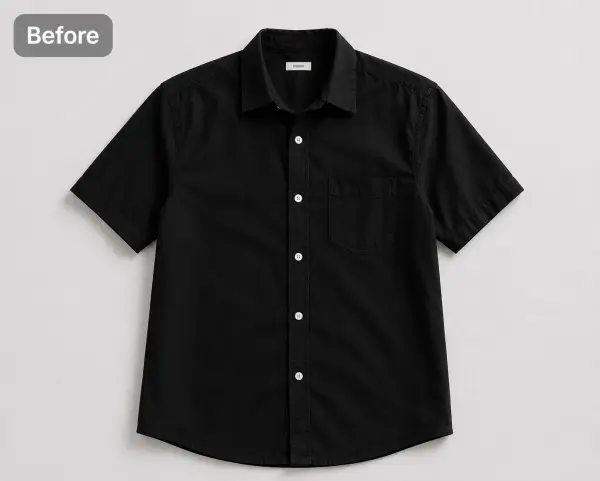
Flat photo of a black shirt before CatalogX processingBefore — flat photo
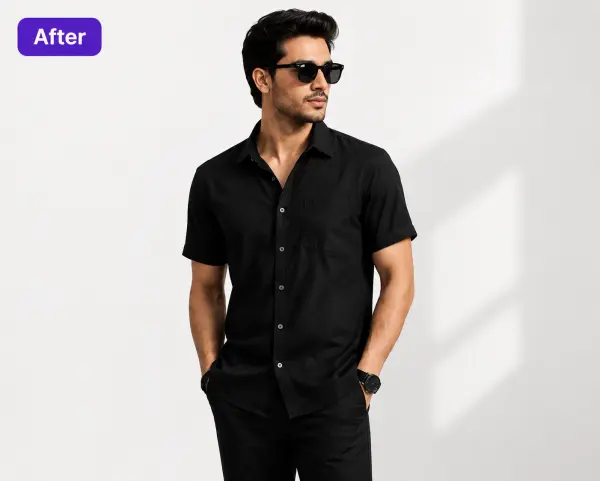
The same black shirt on an AI model, generated by CatalogXAfter — CatalogX

Shown here: a black shirt from our example library — the same flat-photo-to-model pipeline your blazer or suit goes through. Collar, placket and sleeve length carried over from the source photo; for tailoring, the same discipline applies to shoulders, lapels and button stance. See the full pipeline on the flat-lay to model feature page.


Why Formalwear

The hardest garment to photograph without a body inside it

Casualwear forgives. A t-shirt on a table still looks like a t-shirt. A tailored jacket on a table looks like a deflated version of itself — the canvas has nothing to sit on, the shoulders cave, the lapel roll disappears, and the single detail your buyer is paying for, structure, is exactly what the photo can't show.

That's why formal brands shoot on models or dress forms, and why that habit is expensive: a US studio session runs $300+ before model fees, or $50–150 per finished image through an agency. For a tailoring line dropping four jackets a season that's survivable. For a menswear brand with thirty SKUs in three fits, or a reseller listing one-of-one designer pieces every week, it's not a photography budget — it's a second rent.

The usual workarounds each give something up. Ghost mannequins show shape but feel sterile and still need a studio. Flat-lays are cheap but bury the tailoring. Stock-style AI "fashion models" generate a person convincingly and then redraw your garment — which for formalwear is the one unforgivable failure, because a blazer whose lapels have quietly changed style is a different product.

CatalogX takes the third path: your photo is the ground truth, and the model is generated around the garment rather than the garment being reinvented on the model. Compare that with what a studio photoshoot actually costs in the US, and the economics of a formalwear catalog change completely.


How It Works

Three steps from flat-lay to lookbook

The better your source photo, the better the render. For tailoring, the flat-lay is 80% of the craft — here's the formalwear-specific version.

Shoot one clean flat-lay

Button the jacket the way it should be worn, square the shoulders so the shoulder seams sit symmetric, and smooth the lapels flat so the notch or peak reads clearly. Straighten the sleeves, shoot from directly above in even light. This photo is the ground truth.

Pick a model & scene

Choose from 40+ models across genders, skin tones and body types, and 50+ backgrounds — clean studio for marketplace main images, office or street scenes for lookbook shots. Keep the same model across your whole catalog for a coherent brand page.

Generate and list

~30 seconds later, download an on-model shot with the structure your flat-lay showed. High-resolution on every plan, 4K on Pro. You own the output — no watermarks, commercial use included, straight into eBay, Poshmark, Etsy or your Shopify store.


Garment Fidelity

Where generic AI try-on loses the tailoring

Run a structured jacket through a generic try-on tool and you'll meet the same failure modes again and again. Structure is what formalwear buyers pay for — so these aren't cosmetic bugs, they're misrepresentations of the product.

The shoulder line collapses

Generic models drape a jacket like knitwear, rounding off the padded, engineered shoulder into a soft slope. A strong shoulder is the first thing a suit buyer's eye checks — and the first thing weak AI gives away. CatalogX preserves the squared line your flat-lay shows instead of relaxing it.

The lapel style silently changes

Notch becomes peak, peak becomes shawl, a slim lapel widens by an inch. To a generic model these are interchangeable "jacket textures"; to your buyer they're different garments at different price points. CatalogX reproduces the lapel your photo shows — style, width and roll.

The button stance moves

Button stance sets a jacket's entire proportion — where the V ends, how long the torso reads. Generic try-on tools re-place buttons wherever the pose suggests, turning a two-button into a three-button or sliding the stance up an inch. CatalogX keeps the count and position from your photo.

Sleeve length drifts past the cuff

A tailored sleeve ends where it was cut — showing a quarter to half inch of shirt cuff on a classic fit. Generic AI happily extends sleeves to the knuckles or shortens them to the forearm. CatalogX anchors hem and sleeve lengths to the garment as photographed rather than guessing from the pose.

A structured silhouette rendered soft

The sum of all of the above: canvassed, darted, engineered tailoring comes out looking like a cardigan. That's not a quality problem, it's a category error — the render is showing a product you don't sell. CatalogX's whole design premise is that the garment in the photo is the product: the AI builds the model and scene around it and keeps the construction intact. It's the same fidelity-first approach we sharpened on the hardest drape problems in fashion — saree pleats and pallu direction — applied to the crisp end of the spectrum.


For Resellers

Secondhand designer: the exact garment, or nothing

If you sell pre-owned designer — a vintage Yves Saint Laurent blazer on eBay, a barely-worn suit on Poshmark, a consignment piece on a Vestiaire-style platform — the fidelity question is even sharper than for a brand. A brand photographs a sample; you're photographing the one physical item the buyer receives. Any image that shows a different lapel, a different button stance or a fantasy fit isn't a stylistic liberty, it's a misdescription — the kind that comes back as a return, a case, or a dented seller rating.

That's exactly why CatalogX generates from your photo of your item rather than dressing a model in a lookalike. The on-model shot answers the question flat-lays can't — "what does this look like worn?" — while staying anchored to the garment you actually shot. Accuracy is still your responsibility as the seller: review every render against the real piece before you list it, the same way you'd proof a description.

And keep the honesty layer of the listing real. The AI on-model hero wins the click and shows the drape; condition should still be shown in real detail shots alongside it — cuffs, elbows, lining, labels, any pilling or repairs, photographed as they are. On-model hero first, real close-ups behind it: buyers get the aspiration and the evidence in one gallery. Where a marketplace asks you to disclose AI-generated imagery, disclose it.

The practical spec is easy: eBay wants at least 1600px on the longest side (full eBay photo guide), and Poshmark covershots have been 3:4 portrait since March 2026 — a format that flatters full-length tailoring shots (Poshmark photo guide). CatalogX output clears both from one generation.

Model Library

Models that fit a formal catalog

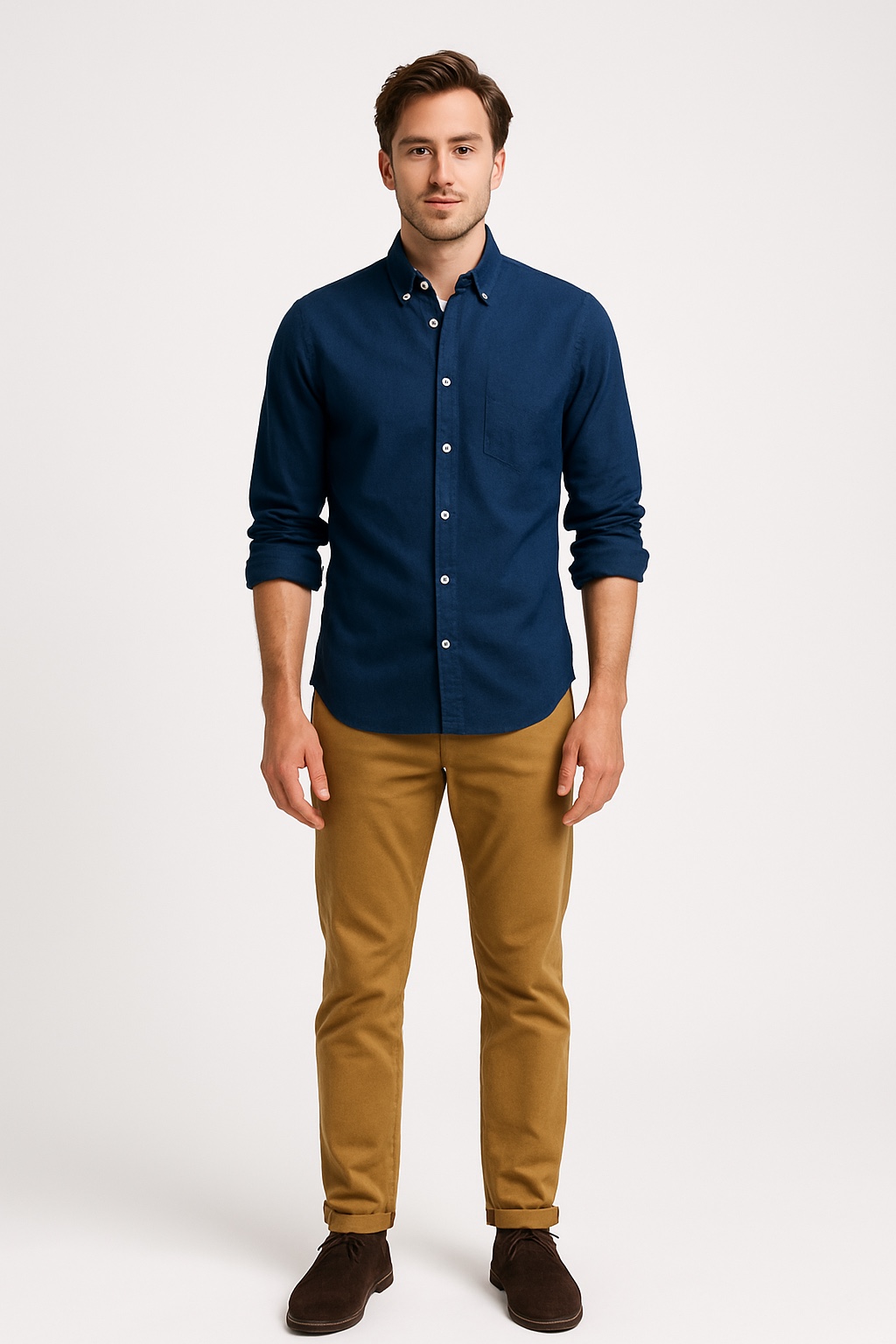
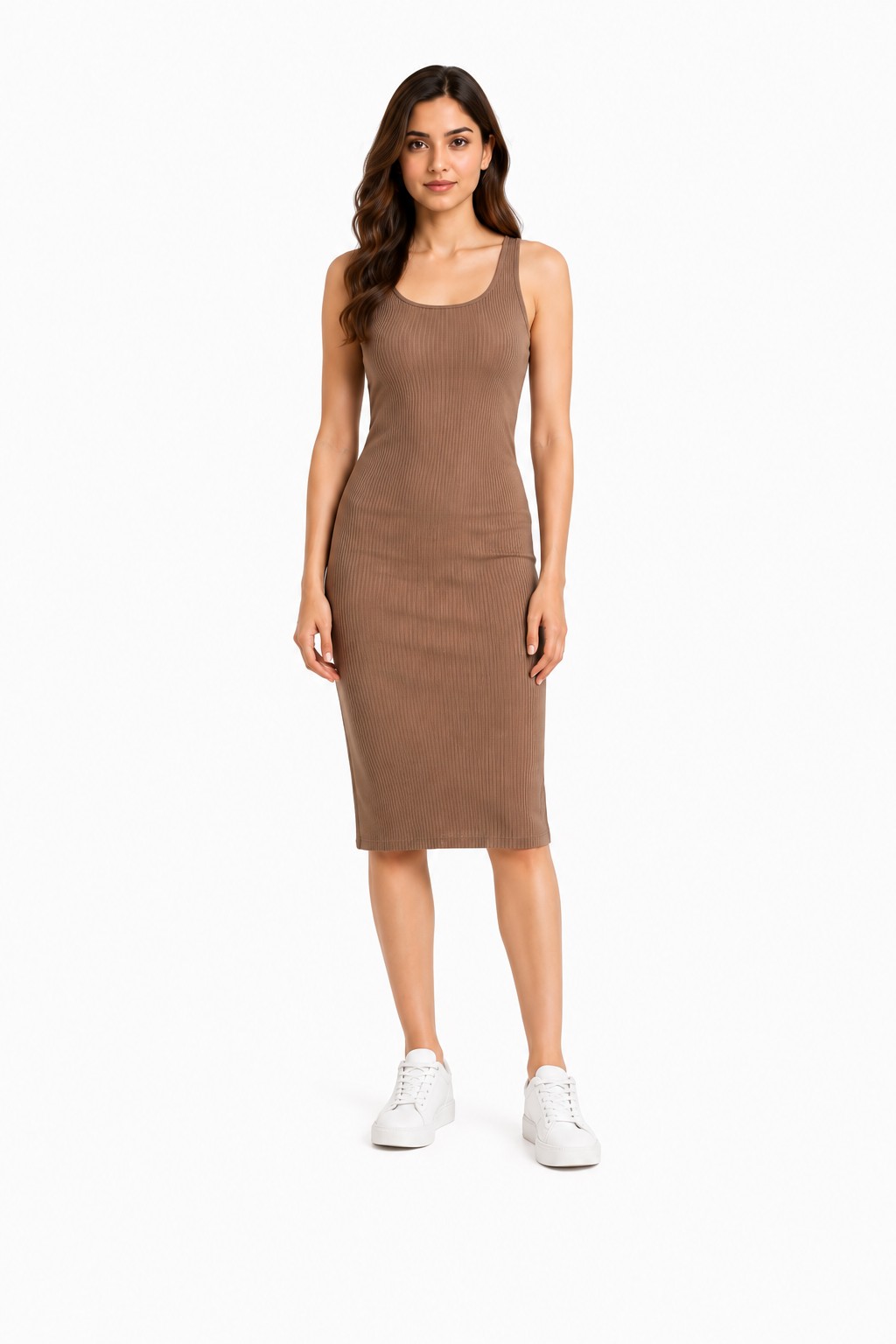
Two of the 40+ models in the CatalogX library. Pick one and keep them across your whole line, so a browsing buyer reads your shop as one brand.

Male model from the CatalogX model library, suited to menswear formal catalogsModel library — men's
Female model from the CatalogX model library, suited to womenswear formal catalogsModel library — women's

Model library examples — these images show available models, not garment renders. Your blazer appears on the model you choose, generated from your photo.


The Honest Comparison

Photoshoot vs generic AI vs CatalogX

Each option has a real job. Here's how they differ for structured formalwear specifically.

Studio photoshootGeneric AI try-onCatalogX
Cost per image$50–150 finished, or $300+ per session before model feesLow, often subscriptionFrom free (5 credits, no card); Starter $9.99/mo for 20 credits
TurnaroundDays to weeks — booking, shoot, retouchMinutes~30 seconds per image
Shoulder & lapel structurePerfect — a real body fills the canvasWeakest point: softened shoulders, redrawn lapels, moved buttonsPreserved from your photo — construction treated as ground truth
Exact-garment fidelityAbsolute — it's the physical itemNot guaranteed; garments often reinterpretedGenerated from your photo of your item; review before listing
Consistency across a catalogCostly — every new drop is a new bookingVaries run to runSame model and scene reusable across every SKU
Best forHero campaigns, fit validation, brand imageryCasualwear mockups where drape tolerance is highFormalwear catalogs and resale listings at volume

A studio shoot is still the right call for a flagship campaign. For the other 95% of images a formalwear catalog needs, the math favors generating them. Full pricing on the US pricing page.


👗 More garments & guides

T-Shirt Model Photos → Dress Model Photos → Jeans Model Photos → Flat-Lay to Model → Blazer & Suit Photography Guide → Selling on eBay → Selling on Poshmark → CatalogX for US Sellers →

FAQ

Blazer & suit AI photos FAQ

CatalogX is built to treat your photo as ground truth: a notch lapel stays a notch lapel, a two-button stance stays two buttons where you photographed them, and patch pockets stay patch pockets. Nothing your photo doesn't show gets invented. Always review the output before listing — with formalwear, the details are the product.

Yes. CatalogX has 40+ models across genders, skin tones and body types, so a men's suit jacket, a women's tailored blazer or an oversized boyfriend cut can each go on an appropriate model. Full suits work too — upload the jacket and trousers as the pieces your photos show.

Yes — with one rule: the photo must accurately represent the exact item you ship. CatalogX generates the on-model shot from your photo of your specific garment, not a stock lookalike. For pre-owned pieces, lead with the on-model hero and keep real detail photos of condition — cuffs, lining, any wear — in the same listing, and disclose AI use wherever the marketplace asks.

One clean flat-lay works best: jacket buttoned, shoulders squared, lapels smoothed flat, sleeves straight, shot from directly above in even light. A hanger shot or a supplier catalog photo also works. Avoid crumpled shots — the AI reproduces what it sees, and a wrinkled photo makes a wrinkled render.

eBay asks for at least 1600px on the longest side. Poshmark covershots have been 3:4 portrait since March 2026, which suits full-body on-model shots well. CatalogX exports high-resolution images on every plan, with 4K output on Pro, so one generation covers both.

A US studio session runs $300+ before model fees, or $50–150 per finished image through an agency. CatalogX starts free with 5 credits and no card; Starter is $9.99/month for 20 credits, Pro $19.99/month for 60 credits with 4K output, Business $49.99/month for 250 credits with API access. One-time packs at the same prices exist if you don't want a subscription.

Yes. You own every image you generate, there are no watermarks, and commercial use is included on every plan — including the free tier. Use them on marketplaces, your own store, ads and lookbooks.

Your tailoring deserves a body inside it

Upload one flat photo of a jacket. Thirty seconds later, see the shoulder line, lapel roll and drape on a model — exactly as you cut it.

Put this blazer on a model — free → See pricing
5 free credits No credit card required You own every image