What You Start With
From flat-lay photo to 3D invisible model
Upload a simple flat garment photo like this — the AI builds the 3D ghost mannequin shape, draping, and folds from it.
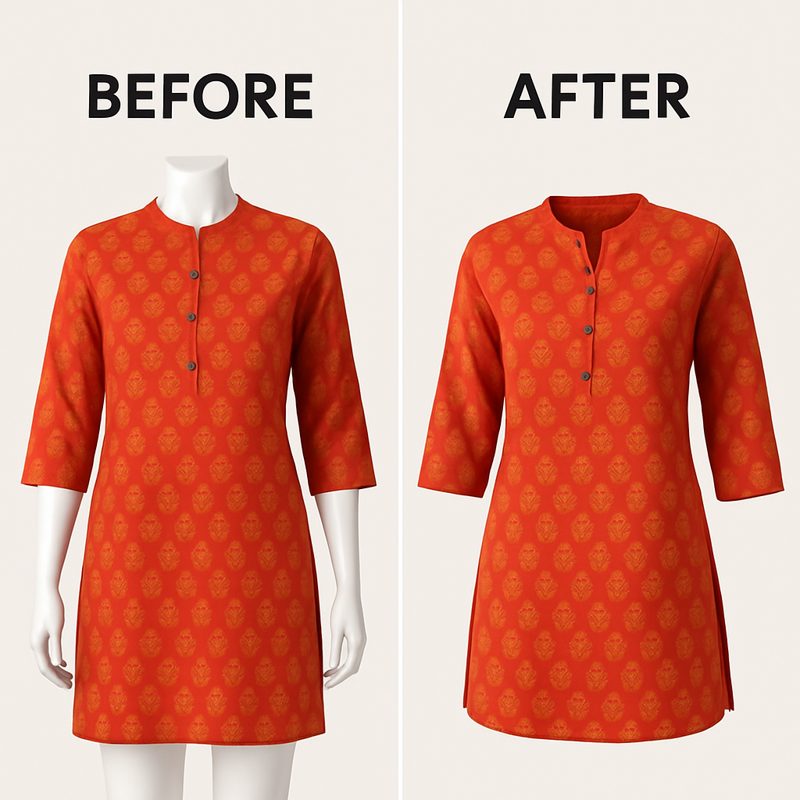
Transform flat-lay garment photos into 3D invisible model shots. The hollow man effect used by Amazon, ASOS, and fashion brands worldwide.
Upload a simple flat garment photo like this — the AI builds the 3D ghost mannequin shape, draping, and folds from it.
The ghost mannequin effect — also called the invisible mannequin or hollow man shot — is a product photo where the garment holds its three-dimensional worn shape, but whatever was holding it up has been removed. Shoulders sit square, sleeves have volume, the neckline stays open, and you can see down into the inner collar. No model, no dress form, no hanger. Just the garment, on pure white.
It exists because it solves a specific commercial problem. A flat lay tells a buyer what a garment looks like but not what shape it takes. A model shot answers fit, but also brings in a face, a body type and a styling choice that all compete with the product. The ghost mannequin sits between the two: maximum information about the garment itself, minimum distraction. That's why it became the house style for catalog-heavy retailers — the grid stays visually consistent even when the range runs to thousands of SKUs.
The conventional method is not one photograph. You dress a mannequin or dress form, light it, and shoot the garment front-on. Then you remove the garment, turn the collar out or lay it flat, and shoot the inner neck separately, so you have a clean plate of whatever is visible down the neckline. Then a retoucher masks the mannequin out of the first frame, composites the inner-neck plate into the opening, rebuilds any edges the mask destroyed, and cleans the background to pure white.
So: a mannequin, a lit set, two exposures per garment, and a retouching pass per image. The retouching — not the shooting — is where the hours go. For a ten-piece capsule that's a manageable afternoon. For a few hundred SKUs refreshed every season, it's the line item that makes brands quietly postpone reshooting altogether.
CatalogX does the same job from a single photo you almost certainly already have: a flat lay, or the garment on a hanger. The model reads the cut, the seams and the fabric weight, renders the garment with the volume it would carry on a body — inner collar, seam lines, natural folds — and places it on a pure white background. No mannequin, no second exposure, no compositing step. One credit, roughly 10–20 seconds.
The honest trade-off: the AI is inferring the worn shape rather than photographing it. For structured pieces with legible construction — shirts, t-shirts, jackets, dresses, kurtis — that inference is well supported by the input photo. For very unstructured or heavily draped garments, where the "correct" shape is partly a styling decision, results vary more and deserve a look before they go live. Check every output against the physical garment.
From flat-lay photo to marketplace-ready ghost mannequin effect in seconds.
Upload a flat-lay photo of your garment — shirt, saree, dress, or any supported type.
Our AI analyzes the garment and generates a realistic 3D invisible model pose with proper draping and folds.
Get a marketplace-ready image with white background, ready for Amazon, ASOS, Myntra, or any platform.
The AI can infer volume it cannot see. It cannot invent detail your photo never captured. Five minutes of care at the shooting stage is worth more than any retry.
A flat lay on a plain floor, table or bed sheet is the easiest input, and a phone camera is genuinely enough. A hanger shot works equally well and is often faster for shirts and jackets, since the garment already holds some of its shape. What matters is that the whole garment is in frame — collar to hem, both sleeves visible, nothing cropped at the edges.
This is the single most common cause of disappointing output. The model treats creases as real garment texture, so a deep fold across the chest of a flat-shot t-shirt comes back as a deep fold across the chest of the ghost mannequin. Steam or smooth the garment first, or at minimum flatten the major creases with your hand. Natural fabric fall is fine; packing creases are not.
Diffuse daylight near a window, or any even indoor light, beats direct sun or a phone flash. Hard shadows sit on the fabric as dark bands, and since the AI reads tone as form, a shadow can be interpreted as a fold that isn't there. Shoot straight down (for flat lays) or straight on (for hangers) rather than at an angle, so the garment isn't distorted by perspective.
Colour accuracy is the thing buyers complain about and the thing returns are made of. The output preserves what your input photo contains, so if the photo renders a navy kurti as washed-out grey, that's what comes back. Shoot in neutral light, avoid coloured walls bouncing a cast onto the fabric, and compare the photo to the physical garment before uploading.
Each generation handles one view. Upload the front flat lay for the front ghost mannequin; if you want a back image too, shoot the garment's back and run it as a second generation. The AI does not invent a back view from a front photo — which is deliberate, because an invented back is the kind of detail a buyer notices and returns the item over.
Whole garment in frame · major creases smoothed · even light, no hard shadow · shot square-on, not angled · colour checked against the real garment · one view per generation.
Create the invisible model effect trusted by fashion brands and e-commerce platforms.
Transform flat-lays into realistic 3D garment shapes. No visible model — just the hollow man effect used on Amazon and ASOS.
Support for t-shirts, shirts, dresses, sarees, lehengas, ethnic wear, tops, and more. Each with optimized draping and shaping.
AI generates realistic fabric folds, wrinkles, and draping. The garment looks dimensional and natural, not flat or artificial.
Clean white background included — marketplace-ready for Amazon, Flipkart, Myntra, Shopify, and all major platforms.
AI preserves fine details like inner collar color, seams, tags, and garment construction — crucial for fashion buyers.
Pure white, high resolution, consistent across a whole range. Ideal for Shopify, Etsy, ASOS-style catalogs and secondary images everywhere — check the format guide below for where it counts as a main image.
All three have a job. The costly mistake is using one where the marketplace expects another.
| Flat lay | Ghost mannequin | On-model | |
|---|---|---|---|
| Shows | Print, colour and outline — no volume or drape | The garment's 3D shape; no body or fit context | Fit, drape, hem position and proportion on a real body |
| Input needed | The garment and a floor | A flat lay or hanger shot | A flat lay, hanger or ghost-mannequin shot |
| Visual consistency across a range | High | Highest — nothing varies but the garment | Varies with model and styling |
| Buyer confidence | Lowest — buyer guesses at fit | Middle — shape yes, fit no | Highest — buyer can picture wearing it |
| Best used as | Shooting format and detail shots | Secondary images; main image where permitted | Main image on most fashion marketplaces |
This is worth getting right before you regenerate a catalog, because the rule is not the same everywhere.
Marketplace image policies change, and they vary by category and region. Treat the list above as a starting point and confirm the current rule in your own seller panel before you regenerate a whole catalog on the strength of it.
These aren't three separate photoshoots. One flat lay converts to a ghost mannequin (this page) or straight to an on-model photo. A ghost mannequin image converts onward to on-model too. The usual pattern for a listing that has to work everywhere: an on-model main image, ghost mannequin in slot two or three for the clean garment view, and flat-lay detail crops for fabric and trim.
The ghost mannequin effect, also called the invisible model effect, is a photography technique where a flat-lay garment photo is transformed to look like a 3D garment on an invisible mannequin. It shows the garment's shape and draping without a visible model. It is a house style for catalog-heavy retailers like ASOS and is widely used for secondary listing images; note that Amazon US does not accept it as the main image for adult apparel.
CatalogX supports 8+ garment types: t-shirts, shirts, dresses, sarees, lehengas, ethnic wear, tops, and more. Each has optimized draping and 3D shaping. Upload a flat-lay of any supported garment, and the AI creates the invisible model effect.
Each ghost mannequin generation costs 1 credit. Free trial users get 5 free credits to try all features including ghost mannequin.
No. Upload a single flat-lay photo (front or back), and the AI generates the invisible model effect. If you want both front and back versions, you can upload both images and generate each separately.
Generation takes 10-20 seconds. Time depends on internet speed and server load, but most generations complete within 30 seconds.
For adult apparel on Amazon US, no. Amazon requires the main image for adult clothing to show the product on a standing human model, which excludes flat lays, hanger shots and ghost mannequin images alike. Ghost mannequin is still useful in the secondary image slots. For a compliant main image, convert the same garment to an on-model shot with flat lay to model or ghost mannequin to model. For children's and baby apparel the standing-model requirement does not apply in the same way. Marketplace rules change and vary by category — confirm in your Seller Central account before regenerating a catalog.
Yes. A hanger shot is a perfectly good input and is often quicker than a flat lay for shirts and jackets, because the garment already holds some of its shape. Keep the whole garment in frame, shoot straight on rather than at an angle, and use even light. The hanger itself is removed in the output.
For structured garments with legible construction — shirts, t-shirts, jackets, dresses, kurtis — the results are comparable, because the input photo gives the model enough information to infer the worn shape accurately. For very unstructured or heavily draped pieces, where the correct shape is partly a styling decision, output varies more and is worth reviewing before it goes live. The AI infers the garment's worn shape rather than photographing it, so always compare the result against the physical garment.
Almost always because the input photo had them. The model reads creases as genuine fabric texture, so a deep packing fold across a flat-shot t-shirt comes back as a fold on the ghost mannequin. Steam or smooth the garment before shooting, and avoid hard shadows — because tone is read as form, a harsh shadow can be rendered as a fold that was never there.
A standard HD generation costs 1 credit. Larger outputs and premium quality cost more — 2K is 2 credits and 4K is 4 — and the exact cost is shown before you generate. Output is on a pure white background, sized for marketplace upload. New accounts get 5 free credits, no card required.
Join 100+ fashion brands using CatalogX to create marketplace-ready product images with AI.