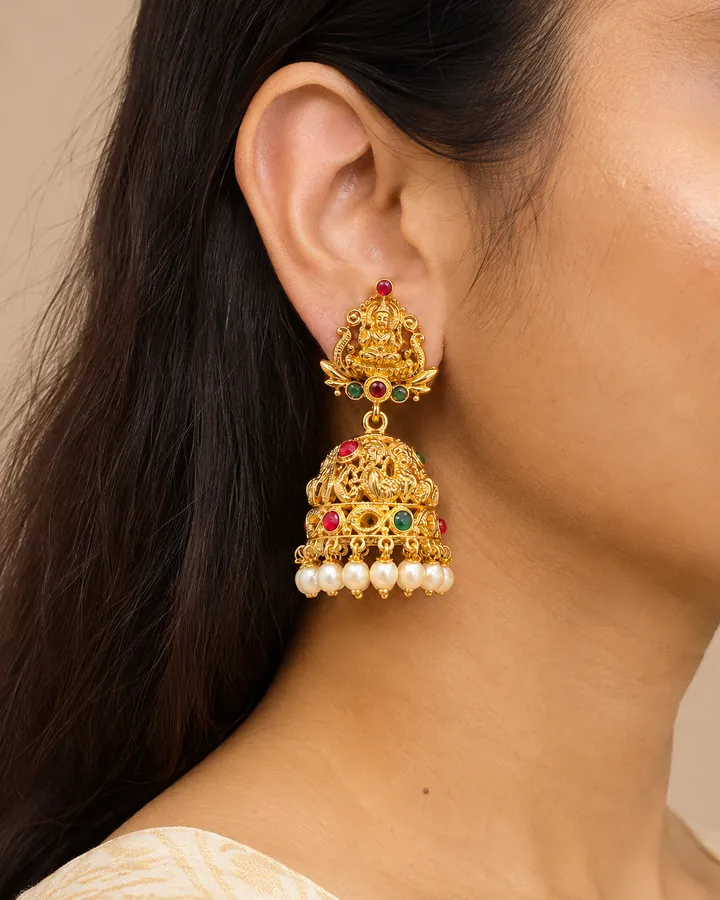
To photograph earrings on a model, pull the hair back behind the ear, turn the head to three-quarter so one earring faces the lens, light from the side the head turns toward, and focus on the earring, not the eyes. The photo has to show the full drop, from lobe to lowest point, against the jaw and neck, because that is how a buyer judges size. With AI you get the same shot from one product photo: in CatalogX choose Jewellery, then Earrings, and type the drop length (for example "5 cm drop"). It is turned into how far the earring hangs: to the jawline, or toward the shoulder.
What an earring photo has to show
A buyer looking at earrings is asking three questions, and only one of them is about the design. The other two are scale questions: how big is it next to a face, and how far does it hang. A packshot on white cannot answer either. A pair of 8 mm studs and a pair of 7 cm chandbalis can fill exactly the same square in a thumbnail.
So the on-model earring photo has a job description. It must show:
- The whole earring, from where it attaches to the lobe down to its last drop, with nothing covering it.
- A body ruler next to it: the ear, the jawline and the side of the neck. Crop too tight and the size reads as nothing again.
- The front face of the design, turned toward the camera rather than edge-on.
- The pair, if both ears are in the frame. One earring and one bare ear makes buyers wonder whether they get a pair.
Shooting earrings on a real model
Hair
Hair is the number one reason earring photos fail. Tuck it behind the ear on the side facing the camera, or tie it up. Loose strands across a drop earring break its outline and make it look smaller and messier than it is. For long danglers and jhumkas, check the shoulder too: a collar or strap that the earring touches hides the bottom of the drop.
Head angle
Straight-on hides earrings behind the cheek and jaw; full profile shows one earring perfectly but loses the face that gives it scale. Three-quarter is the standard: the head turned about 45 degrees, chin level or slightly lifted so the neck lengthens and a long drop has room to hang. Shoot a profile as a second image for statement pieces.
Light
Light from the side the model turns toward, through a window or a large diffuser. Soft light lets metal shine without turning into white blobs, and keeps the fire in stones. A single bare bulb or a phone flash does the opposite: hard highlights on polished gold and flat, grey stones.
Focus and lens
Focus on the earring, not the eye. Phone portrait modes love to blur everything behind the eye plane, which is exactly where an earring lives. Shoot from a little further back and crop, rather than using a wide lens close to the face, which distorts the ear and makes the earring look smaller.
Styling
Keep makeup, outfit and other jewellery quiet. A necklace in the same shot invites the question "is the necklace included?". Neutral necklines and nothing at the ears except the product.
The shot list for an earring listing
| Shot | What it answers | Where it goes |
|---|---|---|
| The pair on plain white, front faces up | What it is, both pieces | Main image on Amazon; second image on Etsy and Shopify |
| On model, three-quarter, hair back | Size against the face, how far it hangs | Main image on Etsy and Shopify; secondary on Amazon |
| On model, profile | The full drop and movement of danglers | Secondary |
| Close-up of the back and closure | Post, hook, lever-back or screw-back | Secondary |
| Size reference: earring next to a ruler, or a stated drop in mm | Exact size for careful buyers | Secondary, plus the listing text |
For the ratio and export size each marketplace uses, see AI jewelry model photos for Etsy, Shopify and Amazon.
Earrings by type: what to watch
- Studs. Tiny on a full face. Frame tight, ear and jaw only, and keep the stud sharp. Size is the whole question, so state it.
- Hoops. Show the hoop's full circle, not an edge. A slight head turn opens the hoop to the lens. Diameter is what buyers compare.
- Drops and danglers. Chin level or lifted, nothing at the shoulder. If it moves, a short video sells it better than any still.
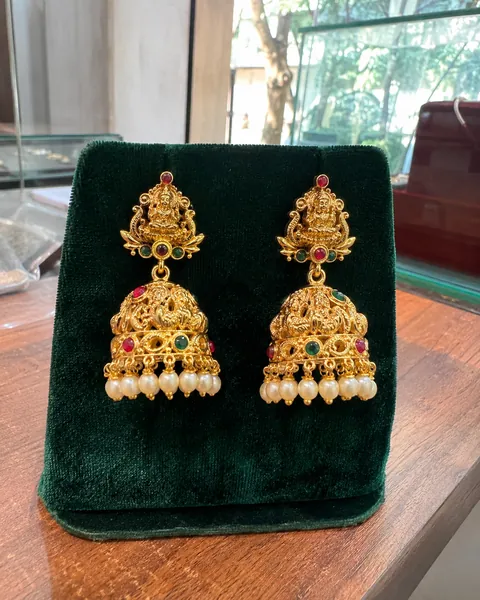
- Jhumkas and chandbalis. Heavy, multi-part, often with pearls or bead drops. Every tier has to survive: the stud, the dome, the bead fringe. Hair fully back, three-quarter angle.
- Ear cuffs and climbers. They follow the ear's edge, so shoot nearer profile. Check the AI result carefully against your piece; these are less common shapes for any image model.
Doing it with AI, step by step
- Photograph the pair side by side on a plain, non-reflective surface, front faces up, in soft daylight. Fill the frame and use your phone's full resolution; under 1,600 pixels on the long side, CatalogX warns you that fine stones will be approximated.
- Choose Accessories, then Jewellery, then Earrings. The earrings rule pulls the hair back behind the ear, turns the head slightly toward the light so at least one earring faces the camera, and renders both earrings when both ears are in frame.
- Give the drop length. Use the quick chips (Short drop, To the jawline, Shoulder-grazing) or type the real number. It maps to where the earring ends: up to 1.5 cm is stud scale on the lobe, 1.5–3 cm just below the lobe, 3–6 cm toward the jawline, 6–9 cm past the jaw toward the shoulder, and longer is shoulder-grazing.
- Pick a model and outfit. By default the model keeps her own outfit; Plain, Festive, Bridal, Party, Formal and Casual are one tap away.
- Check it. Count the parts of each earring against your piece. After every jewellery render the metal colour is matched back to your photo, and on Pro and above an AI reviewer compares the result with your original. Regenerate anything that misses.
Selling the earrings with a matching necklace? Add the earrings as the Matching Earrings photo and the piece becomes a set, each part worn at its own place. More on that in necklace model photos.
What it costs
One HD photo is 1 credit: $0.17–0.33 on monthly plans (Starter $9.99 for 30, Pro $19.99 for 100, Business $49.99 for 260, Agency $149.99 for 900), from $0.15 on volume plans, and the first 5 are free with no card. Sellers in India pay in rupees, from ₹12 a photo; see the jewellery model photoshoot page for India.
2K uses 2 credits; 4K uses 4 and is on Business and above. A short video of the earrings being worn (4, 6 or 8 seconds at 720p) is available from Pro at 2 credits a second, which is the best way to show a dangler moving.
Frequently asked questions
Three-quarter: the head turned about 45 degrees, hair tucked behind the ear facing the camera, chin level or slightly lifted. It shows the earring's front face and the full drop against the jaw and neck, which is how a buyer judges size.
Show them worn with the ear, jaw and neck in frame, and state the drop in millimetres in the listing. With CatalogX, type the drop (for example "5 cm drop") and it renders to the matching point: toward the jawline for 3 to 6 cm, toward the shoulder beyond that.
That is what CatalogX's jewellery lane is built for: the design, metal tone, stones and every part of the earring are copied from your photo, and nothing is added that you did not upload. Small stones are still the hardest detail for any image model, so zoom in on the result before listing.
When both ears are in the frame, yes: the earrings rule renders the pair. At a strong three-quarter or profile angle only one ear is visible, which is normal for earring photography.
For most jewellery the Amazon main image is the product alone on pure white, so the on-model shot goes in a secondary slot. Check the current category style guide before listing. Etsy and Shopify let you lead with the on-model shot.