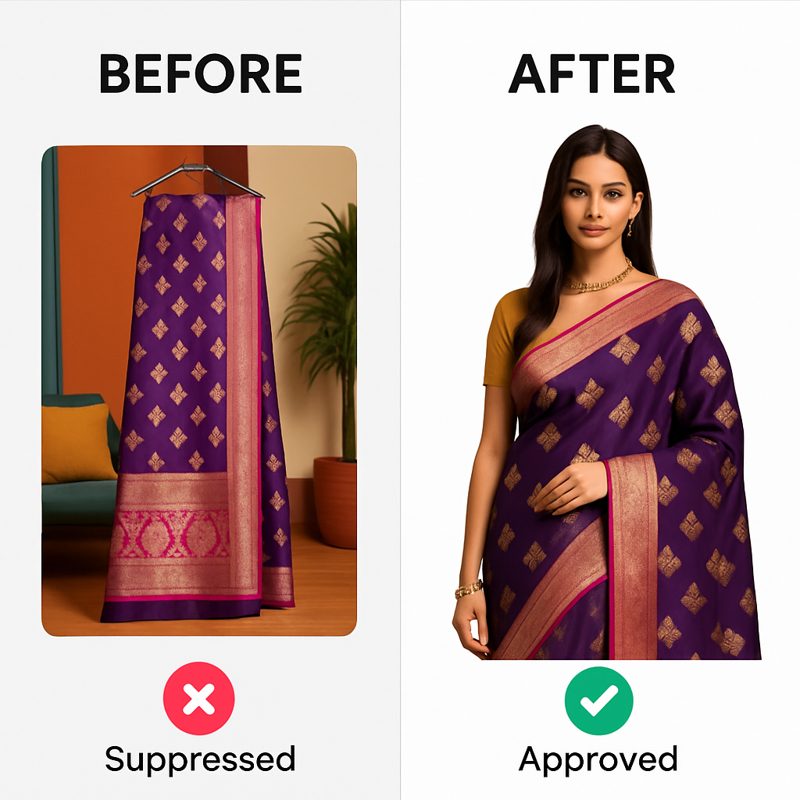
Amazon's Great Indian Festival 2026 starts October 8, with Prime members shopping early access from October 7. For fashion sellers the image bar is specific: a minimum of 2000x2000px in 1:1 ratio for zoom eligibility, a pure white (#FFFFFF) background on the main image, the product filling 85% or more of the frame, JPG or PNG, up to 9 images per listing. Listings that miss these get suppressed or quietly lose the zoom feature that drives conversion — and in the pre-sale crush, a suppressed listing can sit unfixed through the exact days it was supposed to sell.
Two sales, one week, different rules
The Great Indian Festival opens October 8; Flipkart's Big Billion Days opens October 9. Most fashion sellers of any size list on both, and the pre-sale fortnight is one combined images sprint — but the two marketplaces' image rules differ in exactly the ways that cause rejections when one export is reused for both.
| Spec | Amazon India | Flipkart |
|---|---|---|
| Minimum resolution | 2000x2000px | 2048px shortest side |
| Aspect ratio | 1:1 square, required | 1:1.2 portrait, preferred |
| Main image background | Pure white #FFFFFF | Pure white |
| Product fill | 85%+ | 80%+ |
| Images per listing | Up to 9 | Varies by category |
The square-versus-portrait difference is the one that bites: a Flipkart-shaped portrait crop uploaded to Amazon either fails or arrives letterboxed with the product under the 85% fill line. Export per marketplace — CatalogX ships separate presets for Amazon India and Flipkart precisely because one file cannot serve both. Prep for the Flipkart side is covered in our BBD 2026 checklist.
Amazon's main-image rules, and the apparel catch
Amazon polices the main image harder than any Indian marketplace. For fashion, the rules that matter:
- Pure white background (#FFFFFF) — not off-white, not a light grey sweep. Amazon's tooling checks this programmatically.
- The product, and only the product. No logos, watermarks, badges, "SALE" stickers or text overlays on the main image. Festive-offer graphics belong in A+ content, never on image one.
- The standing-model expectation. For many apparel categories Amazon steers the main image toward the garment worn by a standing human model — a flat-lay hero can underperform or be rejected depending on category. The details are in our standing-model rule explainer.
- 85% fill. The garment should dominate the frame. Wide framing that shows the full scene belongs in the secondary slots.
The nine image slots are an underused asset: main shot, back view, close-up of fabric and work, a scale/fit shot, colour options — sellers who fill seven or more slots give the listing the feel of a brand page. Our Amazon India preset page covers the slot-by-slot approach.
If your images are AI-generated, disclose it properly
Amazon requires synthetic or AI-generated model imagery to be machine-labelled — the listing image file itself carries the marker, not a line of listing copy. This is the part most sellers generating images with a general-purpose tool miss entirely, because a plain JPG export carries no provenance at all.
Every CatalogX export writes IPTC DigitalSourceType: trainedAlgorithmicMedia and Amazon's contains-synthetic-performer marker into the file. That means an Amazon India export from CatalogX is compliant with the disclosure requirement as downloaded — nothing to remember at upload time. The policy background, including New York's synthetic performer law that pushed the industry here, is in our disclosure rule explainer.
The prep sequence for the days left
Working back from October 7 (Prime early access):
- Audit what's live. Filter your catalog for images under 2000px, non-white main backgrounds, and main images with text or props. These are the suppression candidates.
- Fix specs without reshoots. Resolution and background problems are processing problems. Generating a fresh on-model shot from your original garment photo is usually faster than retouching a bad photo up to spec.
- Shoot the new festive stock flat, generate on-model. Same volume workflow as any 100-SKU sprint: flat phone photos, bulk generation with SKU filenames preserved, a Project per sale, one ZIP with manifest.csv.
- Export through the Amazon India preset — 2000x2000, white background, disclosure metadata written in. Marketplace Export is free on every plan.
- Upload with margin. Days, not hours, before October 7 — listing changes propagate slowly under pre-sale load.
What not to do in the last week
Three sale-eve mistakes that cost more than they save:
- Do not swap main images during the sale. A mid-sale image change re-enters review and can suppress the listing during its best traffic days. Freeze images before early access; iterate after.
- Do not put festive banners on product images. "Diwali Sale 40% OFF" on the main image is a policy violation, and Amazon's deal machinery already badges discounts.
- Do not stretch a low-res photo to 2000px. Upscaled blur fails at zoom, and zoom is where festival buyers inspect embroidery and fabric. If the source photo is weak, generate from the garment photo rather than enlarging a bad frame.
An honest limit, too: if your hero product's listing depends on one spectacular campaign image — the kind with movement, location and styling — that is photographer work, and September 26 is late to book it. Generate the catalog; save the campaign shoot for after the season.
Frequently asked questions
October 8, 2026, with Prime members getting early access from October 7. Dates verified 26 September 2026. It overlaps Flipkart's Big Billion Days, which opens October 9.
Minimum 2000x2000px in 1:1 square ratio for zoom eligibility, pure white (#FFFFFF) background on the main image, product filling 85% or more of the frame, JPG or PNG format, and up to 9 images per listing. The main image must show only the product — no text, logos or badges.
For many apparel categories Amazon's guidelines steer the main image toward the garment on a standing human model, and a flat-lay hero can underperform or be rejected depending on the category. Ghost mannequin and flat-lay shots remain fine in secondary slots.
Yes, provided they accurately represent the product and carry Amazon's synthetic-performer disclosure marker in the image file. CatalogX writes that marker, plus IPTC DigitalSourceType metadata, into every export automatically.
You can, but you shouldn't — image changes re-enter review and can suppress a listing during peak traffic. Freeze your image set before early access on October 7 and make changes after the festival window.
Not as one file. Amazon requires 1:1 square at 2000x2000px minimum; Flipkart prefers 1:1.2 portrait at 2048px+ on the shortest side. Export separately per marketplace — reusing one crop for both is a common QC rejection at sale time.