Amazon India processes over 1 billion units a year, and fashion is its fastest-growing category. For Indian clothing brands, small manufacturers, and D2C labels, Amazon represents an enormous opportunity — but also a steep learning curve. Between category approvals, strict image requirements, and listing optimization nuances, many sellers spend weeks figuring out the basics before their first product goes live.
This guide covers everything: registration, fashion category approval, image specifications, listing optimization, pricing, fulfillment choices, and common mistakes that lead to suppressed listings. Whether you're launching your first product or scaling an existing catalog, bookmark this page.
Why Amazon India Matters for Fashion Sellers
Amazon India has over 300 million registered users and dominates urban and semi-urban e-commerce in India. For fashion sellers specifically, several factors make it a priority platform:
- High purchase intent: Shoppers on Amazon are actively searching for products to buy, unlike social media where you're competing for attention. Conversion rates on Amazon fashion listings run 3-5x higher than social media storefronts.
- Category growth: Fashion, including apparel, footwear, and accessories, is Amazon India's fastest-growing segment. The platform has invested heavily in fashion-specific features like virtual try-on, size charts, and style recommendations.
- FBA infrastructure: Fulfillment by Amazon (FBA) gives even small sellers access to warehousing, packaging, and delivery across 19,000+ pin codes. This eliminates the logistics headache that kills many D2C brands.
- Brand Registry: Amazon's Brand Registry program gives registered brands access to A+ Content (enhanced listings), Sponsored Brands ads, and Brand Analytics — tools that dramatically improve visibility and conversion.
The trade-off: Amazon charges referral fees (typically 17-20% for fashion), has strict listing standards, and your brand competes directly alongside others on the same search results page. Getting your listings right is critical.
Account Setup & Fashion Category Approval
Step 1: Register as an Amazon Seller
To sell on Amazon India, you need:
- GST registration: A valid GSTIN is mandatory for selling on Amazon India. If you're selling only within your state, you still need GST registration.
- PAN card: Personal PAN (for sole proprietors) or business PAN (for companies/partnerships).
- Bank account: A current account in the name of the business entity. Amazon deposits payments to this account every 7 days.
- Address proof: Utility bill, rent agreement, or property documents for your business address.
Registration itself is free. Go to sellercentral.amazon.in, click "Start Selling," and follow the verification flow. Expect the verification process to complete within 3-7 business days.
Step 2: Get Fashion Category Approval
Fashion is a "gated" category on Amazon India. You can't list clothing, footwear, or fashion accessories without specific category approval. Here's what Amazon requires:
- Brand authorization letter: If you're selling your own brand, you need trademark documentation. If reselling another brand, you need an authorization letter from the brand owner.
- Product images: Amazon will ask for sample product images that meet their quality standards. This is where many applications get rejected — poor-quality images signal an unreliable seller.
- Invoice samples: Purchase invoices for the products you plan to sell, showing brand name, quantity, and supplier details.
- Quality declaration: A self-declaration that products meet BIS (Bureau of Indian Standards) requirements where applicable.
Step 3: Enroll in Amazon Brand Registry (Recommended)
If you own a registered trademark, enroll in Amazon Brand Registry. It's free and unlocks:
- A+ Content: Enhanced product descriptions with rich images, comparison charts, and brand storytelling sections. A+ Content increases conversion rates by 5-10% on average.
- Brand Store: A dedicated storefront page on Amazon with your branding — essentially a mini-website within Amazon.
- Brand Analytics: Search term data, market basket analysis, and demographic reports that inform your product and pricing strategy.
- IP protection: Automated tools to report counterfeit listings and protect your brand.
Image Requirements Deep-Dive
Images are the single most important factor in fashion listing performance on Amazon India. Listings with high-quality, compliant images get 2-3x more clicks and significantly higher conversion rates. Amazon is also strict about enforcement — non-compliant images result in listing suppression.
Main Image Rules
The main image (the one shoppers see in search results) has the strictest requirements:
| Specification | Requirement |
|---|---|
| Background | Pure white (RGB 255, 255, 255). No gradients, patterns, or off-white shades. |
| Minimum size | 1000 x 1000 px (for zoom). Recommended: 2000 x 2000 px. |
| Aspect ratio | 1:1 (square) |
| Product fill | Product must occupy at least 85% of the image frame |
| Format | JPEG or PNG. JPEG recommended for smaller file sizes. |
| Max file size | 10 MB |
| Prohibited | No text, logos, watermarks, borders, color blocks, or promotional badges |
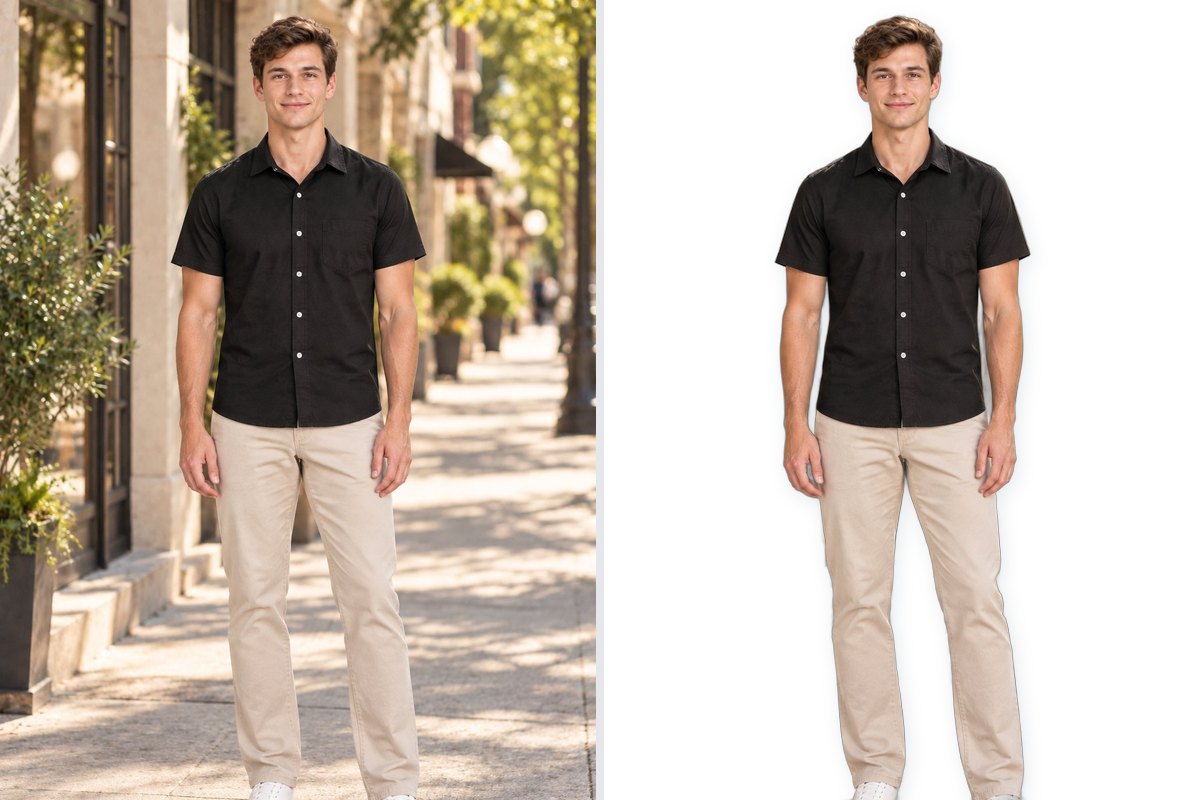
For fashion specifically, the main image should show the product on a model or on a flat-lay/mannequin. Model-on images consistently perform better — Amazon's own data shows 20-30% higher click-through rates for fashion listings with model shots compared to flat-lays.
Lifestyle Images
Amazon allows up to 8 additional images per listing. For fashion, the most effective image set includes:
- Front view on model: Full-length shot showing fit, drape, and proportion.
- Back view: Shows design details, closures, and back fit.
- Detail close-ups: Fabric texture, stitching quality, embroidery, buttons, zippers — anything that demonstrates quality.
- Lifestyle context: Model in a real-world setting (office, outdoors, casual) that helps shoppers envision wearing the product.
- Size reference: A size chart image with measurements in both inches and centimeters.
Unlike the main image, additional images can have any background color and can include text overlays. Use this flexibility to tell your product's story.
Infographic Images
Infographic images combine product photos with text callouts highlighting key features. For fashion, effective infographics include:
- Fabric composition: "100% Cotton" or "Silk Blend" with a close-up texture shot.
- Feature callouts: Arrows pointing to pockets, breathable mesh panels, stretch waistband, etc.
- Occasion mapping: "Perfect for: Office / Casual / Evening" with corresponding styled shots.
- Care instructions: Machine washable, hand wash only, dry clean — visualized with simple icons.
A+ Content Images
If you have Brand Registry, A+ Content lets you add rich image modules below the standard bullet points. For fashion, the most effective A+ modules are:
- Brand story banner: A full-width image introducing your brand with a brief narrative.
- Comparison chart: Compare 3-4 products from your catalog side-by-side (e.g., different fits — slim, regular, relaxed).
- Lifestyle gallery: 3-4 styled images showing the product in different contexts.
Common Rejection Reasons & How to Fix Them
Amazon's automated systems and manual reviewers reject images for specific, fixable reasons. Here are the most common ones for fashion sellers:
- Background not pure white: The most frequent rejection. Even a slightly off-white or cream background (RGB 250,250,248) triggers rejection. Fix: Use a proper background removal tool and place the product on a true #FFFFFF canvas.
- Product doesn't fill 85% of the frame: Small product with too much white space around it. Fix: Crop tighter or resize the product within the frame.
- Watermark or logo visible: Any text overlay, including your brand logo, on the main image will get rejected. Fix: Save a clean version without overlays for the main image; use logos in additional images only.
- Image too small: Below 1000px on either dimension. Zoom won't activate, and Amazon may suppress the listing. Fix: Upload at 2000 x 2000 px minimum.
- Mannequin or hanger visible: For some fashion sub-categories, visible mannequins or hangers in the main image trigger rejection. Fix: Use invisible/ghost mannequin technique or switch to model-on shots.
- Color doesn't match: If the product color in the image doesn't match the color variant selected, Amazon may suppress the listing. Fix: Ensure white balance is accurate and the product color is true-to-life.
Listing Optimization Tips
Title Structure
Amazon India has a specific title formula for fashion. Follow this structure for maximum search visibility:
[Brand] + [Product Type] + [Key Feature/Material] + [Color] + [Size if applicable]
Example: "CatalogX Women's Cotton Kurta Set with Dupatta - Navy Blue"
- Keep titles under 200 characters (Amazon truncates beyond this in mobile search results).
- Put the most important keywords first — Brand and Product Type.
- Don't stuff keywords. "Women's Kurta Kurti Kurtas Kurtis Top" looks spammy and hurts click-through rate.
- Capitalize the first letter of each word. Don't use ALL CAPS.
Bullet Points (Key Features)
You get 5 bullet points. Make each one count:
- Fabric & comfort: "Made from 100% breathable cotton — soft, lightweight, and perfect for Indian summers"
- Fit & sizing: "Regular fit with an elasticated waistband — refer to the size chart for exact measurements"
- Design details: "Features hand-block print in traditional Jaipur motifs with mirror work on the yoke"
- Occasion/versatility: "Ideal for office wear, casual outings, and festive occasions"
- Care instructions: "Machine washable — gentle cycle, cold water. Colors stay vibrant wash after wash"
Backend Keywords
Amazon gives you 250 bytes of backend search terms — keywords that don't appear in your listing but help your product show up in search results. Use them wisely:
- Include synonyms and regional terms: "kurti" and "kurta," "palazzo" and "plazo," "churidar" and "chudidar"
- Include occasion-based terms: "office wear," "party wear," "festival clothing," "wedding guest"
- Include fabric variations: "cotton blend," "rayon," "crepe," "georgette"
- Don't repeat words already in your title or bullets — it's wasted space.
- Don't include competitor brand names — this violates Amazon's terms of service.
Pricing & FBA vs Self-Fulfillment for Apparel
Understanding Amazon's Fee Structure
Before setting prices, understand what Amazon charges:
| Fee Type | Fashion Rate | Notes |
|---|---|---|
| Referral fee | 17% (most fashion) | Percentage of selling price. Some sub-categories are 11-20%. |
| Closing fee | 4-30 per unit | Fixed fee based on price bracket and fulfillment method. |
| FBA fee | 29-75 per unit | Based on product weight and dimensions. Includes pick, pack, and ship. |
| Storage fee | 42/cu ft/month | Monthly storage. Higher during Oct-Dec peak season. |
| GST on fees | 18% | All Amazon fees attract 18% GST. |
For a typical fashion product priced at 999, your net realization after all fees is approximately 650-720 (FBA) or 700-770 (self-fulfilled). Price your products to maintain at least a 30% gross margin after all platform fees.
FBA vs Self-Fulfillment (Easy Ship)
Amazon offers two fulfillment options for fashion sellers:
FBA (Fulfillment by Amazon):
- You ship inventory to Amazon's warehouses. They handle storage, packing, shipping, and returns.
- Products get the "Fulfilled by Amazon" badge and Prime eligibility — significantly boosting visibility and conversion.
- Best for: Sellers with steady-selling SKUs, products with predictable demand, and sellers who want hands-off logistics.
- Downside: Higher fees, less control over packaging/presentation, and you pay storage even for slow-moving inventory.
Easy Ship (Self-Fulfillment):
- You store inventory yourself. Amazon's courier picks up orders from your location.
- Lower fees, more control over packaging and presentation.
- Best for: New sellers testing demand, sellers with large/seasonal catalogs, and those who want to control the unboxing experience.
- Downside: No Prime badge, higher return processing burden, and you handle packaging yourself.
Common Mistakes Fashion Sellers Make on Amazon India
- Inconsistent sizing: The #1 reason for returns in fashion. If your "M" runs small, customers return it and leave negative reviews. Solution: Create an accurate size chart with actual garment measurements (not body measurements), and include it as an image in your listing.
- Poor image quality: Blurry photos, bad lighting, or images that don't show the product clearly. This suppresses your listing in search results and kills conversion. Solution: Invest in professional product photography or use AI tools to generate high-quality model shots.
- Ignoring return rates: Amazon tracks your return rate. If it exceeds category benchmarks (typically 15-20% for fashion), Amazon may suppress your listings or restrict your account. Solution: Focus on accurate descriptions, honest color representation, and detailed size charts.
- Not optimizing for mobile: Over 85% of Amazon India shopping happens on mobile. Your title gets truncated after 80 characters on mobile search results. Solution: Front-load your title with the most important information.
- Pricing too low: Racing to the bottom on price erodes margins and attracts price-sensitive buyers who return more often. Solution: Compete on value (better images, better descriptions, better reviews) rather than price alone.
How CatalogX Streamlines the Image Workflow
The biggest bottleneck for fashion sellers on Amazon India is product photography. A traditional photoshoot for 50 SKUs involves booking a studio, hiring models, coordinating styling, shooting for 2-3 days, and then 1-2 weeks of post-production. For a small brand, this costs 1-2 lakhs and delays your launch by weeks.
CatalogX eliminates this bottleneck entirely:
- Upload your garment photo — a flat-lay, mannequin shot, or even a hanger photo.
- Select a model and pose — choose from diverse AI models in poses suited to your garment type.
- Generate in seconds — get a photorealistic model-on shot that looks like it came from a professional studio.
- Export for Amazon — one click to get a 2000x2000px, pure white background image that meets every Amazon specification.
The result: catalog-ready images for 299 per generation instead of 2,000-4,000 per SKU from a traditional photoshoot. New SKUs can go live the same day instead of waiting weeks for studio scheduling and post-production.
Related Articles
- How to Sell Fashion on Meesho: Complete Seller Guide 2026
- Flipkart Fashion Image Requirements & Listing Guide 2026
- The Exact Image Sizes Every Indian Marketplace Requires in 2026
Frequently Asked Questions
To get fashion category approval on Amazon India, you need a brand authorization letter or trademark documentation, high-quality product images meeting Amazon's standards, purchase invoices showing brand name and supplier details, and a quality declaration for BIS compliance. Most rejections happen due to poor image quality or incomplete documentation.
Amazon India requires fashion product images to have a pure white background (RGB 255,255,255), minimum 1000x1000 pixels (2000x2000 recommended), 1:1 square aspect ratio, and the product must fill at least 85% of the frame. No text, logos, watermarks, or borders are allowed on the main image.
Amazon India charges a referral fee of 17% for most fashion categories, though some sub-categories range from 11-20%. Additional costs include closing fees of 4-30 rupees per unit and FBA fees of 29-75 rupees per unit based on weight and dimensions. All Amazon fees attract 18% GST.
Start with Easy Ship to test demand and validate your catalog. Once you identify your top 20% of SKUs by sales volume, move those to FBA for the Prime badge, which boosts visibility and conversion. Keep long-tail and seasonal products on Easy Ship to avoid storage fees on slow-moving inventory.
Common reasons for Amazon fashion listing suppression include non-white backgrounds on main images, product not filling 85% of the frame, watermarks or logos visible, images below 1000px resolution, visible mannequins or hangers, and color mismatches between the image and selected color variant.
Yes, Amazon India accepts AI-generated product photos as long as they meet all image specifications including pure white background, correct dimensions, and photorealistic quality. Tools like CatalogX generate model-on shots at 2000x2000px with compliant white backgrounds, passing Amazon's automated and manual image checks.