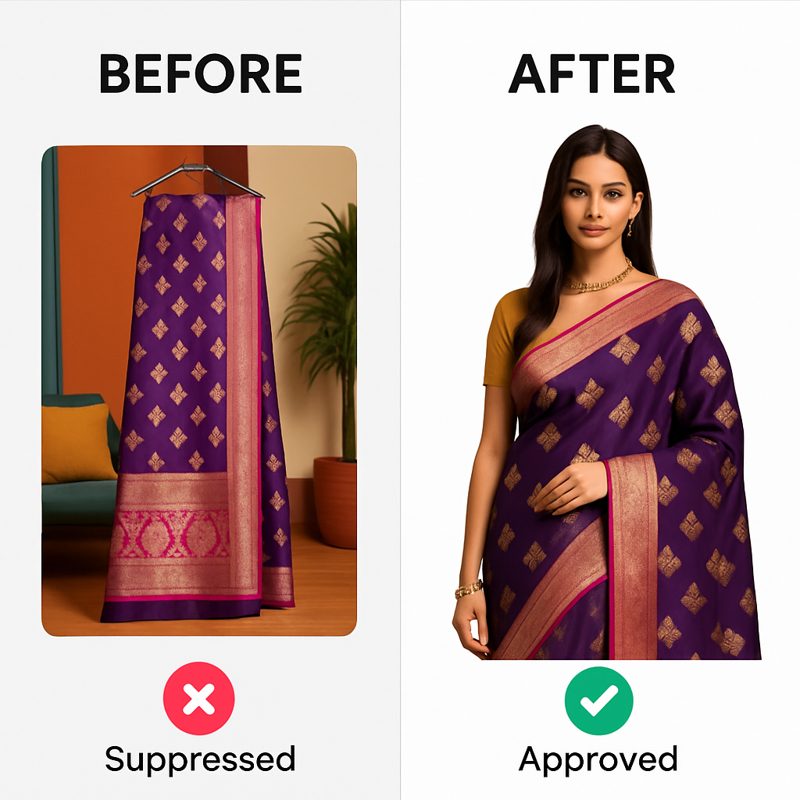
You can create professional Meesho model shots without hiring a model by using AI virtual try-on tools like CatalogX. Upload your flat-lay or mannequin garment photo, select an AI model, and generate photorealistic on-model images in 30 seconds — compliant with Meesho's image policies at a fraction of traditional photography costs.
If you are a Meesho seller, you already know that model-on shots outperform flat-lay images by a wide margin. Products shown on models get 35-60% higher click-through rates because buyers can visualize the fit, drape, and length of a garment. But hiring a model, booking a studio, and paying a photographer can cost Rs.5,000-15,000 per session — an expense that doesn't make sense when you are listing kurtas at Rs.399.
This guide walks you through every aspect of creating Meesho-ready model shots using AI: what Meesho's image policies actually require, how to stay compliant, a step-by-step workflow, cost breakdowns, and the garment types that produce the best results.
What Are Meesho's Image Requirements for Fashion Listings?
Before generating any product images, you need to understand exactly what Meesho expects. Listings that don't meet these specifications get rejected or receive low catalog quality scores, which directly impacts your visibility in search results. Here are the current specifications for 2026:
| Specification | Requirement |
|---|---|
| Minimum resolution | 800 x 800 px |
| Recommended resolution | 1080 x 1440 px (3:4 portrait) |
| Ideal resolution | 1500 x 1500 px (square) or 1500 x 2000 px (portrait) |
| Background | White or light solid color preferred; clean, uncluttered backgrounds accepted |
| File format | JPEG or PNG |
| Maximum file size | 5 MB per image |
| Minimum images per catalog | 1 (but 4+ recommended for higher quality score) |
| Maximum images per catalog | 6 |
| Prohibited elements | Collages, heavy text overlays, watermarks with contact info, obscene content |
| Color accuracy | Must match actual product; color mismatches lead to returns and penalties |
For a comprehensive breakdown of image sizes across all Indian marketplaces, see our complete image sizes guide.
What Meesho's Catalog Quality Score Rewards
Meesho assigns a quality score to each catalog, and images are the single biggest factor. Catalogs that score well get pushed higher in search results and recommendation feeds. Here's what the algorithm rewards:
- 4+ images per catalog: Meesho's data shows that catalogs with 4 or more images get 25-40% more impressions than those with fewer.
- Model-on shots as the primary image: When your first image shows the garment on a model, click-through rates increase significantly compared to flat-lay or mannequin-only shots.
- Multiple angles: Front view, back view, close-up detail, and a lifestyle or context shot. This combination covers every buyer concern.
- High resolution: Images at or above 1080x1440px look sharp on all devices including tablets and large-screen phones.
- Clean backgrounds: White or neutral backgrounds score higher than busy room backgrounds or outdoor settings.
The takeaway: you need model-on shots with clean backgrounds and high resolution. That's precisely what AI virtual try-on delivers.
Does Meesho Allow AI-Generated Product Photos?
This is the most important question for sellers considering AI tools, and the answer requires nuance.
CatalogX's approach is fundamentally different and compliant. Here's why:
- The garment is real: You upload an actual photo of your actual product — a flat-lay, hanger shot, or mannequin photo. The garment in the final image is your real product, not something the AI invented.
- Only the model is AI-generated: CatalogX places your real garment onto a virtual model. The product representation remains authentic — the colors, fabric texture, print pattern, and design are all from your real photo.
- No product misrepresentation: Since the garment shown is the garment you ship, there's no mismatch between listing and delivery. This is the key factor Meesho evaluates.
- Similar to ghost mannequin photography: Many professional e-commerce photographers use invisible mannequin techniques where the mannequin is digitally removed in post-production. AI model overlay is conceptually the same — a post-production enhancement that doesn't alter the product itself.
That said, follow these best practices to stay fully compliant:
- Always use your actual garment photo as the source image. Never use stock photos or images from other sellers.
- Verify color accuracy in the generated output. If the AI shifts the color slightly, regenerate or adjust before listing.
- Include at least one non-AI photo in your catalog — a real flat-lay or close-up of the fabric. This builds buyer trust and provides a reference point.
- Don't claim "as worn by model" in your product descriptions. The model is AI-generated; the garment is real.
How to Create Model Shots with AI: Step-by-Step
Here's the complete workflow for generating Meesho-ready model-on images using CatalogX's virtual try-on tool:
Step 1: Prepare Your Garment Photo
The quality of your output depends heavily on the quality of your input. For best results:
- Shoot in natural daylight near a large window. Avoid direct sunlight which creates harsh shadows.
- Use a white or light background. A white bedsheet, chart paper, or clean white wall works. This makes it easier for the AI to isolate the garment.
- Lay the garment flat or put it on a mannequin. Smooth out all wrinkles and creases. For sarees, arrange the pallu and pleats neatly.
- Capture the full garment from hem to neckline. Don't crop off any part of the garment.
- Ensure accurate color reproduction. Set your phone camera to auto white balance or tap on a white area to calibrate. The garment color in the photo must match the real product.
If your garment photo has a busy background, use CatalogX's free background removal tool to clean it up before generating the model shot.
Step 2: Upload to CatalogX
- Go to CatalogX and sign in (you get 5 free credits on signup).
- Select "Virtual Try-On" mode.
- Upload your garment photo. CatalogX accepts JPEG, PNG, and WebP formats up to 10 MB.
- Select the garment type — saree, kurta, t-shirt, dress, lehenga, etc. This helps the AI understand how the garment should drape on the model.
Step 3: Choose Your Model and Background
- Model selection: Choose from diverse AI models of different body types, skin tones, and ages. For Meesho's Tier 2-4 audience, models that look relatable and approachable tend to perform better than high-fashion editorial models.
- Background: Select a plain white or light gray background to meet Meesho's preferences. CatalogX also offers studio, lifestyle, and outdoor backgrounds if you want variety across your catalog images.
- Pose: Choose between front-facing, slight angle, or full-body poses depending on the garment type. Front-facing works best for most Meesho listings.
Step 4: Generate
Each generation costs 1 credit and produces clean, professional results with detailed fabric texture reproduction and accurate draping — suitable for everyday Meesho listings as well as high-value garments like designer sarees or embroidered lehengas.
Click Generate and wait 30-60 seconds. The AI processes your garment photo, maps it onto the selected model, adjusts the draping and fit, and renders a photorealistic result.
Step 5: Review, Adjust, and Export
- Check color accuracy: Compare the generated image against your actual garment. Colors should match closely. If they don't, regenerate with a different model or background.
- Check garment fit: The garment should look natural on the model — no awkward stretching, bunching, or floating edges.
- Export at Meesho resolution: Download the image at 1080x1440px (or higher) with a white background. The file is ready to upload to your Meesho catalog.
Upload a garment photo and generate your first Meesho-ready model shot in under a minute. 5 free credits on signup.
Start Free — 5 Credits →
How Much Does It Cost? AI vs Traditional Photoshoot
Cost is the primary reason most Meesho sellers skip model photography entirely. Let's compare the real numbers for a typical fashion seller listing 50 products per month:
| Cost Factor | Traditional Photoshoot | CatalogX AI |
|---|---|---|
| Model fees | Rs.2,000-5,000 per session | Rs.0 |
| Photographer fees | Rs.2,000-5,000 per session | Rs.0 |
| Studio rental | Rs.1,000-3,000 per session | Rs.0 |
| Post-production / editing | Rs.500-2,000 | Rs.0 (included) |
| Per-image cost | Rs.100-300 per image | ₹12–15 per image |
| 50 product catalog | Rs.5,000-15,000 | Rs.500-2,500 |
| Turnaround time | 2-5 days (shoot + editing) | Under 1 hour |
| Availability | Need to schedule, coordinate | 24/7, instant |
| New product additions | Wait for next shoot session | Generate same day |
For a deeper look at why professional product photography is so expensive and how AI is disrupting the industry, read our analysis on photographing sarees and kurtas without a model.
What Garment Types Work Best with AI Model Shots?
Not all garments produce equally good results with AI virtual try-on. Here's a breakdown of what works well for Meesho sellers, based on thousands of generations we've processed:
Excellent Results
- Sarees: AI handles saree draping remarkably well, including pallu arrangement and pleating. This is one of the most popular garment types on Meesho, and model shots dramatically outperform flat-lay images for sarees because buyers need to see how the fabric falls and how the pallu looks when worn. For best results, photograph the saree neatly draped on a mannequin with the pallu visible.
- Kurtas and Kurtis: Straightforward garment shapes that produce consistently excellent results. Front-facing poses work best. The AI accurately renders embroidery details, print patterns, and neckline designs. This is Meesho's highest-volume fashion category.
- T-shirts and Casual Tops: Simple silhouettes that the AI renders with high accuracy. Print designs, graphic elements, and text on t-shirts are well-preserved from the source photo. Ideal for Meesho's growing western wear category.
- Western Dresses: A-line, fit-and-flare, maxi, and shift dresses all produce clean, professional results. The AI handles hem length and waist definition accurately.
Good Results (May Need a Regeneration)
- Lehenga Cholis: The two-piece nature (blouse + skirt) requires more complex rendering. An extra regeneration may be needed for best results, especially for heavily embellished designs.
- Palazzo Suits and Salwar Kameez: Multi-piece outfits with dupatta work well, but ensure the full outfit is visible in your source photo. The AI renders the set more accurately when all components are photographed together.
- Jackets and Blazers: Structured garments with defined shoulders produce good results, though very stiff or oversized structures may need regeneration for optimal fit.
Tips for Challenging Garments
- Unstitched fabric: Photograph it draped or arranged to suggest the final garment shape. Pure flat-lay of folded fabric won't produce useful model shots.
- Sheer or transparent fabrics: Ensure the source photo clearly shows the fabric's transparency. The AI handles sheer fabrics better with high-quality source images.
- Heavy embroidery or sequin work: Shoot close-up details separately for your catalog. Use the AI-generated model shot as your primary image and include the close-up detail photo as a secondary catalog image.
What Common Mistakes Get Meesho Listings Rejected?
Whether you're using AI-generated model shots or traditional photography, these are the most common reasons Meesho rejects listings or assigns low quality scores. Avoid every single one:
Image-Related Rejections
- Resolution too low: Images under 800x800px are automatically rejected. Even images just above the minimum look pixelated on modern phones. Always target 1080x1440px or higher.
- Watermarks or text overlays: Any text on the image — brand watermarks, phone numbers, "COD available," price tags — triggers rejection. Meesho explicitly prohibits contact information in images.
- Collage-style images: Multiple product photos stitched into a single collage image are rejected. Each image slot should contain one clean product view.
- Mismatched product colors: If your image shows a deep navy blue kurta but the actual product is more of a royal blue, buyers will return it and file complaints. Meesho tracks return reasons and penalizes sellers with high "product mismatch" return rates.
- Busy or distracting backgrounds: While Meesho doesn't strictly enforce white backgrounds, images with cluttered rooms, unmade beds, or outdoor settings with distracting elements receive lower quality scores.
Catalog-Level Mistakes
- Only one image per catalog: Single-image catalogs get 25-40% fewer impressions. Aim for 4+ images: model shot (front), model shot (back or side), flat-lay close-up, and fabric/detail close-up.
- Inconsistent image styling: If your first image has a white background and your second has a garden background, the catalog looks unprofessional. Maintain consistent backgrounds and lighting across all images in a catalog.
- Using someone else's images: Copying product images from other sellers or from the internet leads to intellectual property complaints and potential account suspension. Always use your own product photos as the source material.
- Incorrect category mapping: Listing a kurta in the "dress" category or a lehenga in the "skirt" category confuses the algorithm and reduces visibility. Select the exact garment category that matches your product.
For the complete guide to selling fashion successfully on Meesho — including registration, pricing strategy, and the reseller model — read our Meesho seller guide.
How to Build a Complete Meesho Catalog Workflow
Once you've generated model shots, here's how to assemble a complete, high-converting Meesho catalog:
The Ideal 4-Image Catalog
- Image 1 — AI model shot (front view): This is your hero image. It appears in search results, recommendation feeds, and WhatsApp shares by resellers. Make it count with a clean white background, front-facing pose, and the full garment visible from neckline to hem.
- Image 2 — AI model shot (back or angled view): Generate a second shot with a different pose to show the back design, sleeve detail, or side profile. This gives buyers a complete picture of the garment.
- Image 3 — Flat-lay or close-up: Use your original garment photo (the one you uploaded to CatalogX) as a supplementary image. This serves as a "real product" reference and shows fabric texture up close.
- Image 4 — Detail shot: Photograph the embroidery, print pattern, stitching quality, label, or any distinctive detail. This builds buyer confidence and reduces returns due to quality expectation mismatch.
Batch Processing for Volume Sellers
If you are listing 10-50 products per week (common for active Meesho sellers), efficiency matters. Here's a batch workflow:
- Photography day: Set aside 2-3 hours to photograph all new garments. Use the same white background, same lighting, same phone position for consistency.
- AI generation batch: Upload all garment photos to CatalogX and generate model shots in one session. With 30-60 seconds per generation, 50 products take under an hour.
- Quality review: Quickly scan all generated images against your checklist. Regenerate any that don't meet standards.
- Meesho upload: Upload all catalogs with your prepared images, descriptions, and pricing. A batch of 50 catalogs can be listed in a single afternoon.
This entire workflow — from photographing garments to having live Meesho listings with professional model shots — can be completed in a single day. Compare that to the 1-2 week turnaround of traditional photography followed by editing and uploading.
Frequently Asked Questions
Yes, but with an important distinction. Meesho prohibits fully AI-generated product images where the garment itself is fabricated. However, using AI to place a real garment photo onto a virtual model is compliant because the product shown is the actual item you are selling. CatalogX uses your real garment photo as the base, ensuring the product representation is accurate. To stay safe, always include at least one non-AI photo (flat-lay or close-up) in your catalog as well.
With CatalogX, each AI model shot costs about ₹12–15 depending on your plan. Each model shot costs 1 credit. You get 5 free credits on signup to test the platform. For a catalog of 50 products, expect to spend Rs.500-2,500 total — compared to Rs.5,000-15,000 for a traditional photoshoot session with a model and photographer.
Meesho requires a minimum of 800x800 pixels and recommends 1080x1440 pixels in a 3:4 portrait aspect ratio. Images should be in JPEG or PNG format, under 5 MB, with a clean white or light background. CatalogX outputs images at 1080x1440px by default, matching Meesho's recommended specifications exactly.
Sarees, kurtas and kurtis, t-shirts, western dresses, and lehenga cholis all produce excellent results with AI virtual try-on. These garments have well-defined shapes that the AI can accurately render on a model. Items with heavy draping like unstitched fabric may take an extra regeneration for optimal results. For embroidered or sequin-heavy garments, include a separate close-up detail shot in your catalog alongside the AI model shot.
Your account will not be suspended for using AI-assisted photography where the real garment is shown. Meesho suspends accounts that use completely fabricated product images where the actual product differs significantly from what is shown in the listing. Since CatalogX uses your real garment photo and overlays it onto an AI model, the product representation remains authentic. The key compliance factor is that the garment in your image must match the garment you ship.
Each image takes approximately 30 to 60 seconds to generate. You can create a complete catalog of 50 products with model shots in under an hour, compared to 2-3 days for a traditional photoshoot including editing and post-production. The process involves uploading your garment photo, selecting a model and background, and clicking generate.