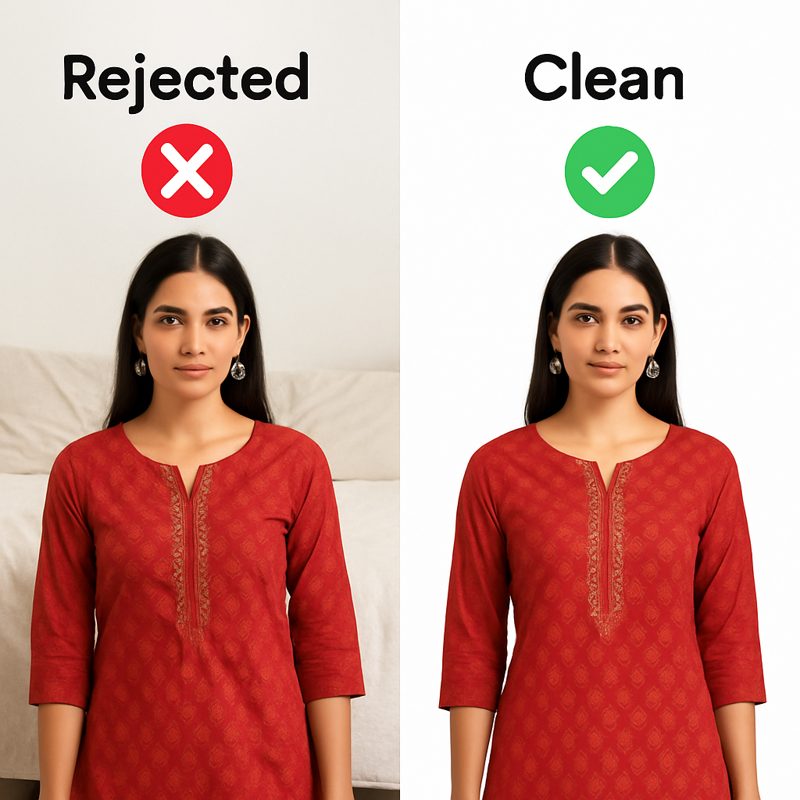
Every fashion brand selling on Indian marketplaces has dealt with image rejection. You upload your product photos, wait for approval, and get a rejection notice: "Image does not meet specifications." The dimensions are wrong, the aspect ratio is off, the background isn't compliant, or the file is too large.
The frustrating part: every marketplace has different requirements. What works on Amazon gets rejected on Myntra. What Flipkart accepts, Ajio doesn't. And the specs change periodically without much notice.
This guide compiles the current requirements for every major Indian e-commerce platform in one place. Bookmark it — you'll use it every time you upload a new catalog.
Quick Reference: Image Size Cheat Sheet
| Platform | Primary Image | Aspect Ratio | Background | Max File Size | Format |
|---|---|---|---|---|---|
| Amazon India | 2000 x 2000 px | 1:1 | Pure white (RGB 255,255,255) | 10 MB | JPEG, PNG |
| Flipkart | 1500 x 1500 px | 1:1 | White / light grey | 10 MB | JPEG, PNG |
| Myntra | 1500 x 2000 px | 3:4 | White / off-white | 5 MB | JPEG |
| Ajio | 1500 x 2000 px | 3:4 | White / light grey | 5 MB | JPEG |
| Meesho | 1080 x 1440 px | 3:4 | White preferred | 5 MB | JPEG, PNG |
| Nykaa Fashion | 1200 x 1600 px | 3:4 | White / neutral | 5 MB | JPEG |
| 1080 x 1350 px | 4:5 | Any | 30 MB | JPEG, PNG | |
| Instagram Story | 1080 x 1920 px | 9:16 | Any | 30 MB | JPEG, PNG |
| WhatsApp Catalog | 1024 x 1024 px | 1:1 | Any | 5 MB | JPEG, PNG |
Platform-by-Platform Breakdown
Amazon India
Amazon has the strictest image requirements of any Indian marketplace:
- Main image: Must have a pure white background (RGB 255,255,255). The product must fill 85% of the image frame. No text, logos, watermarks, or borders.
- Minimum size: 1000 x 1000 px (zoom won't enable below this). Recommended: 2000 x 2000 px for best zoom quality.
- Additional images: Up to 8 additional images allowed. Can include lifestyle shots, infographics, size charts, and detail close-ups. Background can be any color.
- Format: JPEG or PNG. JPEG recommended for file size efficiency.
- Common rejection reasons: Background not perfectly white (even slightly off-white gets rejected), product not filling enough of the frame, watermarks or brand logos visible.
Flipkart
- Main image: White or light grey background. Product should fill 80%+ of the frame.
- Minimum size: 1000 x 1000 px. Recommended: 1500 x 1500 px.
- Additional images: Up to 7 additional images. Model shots, flat-lays, and detail shots are encouraged.
- Key difference from Amazon: Flipkart is slightly more lenient on background shade — light grey is acceptable, not just pure white. But clean, professional images still get better placement.
Myntra
- Main image: Model-on shot required for most fashion categories. White or off-white background. 3:4 aspect ratio (portrait).
- Minimum size: 1080 x 1440 px. Recommended: 1500 x 2000 px.
- Image count: Minimum 4 images required per listing (front, back, detail, full-length). Model-on images are strongly preferred over flat-lays.
- Key difference: Myntra prioritizes model photography over flat-lay. Products with professional model shots rank higher in search results and get more visibility.
CatalogX's Marketplace Export tool resizes your product images to the exact dimensions each platform requires. No manual cropping or resizing.
Try Marketplace Export Free →
Ajio
- Main image: White or light grey background. 3:4 aspect ratio. Model-on preferred for fashion.
- Minimum size: 1080 x 1440 px. Recommended: 1500 x 2000 px.
- Quality: Ajio is particularly strict about image sharpness and color accuracy. Blurry or color-shifted images get rejected.
Meesho
- Main image: White background preferred but not strictly enforced. Clean, uncluttered backgrounds work.
- Minimum size: 800 x 800 px. Recommended: 1080 x 1440 px.
- Key difference: Meesho has the most relaxed image requirements of major marketplaces, but professional images still convert significantly better. The reseller-driven model means your images compete directly with other sellers of similar products.
Instagram & Social Media
- Feed post: 1080 x 1350 px (4:5 portrait) gets the most screen real estate in feed. Square 1080x1080 also works.
- Stories/Reels: 1080 x 1920 px (9:16 full screen).
- No background restrictions: Instagram is where you can get creative — lifestyle backgrounds, seasonal themes, branded color palettes. This is where CatalogX's 50+ background library shines.
Common Mistakes That Get Images Rejected
- Background not white enough: The most common rejection on Amazon. Even if it looks white to your eye, if the RGB values aren't 255,255,255, Amazon's automated system will flag it. Use background removal + white background export to be safe.
- Wrong aspect ratio: Uploading a 1:1 square image to Myntra (which requires 3:4) results in awkward cropping or rejection. Always check the platform's ratio requirement first.
- Image too small: Uploading 600x800 images to any major marketplace will fail. Most platforms require 1000px minimum. Use HD Upscale if your source images are too small.
- Watermarks or logos: Amazon and Flipkart strictly prohibit any text overlays, brand logos, or watermarks on the main product image.
- Product doesn't fill the frame: A tiny product in the center of a large white canvas looks unprofessional and may violate the 80-85% fill requirement.
- Inconsistent lighting across images: If your main image is warm-toned and your detail shot is cool-toned, it looks unprofessional. Maintain consistent white balance across all images in a listing.
The CatalogX Workflow: One Image, Every Platform
Instead of manually resizing and cropping for each marketplace, CatalogX's tools let you handle the entire workflow from one source image:
- Generate a mockup — upload your garment, pick a model, and generate a high-quality AI product photo.
- Remove background — get a clean transparent PNG of your model-on product shot.
- Upscale if needed — ensure the image meets minimum resolution requirements.
- Export for each marketplace — click the platform button and get an image at exactly the right dimensions, aspect ratio, and background color. Amazon (1:1 white), Myntra (3:4 white), Instagram (4:5 any), and more — all from one click each.
Related Articles
- How to Sell Fashion on Amazon India: Complete Seller Guide 2026
- Myntra Seller Guide: Image Requirements & Listing Optimization 2026
- Flipkart Fashion Image Requirements & Listing Guide 2026
Frequently Asked Questions
Amazon India requires a minimum of 1000x1000 pixels with 2000x2000 recommended for optimal zoom. The aspect ratio must be 1:1 square. Background must be pure white (RGB 255,255,255). Maximum file size is 10 MB. Accepted formats are JPEG and PNG. The product must fill at least 85% of the image frame.
Myntra requires a 3:4 portrait aspect ratio with minimum resolution of 1080x1440 pixels and recommended 1500x2000 pixels. Only JPEG format is accepted, with a maximum file size of 5 MB. Background must be white or off-white, and model-on photography is mandatory for most fashion categories.
Flipkart requires a 1:1 square aspect ratio for primary images with a minimum of 1000x1000 pixels and recommended 1500x1500. Maximum file size is 10 MB. Both JPEG and PNG formats are accepted. Background should be white or light gray. Minimum 3 images per listing, maximum 8.
Meesho requires minimum 800x800 pixel images with 1080x1440 pixels recommended. The preferred aspect ratio is 3:4 portrait, though 1:1 is also accepted. White backgrounds are preferred but not strictly enforced. Maximum file size is 5 MB. Both JPEG and PNG formats work.
The most common rejection reasons are background not being pure white (especially on Amazon), wrong aspect ratio for the platform, image resolution below minimum requirements, watermarks or logos on the main image, and product not filling enough of the frame. Each marketplace has different specific thresholds.
For Instagram feed posts, use 1080x1350 pixels in a 4:5 portrait ratio for maximum screen real estate. For Stories and Reels, use 1080x1920 pixels in 9:16 full-screen format. Square 1080x1080 also works for feed posts. Instagram allows any background color and has a generous 30 MB file size limit.