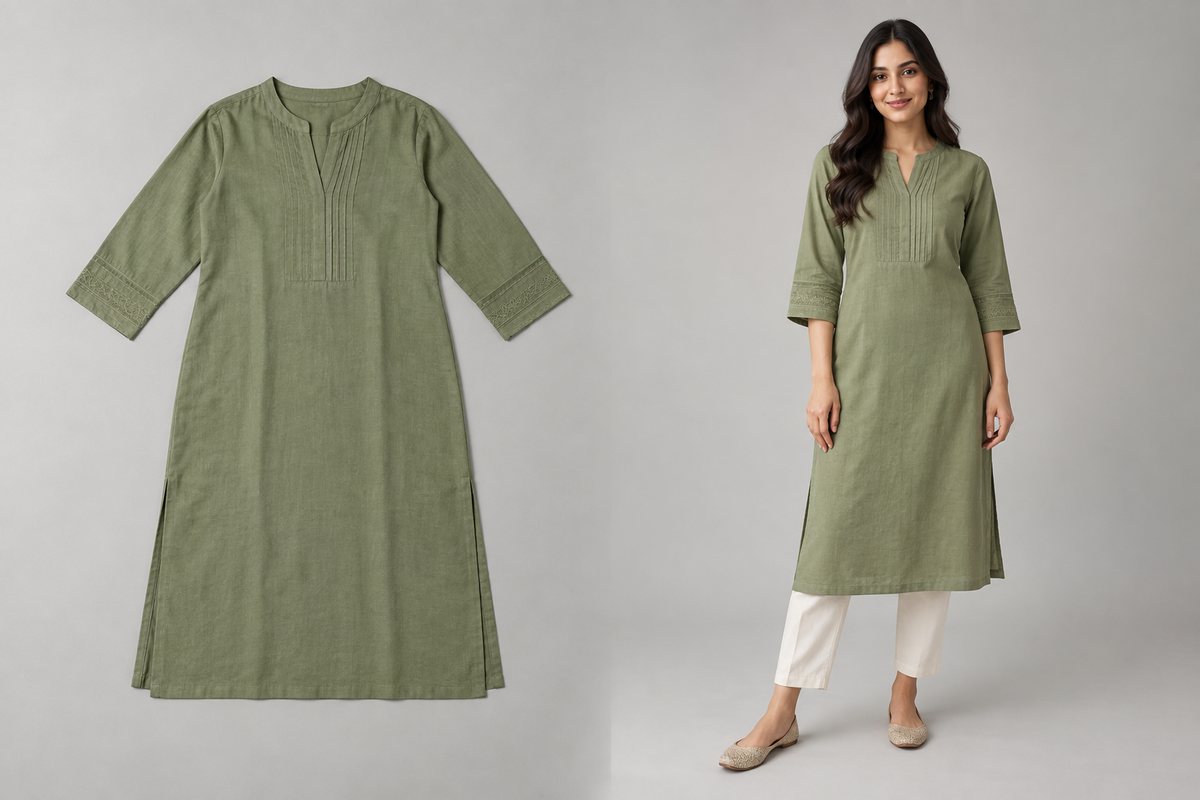
Upload a flat lay, hanger shot, ghost-mannequin photo or a picture of the garment being worn, and about 30 seconds later CatalogX hands back a photorealistic on-model product photo. What matters for your catalog is everything that happens inside those 30 seconds — because it is why shot #40 still looks like the same brand as shot #1.
Step 1: The garment is analyzed before anything is generated
A vision pass reads your upload first: garment category, whether prints or embroidery are present, whether the garment is flat or being worn, and measured construction signals — including hem-length proportions read from your own photo (there is a whole article on that mechanism). Generation is conditioned on what was measured, not just on a text description. The analysis is cached, so re-running the same garment doesn't repeat the work.
Step 2: A playbook for the specific garment, not a generic prompt
Saree, lehenga, kurti, kurta-pyjama, sherwani, co-ord set, dress, jumpsuit, blazer, hoodie, jeans, skirt — around 28 garment types each have their own generation playbook encoding how that construction actually drapes. A saree's pleats and pallu direction are not a "dress with extra fabric"; a co-ord is not two unrelated pieces. This is the proof point we put plainly: if the AI gets a saree's pleats right, your t-shirt is easy.
Step 3: A model catalog with real demographic control
You pick from 58 catalog models spanning body types, ages and skin tones — or, on Pro and above, upload and save your own model. Verified against competitors in September 2026: Photoroom exposes no gender, body-type, age or skin-tone parameters at all (16 fixed presets), and Claid offers a large library without controllable axes. Demographic controllability — including proper South Asian representation — is genuinely rare in this category.
Step 4: Preflight, so bad inputs don't cost you
Uploads that will generate badly — too small, wrong subject — are caught before a credit is spent. And if a generation fails outright, the credit refunds automatically.
Two modes, one pipeline
Standard mode runs on every plan. Quality mode (Pro and above) adds a second act: measured checks plus an AI reviewer that compares the output to your original photo and automatically re-shoots on failure — covered in its own article.