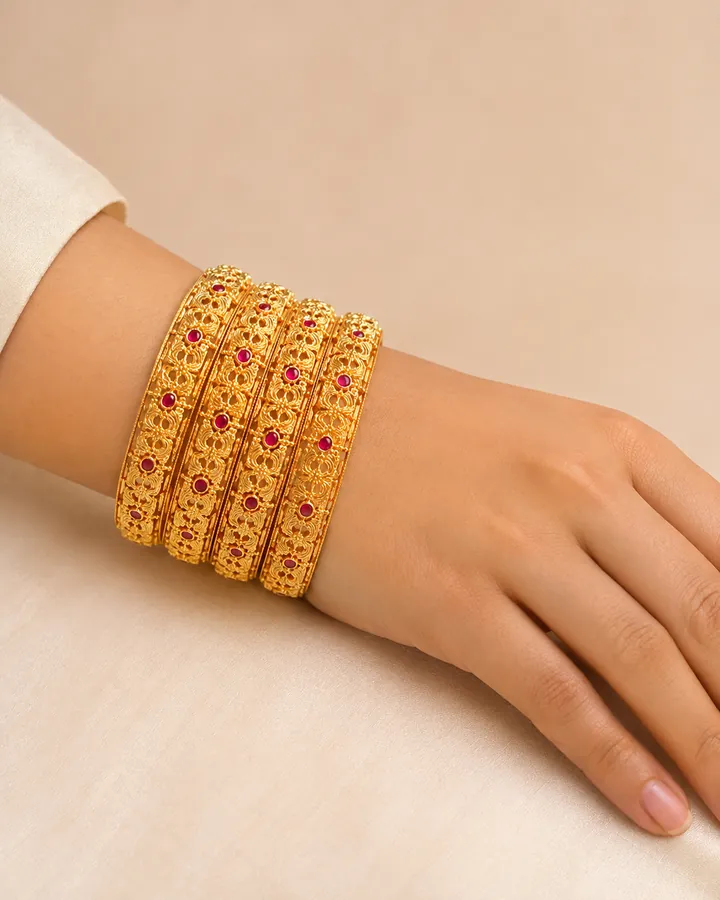
To photograph bangles or a bracelet on a model, raise the wrist into the frame, keep the hand relaxed with fingers slightly apart, and angle the forearm so the piece faces the lens instead of sliding toward the elbow. Push sleeves well clear, light from the side, and keep the hand and part of the forearm in shot so the width reads against them. With AI, CatalogX's Bangle / Cuff piece type does that pose for you from one product photo and shows where the piece sits on the wrist and how much of the forearm it covers.
Why wrist jewellery is hard to photograph
Three things go wrong with almost every first attempt. The piece slides. A bangle on a hanging arm drops to the hand and sits sideways, showing an edge instead of its face. Sleeves cover it. Even a three-quarter sleeve hides half a kada. The frame crops it. A portrait framed for the face ends at the chest, and the wrist is below it.
The fix for all three is the pose, not the camera: bring the wrist up to where the camera already is.
Posing the wrist
- Raise the wrist to chest or collarbone height: hand near the face, on the opposite shoulder, holding a lapel or a dupatta edge. The bangle settles on the wrist bone instead of sliding to the hand.
- Relax the hand. Fingers slightly separated and softly curved. A clenched fist or flat, splayed fingers both look posed in the wrong way.
- Angle the forearm so the piece's face turns to the lens. For a cuff, that is the decorated centre; for a bangle stack, the outer faces.
- Clear the sleeve past the elbow, or use a sleeveless outfit. The forearm is the ruler that shows how wide the piece is.
- Keep the hand in frame. The hand is what tells a buyer whether the bangle is delicate or chunky. Crop it off and the size is gone.
Stacks and sets
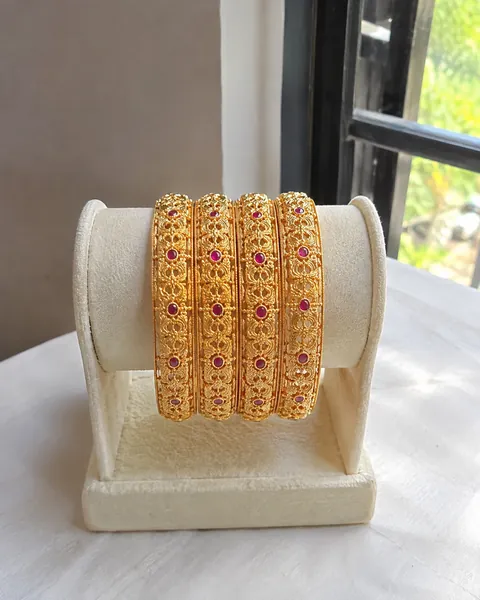
Indian bangle sets are sold as a stack: 2, 4, 6 or a dozen in a box. Photograph the stack exactly as it is sold, count the bangles in the photo, and say the count in the listing. If a set comes with a matching kada, put both in the same frame. For single bracelets, one piece per photo; a stack of mixed products invites "is this included?" questions.
Bangle and bracelet sizes
Buyers want to know whether it fits, and a photo cannot tell them. Put the size in the listing, in the system your buyers use. Indian bangle sizes are the inside diameter in inches, written as whole inches and sixteenths:
| Indian bangle size | Inside diameter | Typical fit |
|---|---|---|
| 2.2 | 2 2/16" ≈ 54 mm | Small, slim hands |
| 2.4 | 2 4/16" ≈ 57 mm | Small to medium |
| 2.6 | 2 6/16" ≈ 60 mm | Medium, the most common size |
| 2.8 | 2 8/16" ≈ 64 mm | Medium to large |
| 2.10 | 2 10/16" ≈ 67 mm | Large |
Bracelets are sold by length instead: most women's bracelets run about 6.5 to 7.5 inches (16.5 to 19 cm), and men's about 8 to 8.5 inches. Cuffs and adjustable pieces should say so. A bangle has to pass over the knuckles, which is why the inside diameter is larger than the wrist.
The shot list
| Shot | What it answers |
|---|---|
| The piece or stack on plain white, faces up | What it is, how many in the set |
| On model, wrist raised near the face or shoulder | Width against the wrist and hand, how it sits |
| Close-up of the clasp, hinge or screw | How it opens, for bracelets and openable kadas |
| Inside view or a ruler next to it | Inside diameter or length, for careful buyers |
| Lifestyle: with a saree, lehenga or a plain dress | The occasion it is bought for |
Doing it with AI
- Photograph the piece on a plain, non-reflective surface in soft daylight. For a stack, spread it so every bangle shows; for a bracelet, lay it open so the clasp and full length show.
- Choose Accessories, then Jewellery, then Bangle / Cuff. The rule raises the wrist into the frame with the hand relaxed and fingers slightly apart, angles the arm so the piece faces the lens, and shows where it sits on the wrist and how much of the forearm it covers.
- Add the size if you have it. Pick a tier (Delicate, Everyday, Statement, Bridal) or type the measurement. For bangles and bracelets the measurement is passed to the render as written rather than mapped to a landmark.
- Pick the outfit. A sleeveless or short-sleeved outfit keeps the forearm clear. Festive or Bridal suits a bangle set worn with ethnic wear.
- Check the count. Compare the number of bangles in the render with your stack, then the metal tone. After every jewellery render the gold or silver colour is matched back to your photo; on Pro and above an AI reviewer compares the result with your original.
Wrist watches follow the same logic with one extra rule: the dial faces the camera. See AI watch model photos. Rings are covered in ring photography on hand models.
What it costs
One HD photo is 1 credit: $0.17–0.33 on monthly plans (Starter $9.99 for 30, Pro $19.99 for 100, Business $49.99 for 260, Agency $149.99 for 900), from $0.15 on volume plans, and the first 5 are free with no card. Sellers in India pay in rupees, from ₹12 a photo; see the jewellery model photoshoot page for India.
Frequently asked questions
Raise the wrist to chest or face height, relax the hand with fingers slightly apart, clear the sleeve and angle the forearm so the bracelet faces the lens. Keep the hand in frame so the width reads against it, and use soft side light.
Photograph the stack exactly as it is sold, with every bangle visible, and state the count in the listing. On a model, raise the wrist so the stack settles on the wrist bone rather than sliding to the hand.
2.6 (an inside diameter of 2 6/16 inches, about 60 mm) is the most commonly stocked size, with 2.4 and 2.8 either side. Always state the size in the listing.
CatalogX copies the design, metal tone, stones, chain or band and clasp from your photo and is instructed not to add anything you did not upload. Check the render against your piece, especially the bangle count and small stones.
Yes. Choose the Festive / Ethnic or Bridal outfit for the model. The jewellery stays the subject; the outfit is not allowed to crowd it.