Zalando Skirt Image Requirements
Selling skirts — mini, midi, maxi and pleated to European fashion shoppers on a platform that reviews every image? Here is what Zalando expects from your skirt images in 2026:
| Requirement | Zalando specification |
|---|
| Aspect ratio | 1:1.44 portrait (width × height) |
| Resolution | 1801×2600px best practice; 762×1100px minimum (1800×2600 for designer brands) |
| Format | JPG in sRGB, up to 20MB |
| Background | Model views on light grey, not white — Zalando converts white packshots to light grey itself |
| Views | At least three images per apparel article, same model and styling across all views |
| AI images | Accepted; rejected if they break believability or misrepresent the product. Invisible marking recommended by December 2026, visible labels not permitted |
How to Shoot Skirts for Zalando
A skirt's selling point on Zalando is length and movement, and the platform's 1:1.44 portrait canvas at 1801×2600px is built to show both. Zalando wants the whole article visible and model views on light grey; a sitting model is allowed only if the article stays fully visible. CatalogX renders the skirt on a standing model to that canvas, with the hem anchored to the length in your photo.
Cover the three-image minimum with a front view, an angled view that shows pleats or flare in motion, and a waistband or fabric close-up, all on one model. Every export carries IPTC provenance metadata — the invisible AI marking Zalando recommends — and has been scored against the original before it reaches you.
One Flat Photo In, One Listing Shot Out
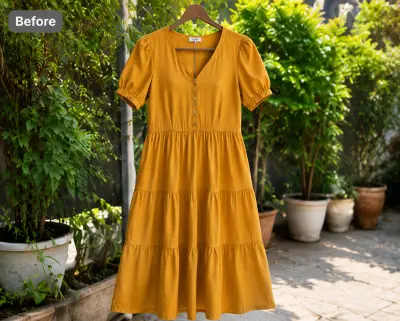 Before — flat photo
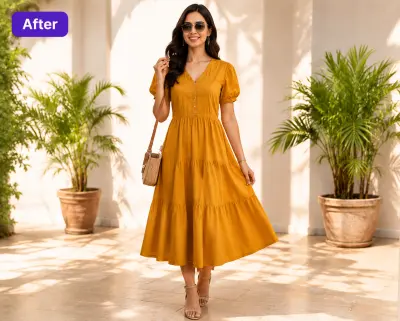 After — CatalogX
Shown on a dress from our public gallery — we don't have a skirt pair published yet, but the flow is identical: flat photo in, on-model photo out, hem length preserved.
From Photo to Live Listing
1. Upload your skirt — a flat-lay, hanger shot or supplier photo works. Tags and pins are removed automatically.
2. Pick a model — 40+ models across skin tones and body types. The AI respects your garment's construction; it doesn't guess.
3. Set the scene — light grey for every model view, one scene across the whole article.
4. Generate and export — about 30 seconds per image, sized for Zalando's specs. You own every output; commercial use is included on all plans, no watermarks.
On cost: a US studio photoshoot runs $300+ per session, or $50–150 per finished image. CatalogX starts free (5 credits, no card) and paid plans start at $9.99/month — see USD pricing or the full AI vs studio cost breakdown.