Zalando Dress Image Requirements
Selling dresses and gowns to European fashion shoppers on a platform that reviews every image? Here is what Zalando expects from your dress images in 2026:
| Requirement | Zalando specification |
|---|
| Aspect ratio | 1:1.44 portrait (width × height) |
| Resolution | 1801×2600px best practice; 762×1100px minimum (1800×2600 for designer brands) |
| Format | JPG in sRGB, up to 20MB |
| Background | Model views on light grey, not white — Zalando converts white packshots to light grey itself |
| Views | At least three images per apparel article, same model and styling across all views |
| AI images | Accepted; rejected if they break believability or misrepresent the product. Invisible marking recommended by December 2026, visible labels not permitted |
How to Shoot Dresses for Zalando
Zalando's image guide is portrait-first: 1:1.44, 1801×2600px best practice, model views on light grey rather than white, and the same model across every view of an article. A dress is the garment that benefits most — the tall frame shows the full length and fall without cropping. CatalogX's Zalando preset renders exactly that canvas on light grey (#F1F1F1) with the hem where your photo puts it.
Zalando requires at least three images per apparel article and reviews each one; AI assets are accepted but rejected if they break believability or misrepresent the product, with invisible marking strongly recommended by December 2026. Every CatalogX export carries IPTC provenance metadata and has been scored against your original photo, so the front, back and detail views you submit are the dress you ship.
One Flat Photo In, One Listing Shot Out
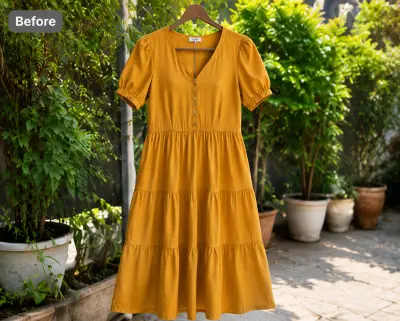 Before — flat photo
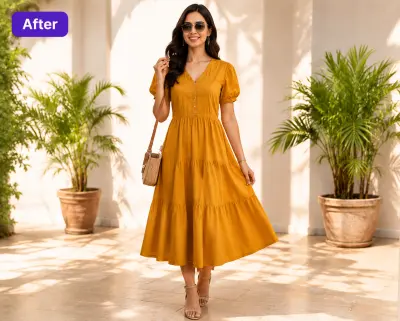 After — CatalogX
A mustard dress from our public gallery — flat photo in, on-model photo out, silhouette and hem length kept as photographed.
From Photo to Live Listing
1. Upload your dress — a flat-lay, hanger shot or supplier photo works. Tags and pins are removed automatically.
2. Pick a model — 40+ models across skin tones and body types. The AI respects your garment's construction; it doesn't guess.
3. Set the scene — light grey for every model view, one scene across the whole article.
4. Generate and export — about 30 seconds per image, sized for Zalando's specs. You own every output; commercial use is included on all plans, no watermarks.
On cost: a US studio photoshoot runs $300+ per session, or $50–150 per finished image. CatalogX starts free (5 credits, no card) and paid plans start at $9.99/month — see USD pricing or the full AI vs studio cost breakdown.