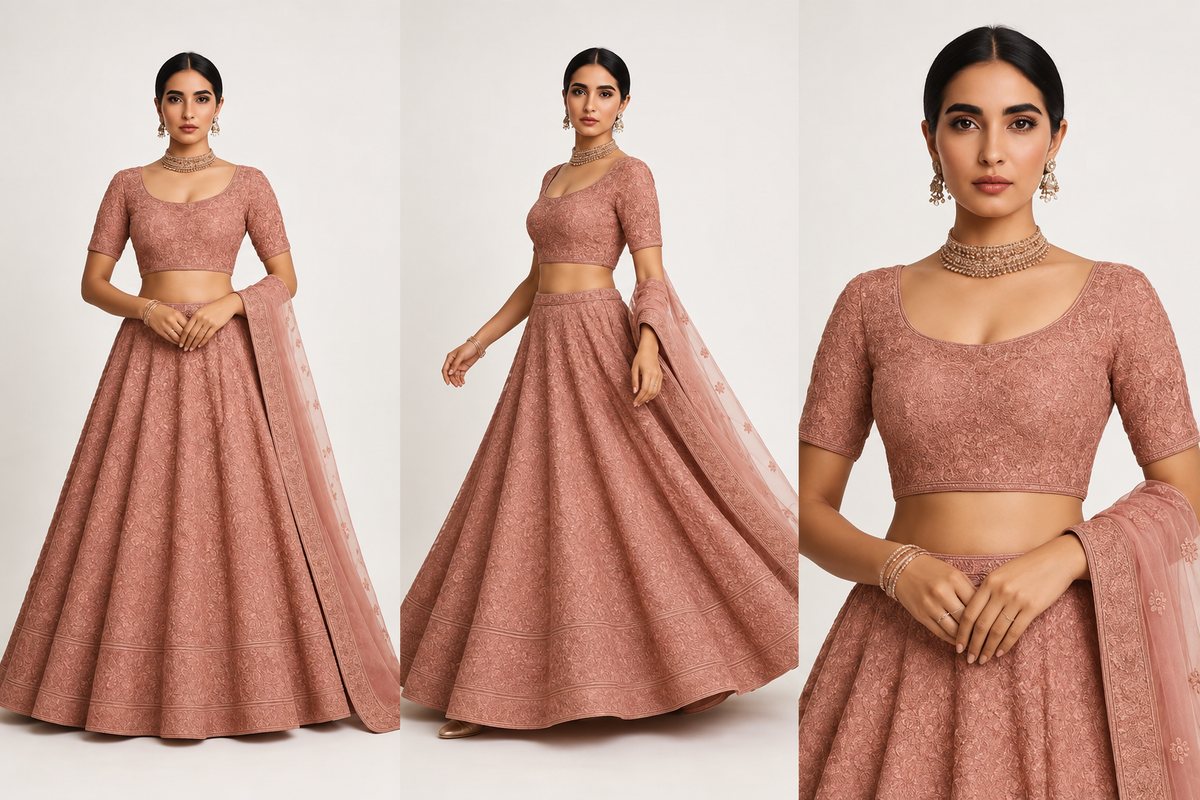
Myntra is India's largest fashion-focused e-commerce platform, with over 150 million registered users and a reputation for premium-quality shopping experiences. For fashion brands, a presence on Myntra signals legitimacy — it's where style-conscious Indian consumers shop.
But Myntra is also the hardest Indian marketplace to sell on. The onboarding process is selective, the image requirements are the strictest in the industry, and the quality control (QC) team rejects listings that don't meet their standards. This guide covers everything you need to know to get onboarded, create compliant listings, and avoid the rejection cycles that frustrate many sellers.
Myntra Partner Portal Onboarding
Unlike Amazon or Meesho where any registered business can start selling, Myntra is selective about which brands and sellers they onboard. Here's the process:
Eligibility Requirements
- Registered brand or trademark: Myntra strongly prefers brands with a registered trademark. Unbranded or generic products are rarely accepted.
- Minimum catalog depth: Myntra typically requires a minimum of 50-100 SKUs for onboarding. They want sellers who can maintain a meaningful catalog, not one-off listings.
- Product quality standards: Myntra may request product samples for quality assessment. Garments with poor stitching, cheap fabric, or inconsistent sizing won't pass.
- Professional product images: Your onboarding application must include sample product images that meet Myntra's standards — model-on shots with white backgrounds. This is where many applications are rejected.
Application Process
- Visit partners.myntra.com and submit an expression of interest.
- Myntra's team reviews your brand, catalog, and images. This can take 2-4 weeks.
- If approved, you'll be assigned a Myntra relationship manager who guides you through account setup.
- Sign the Partner Agreement — this covers commission rates, return policies, and service level agreements.
- Upload your catalog through the Partner Portal with all required images and product data.
- Myntra's QC team reviews each listing. Expect 1-2 rounds of feedback before your first products go live.
Why Myntra Is Strict on Image Quality
Myntra's brand identity is built on a curated, premium shopping experience. Every product image on the platform contributes to this perception. Unlike Amazon (which is a marketplace for everything) or Meesho (which targets value shoppers), Myntra positions itself as a fashion destination.
This means:
- Visual consistency across the catalog: Myntra wants every listing to look like it belongs on the same platform. Inconsistent image quality — some products with professional model shots, others with phone photos — undermines the user experience.
- Model-on photography is not optional: For most fashion categories, Myntra requires model-on images. Flat-lays, mannequin shots, and hanger photos are not acceptable as primary images for clothing.
- Background and composition standards: White or off-white backgrounds, consistent lighting, model centered in frame, full-length view — these aren't suggestions, they're requirements enforced by automated checks and manual QC review.
Mandatory Model Shots — What's Required
This is the section most Myntra sellers need. Model-on photography requirements vary by category, but here's the baseline:
General Model Shot Requirements
| Specification | Requirement |
|---|---|
| Model type | Real human model (AI-generated model images are accepted if photorealistic) |
| Background | White or off-white. No gradients, props, or environmental backgrounds. |
| Full body | Head-to-toe visible. No cropping at knees or waist. |
| Model position | Centered in frame, facing forward or at slight angle. Natural standing pose. |
| Lighting | Even, professional studio lighting. No harsh shadows, no yellowish tint. |
| Minimum images | 4 per listing (front, back, side/detail, close-up) |
| Model diversity | Myntra encourages but doesn't mandate diverse model representation |
What's NOT Acceptable
- Mannequin or ghost mannequin images as the primary photo
- Flat-lay or hanger shots as the primary photo (acceptable as additional images only)
- Selfie-style or mirror photos
- Outdoor or environmental backgrounds for primary images
- Heavy filters, color grading, or artistic post-processing
- Collages or multiple products in a single image
- Visible tags, pins, clips, or styling aids
Category-Specific Image Rules
Myntra's image requirements vary by fashion category. Here are the specific rules for major categories:
Ethnic Wear (Kurtas, Sarees, Lehengas, Salwar Suits)
- Full drape required: Sarees must be shown fully draped on a model — not folded or on a mannequin. The pallu should be visible and styled naturally.
- Complete set visible: For salwar suits and kurta sets, all pieces must be visible in the primary image. If a dupatta is included, it should be draped or held visibly.
- Embroidery/work detail: At least one close-up image showing embroidery, print, or fabric texture detail is required.
- Model styling: Minimal jewelry and styling. The focus should be on the garment, not accessories. Hair should be styled neatly and not cover the garment.
Western Wear (T-Shirts, Dresses, Jeans, Tops)
- Fit visibility: The image must clearly show the fit — slim, regular, oversized. Tucking, rolling sleeves, or other styling that obscures the natural fit is discouraged.
- Color accuracy: Western wear colors must be true-to-life. Myntra's QC team specifically checks for color accuracy and may reject listings where the model shot color doesn't match the actual product.
- No brand prominence: While brand logos on the garment are fine, the primary image should not be styled to make the brand logo the focal point.
Accessories (Bags, Watches, Jewelry, Footwear)
- Footwear: Model-on shots required for most footwear. Show the shoe from front, side, and back angles. At least one image should show the shoe being worn.
- Bags: Show the bag being held/carried by a model and also as a standalone product shot on white background. Include interior shots.
- Jewelry: Close-up shots on a model are required. Show scale reference — how the piece looks when worn.
CatalogX creates photorealistic model-on images that pass Myntra's QC — white background, full-length, professional lighting. No studio or model booking needed.
Try Free — 5 Credits →
QC Rejection Reasons & Prevention
Myntra's quality control team manually reviews every new listing. Here are the most common rejection reasons and how to prevent them:
Image-Related Rejections
- "Background not compliant" — Background isn't white/off-white, or has visible gradients, shadows, or objects. Fix: Use proper background removal and place on pure white canvas. Check edges for gray halos from poor masking.
- "Model not fully visible" — Head or feet cropped out of frame. Fix: Ensure full head-to-toe visibility with some padding at top and bottom of the frame.
- "Image resolution too low" — Below 1080 x 1440 px. Fix: Upload at 1500 x 2000 px minimum. Use AI upscaling if your source images are too small.
- "Insufficient image count" — Fewer than 4 images per listing. Fix: Always upload front, back, detail, and one additional angle. More is better — 5-6 images per listing is ideal.
- "Image quality poor" — Blurry, noisy, badly lit, or color-shifted images. Fix: Use professional photography or AI-generated images with consistent lighting.
- "Props or styling aids visible" — Clips, pins, tape, or other aids used to style the garment are visible. Fix: Check images carefully at 100% zoom before uploading. Remove or retouch visible aids.
Content-Related Rejections
- "Incorrect category mapping" — Product listed in wrong sub-category (e.g., a kurta listed under "tops"). Fix: Use Myntra's category tree carefully. When in doubt, ask your relationship manager.
- "Missing mandatory attributes" — Required product attributes (fabric, pattern, occasion, care instructions) not filled. Fix: Complete every attribute field, even optional ones — more data improves search visibility.
- "Description doesn't match images" — Color name in listing doesn't match the visible color, or the described features aren't visible in images. Fix: Cross-check every detail between your product data and images.
Image Specifications Deep-Dive
Here are Myntra's complete image specifications for fashion listings:
| Specification | Requirement | Notes |
|---|---|---|
| Aspect ratio | 3:4 (portrait) | Non-negotiable. Other ratios will be auto-cropped or rejected. |
| Minimum resolution | 1080 x 1440 px | Recommended: 1500 x 2000 px for best quality. |
| Maximum resolution | 3000 x 4000 px | Higher resolution files are accepted but add no benefit. |
| File format | JPEG only | PNG is not accepted on Myntra. |
| Max file size | 5 MB per image | Optimize JPEG quality to stay under limit while maintaining visual quality. |
| Color space | sRGB | Images in CMYK or other color spaces may render differently. |
| Background | White or off-white | RGB values should be 245-255 across all channels. |
| Min. image count | 4 | Front, back, side/detail, close-up minimum. |
| Max. image count | 7 | Use all 7 slots for maximum engagement. |
Image Naming Convention
Myntra requires specific image naming when uploading through the Partner Portal:
- Primary image:
StyleID_1.jpg— Front view on model - Second image:
StyleID_2.jpg— Back view on model - Third image:
StyleID_3.jpg— Side angle or alternative pose - Fourth image:
StyleID_4.jpg— Detail/close-up shot - Additional:
StyleID_5.jpgthroughStyleID_7.jpg
Incorrect naming results in upload failures. Always follow this convention exactly.
Listing Optimization for Myntra Search
Getting your images approved is step one. Optimizing your listings for Myntra's search and discovery algorithm is what drives actual sales.
Product Title
Myntra auto-generates product titles from your attribute data using the formula:
[Brand] + [Product Type] + [Key Feature] + [Color]
You don't have full control over titles on Myntra (unlike Amazon). The best strategy is to fill in all attribute fields accurately, as Myntra's system constructs the title from these fields.
Product Attributes That Matter Most
- Occasion: Casual, Formal, Party, Festive, Sports — this is a primary filter on Myntra. Assign the most relevant occasion. You can select multiple.
- Pattern: Solid, Printed, Striped, Checked, Embroidered — another high-usage filter. Be specific.
- Fabric: Cotton, Silk, Polyester, Crepe, Georgette — buyers filter by fabric frequently. Don't use generic terms like "blended fabric" when you can be specific.
- Fit: Slim, Regular, Relaxed, Oversized — especially important for western wear. Myntra highlights fit prominently in listings.
- Season: Summer, Winter, All Season — helps with seasonal search relevance.
Product Description
Myntra's product description field supports basic HTML formatting. Use it effectively:
- Lead with the most compelling product feature (fabric quality, design origin, craft technique).
- Include specific measurements for key sizes (e.g., "Size M: Chest 40", Length 28").
- Mention care instructions clearly.
- Keep it factual and specific — avoid hyperbole like "best quality" or "premium luxury."
How CatalogX Generates Myntra-Compliant Model Shots
The model shot requirement is the biggest barrier for fashion sellers on Myntra. Traditional model photography costs 2,000-5,000 per SKU (studio + model + photographer + post-production). For a catalog of 100 SKUs, that's 2-5 lakhs before you've sold a single unit.
CatalogX solves this specific problem:
- Upload your garment — a flat-lay, mannequin shot, or even a well-lit hanger photo works as the source image.
- Select model and pose — choose from AI models in natural standing poses suited to your garment type. For ethnic wear, select poses with appropriate draping posture.
- Generate — CatalogX produces a photorealistic model-on image with professional studio lighting and consistent white background.
- Export for Myntra — one click to export at 1500x2000px, 3:4 aspect ratio, JPEG format, white background — meeting every Myntra specification.
The generated images pass Myntra's QC review because they meet the exact technical requirements: full-length model visibility, white background, even lighting, proper resolution, and consistent composition across your entire catalog.
Multiple Angles from One Source
Myntra requires minimum 4 images per listing. CatalogX can generate multiple views from a single garment photo:
- Front view — the primary listing image
- Different pose — a slight angle variation for the second slot
- Detail context — use the original garment photo (cropped to detail) for the close-up slot
- Alternative background — generate a lifestyle context image for the 5th or 6th slot (Myntra allows non-white backgrounds for additional images)
Related Articles
- How to Sell Fashion on Amazon India: Complete Seller Guide 2026
- Flipkart Fashion Image Requirements & Listing Guide 2026
- The Exact Image Sizes Every Indian Marketplace Requires in 2026
Frequently Asked Questions
Yes, Myntra requires model-on photography for most fashion categories. Flat-lays, mannequin shots, and hanger photos are not acceptable as primary images for clothing. The model must be fully visible head-to-toe, centered in frame, on a white or off-white background with professional studio lighting.
Myntra requires a 3:4 portrait aspect ratio, minimum 1080x1440 pixels (1500x2000 recommended), JPEG format only, maximum 5 MB per image, sRGB color space, and white or off-white background. A minimum of 4 images per listing is required: front view, back view, side or detail, and close-up.
Apply through partners.myntra.com with a registered brand or trademark, minimum 50-100 SKUs, product samples for quality assessment, and professional model-on product images. Myntra reviews applications in 2-4 weeks. If approved, you get a relationship manager who guides account setup and catalog upload.
Common Myntra QC rejection reasons include non-compliant backgrounds, model not fully visible (head or feet cropped), image resolution below 1080x1440 pixels, fewer than 4 images per listing, poor image quality (blurry or badly lit), and visible styling aids like clips or pins. Each issue must be fixed before resubmission.
Yes, Myntra accepts AI-generated model images as long as they are photorealistic and meet all technical specifications. The images must show a realistic human model on a white background with proper lighting. Tools like CatalogX generate Myntra-compliant model shots that achieve 90%+ first-submission QC approval rates.
Myntra requires images to follow a specific naming convention when uploading through the Partner Portal: StyleID_1.jpg for the front view primary image, StyleID_2.jpg for back view, StyleID_3.jpg for side angle, StyleID_4.jpg for detail close-up, and StyleID_5 through StyleID_7 for additional images.