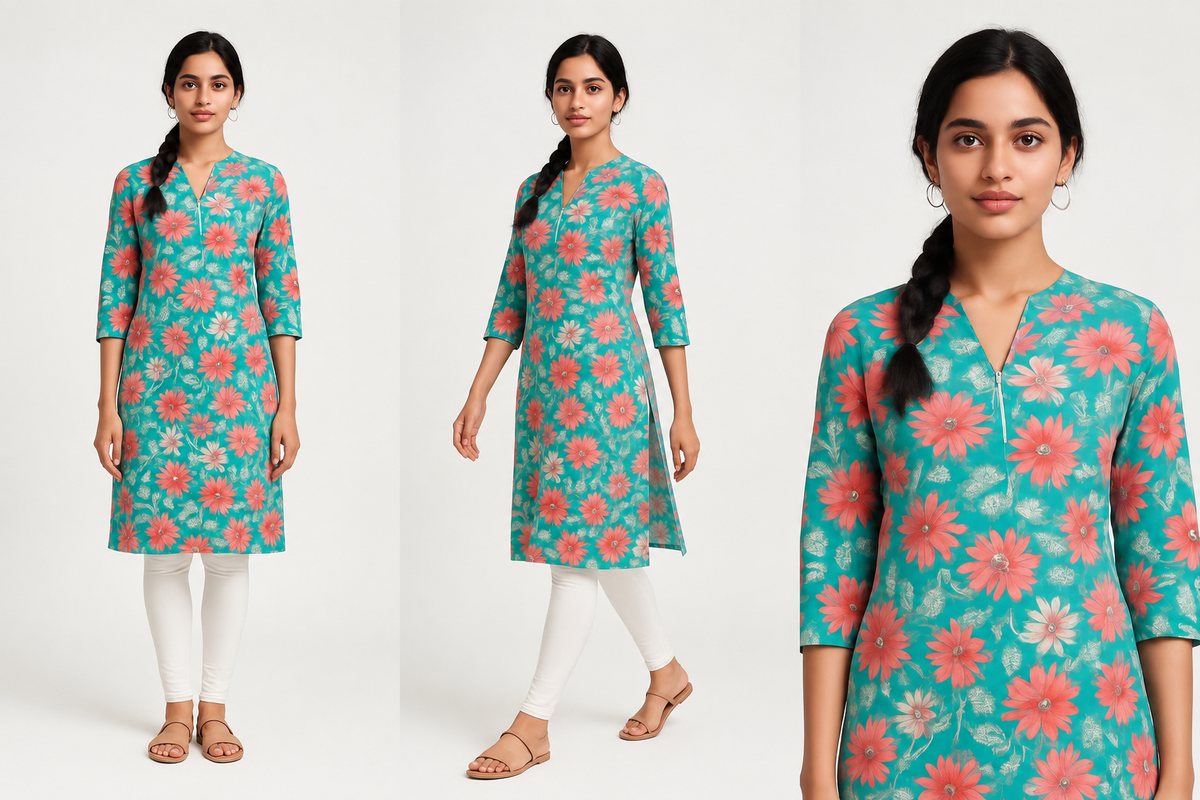
Flipkart dominates Indian e-commerce with over 500 million registered users and a fashion category that spans everything from budget daily wear to premium designer brands. Unlike Myntra (which Flipkart owns but operates as a premium-only platform), Flipkart serves the full price spectrum — making it accessible to sellers of all sizes.
But accessible doesn't mean anything goes. Flipkart has clear image requirements, a structured listing process, and a quality badge system (Flipkart Assured) that directly affects your search visibility and conversion rate. This guide covers everything fashion sellers need to know to register, list products correctly, and rank higher on Flipkart in 2026.
Getting Started — Flipkart Seller Registration
Flipkart's seller onboarding is more open than Myntra's but still requires proper documentation and category approval. Here's the full process:
Documents Required
- GSTIN (GST Identification Number): Mandatory for all sellers. Your GST registration must cover the product categories you intend to sell. For fashion, ensure your GSTIN includes the relevant HSN codes for textiles and apparel.
- PAN card: The PAN linked to your business entity (sole proprietorship, partnership, or company). This must match the name on your GSTIN.
- Bank account: A current account in your business name. Flipkart deposits seller payouts every 7-14 days depending on your seller tier. Savings accounts are not accepted.
- Brand authorization letter: If you're selling branded products that you didn't manufacture, Flipkart requires a brand authorization letter from the brand owner or authorized distributor. This is strictly enforced for fashion — selling branded apparel without authorization will result in listing removal and potential account suspension.
Registration Process
- Visit seller.flipkart.com and click "Start Selling." Enter your GSTIN and PAN details for initial verification.
- Complete the Seller Hub profile — business name, pickup address, return address, and bank account details for payouts.
- Select your product categories. For fashion, you'll need to choose sub-categories (Men's Western Wear, Women's Ethnic Wear, Footwear, etc.). Some premium fashion sub-categories require additional approval.
- Upload product listings with images and complete attribute data. Flipkart's system runs automated quality checks on images before listings go live.
- Set up shipping — choose Flipkart's fulfillment service (Flipkart Assured eligible) or self-ship. Most fashion sellers start with self-ship and move to Flipkart fulfillment as volume grows.
- Once your first listings pass quality checks, they go live within 24-48 hours. Flipkart's approval process is significantly faster than Myntra's.
Fashion Vertical — Branded vs. Unbranded
Flipkart allows both branded and unbranded fashion products, but the requirements differ:
- Branded products: Require brand authorization. Listings must use the brand's registered name exactly as it appears in trademark records. Images must accurately represent the brand's products — using stock photos from other sellers or generic images is prohibited.
- Unbranded/private label: You can create your own brand and list products under it. No authorization letter needed, but your brand name must not infringe on existing trademarks. Flipkart allows private label sellers in fashion, which is a significant advantage over Myntra's brand-only policy.
Flipkart Fashion Image Specifications
Flipkart's image requirements are less strict than Myntra's but still enforce baseline quality standards. Here are the complete technical specifications:
| Specification | Requirement | Notes |
|---|---|---|
| Aspect ratio | 1:1 (square) for primary image | Additional images can be 3:4 or 1:1. Primary must be square. |
| Minimum resolution | 1000 x 1000 px | Recommended: 1200 x 1200 px or higher for zoom functionality. |
| Maximum file size | 10 MB per image | JPEG compression at 85-90% quality keeps files well under limit. |
| File format | JPEG, PNG | JPEG preferred for smaller file sizes. PNG accepted for images requiring transparency. |
| Background | White or light gray | RGB values between 240-255 recommended. No busy or colored backgrounds. |
| Minimum images | 3 per listing | Front view mandatory. Back view and detail shot strongly recommended. |
| Maximum images | 8 per listing | Use all 8 slots for maximum buyer confidence and lower return rates. |
| Color space | sRGB | Images in Adobe RGB or CMYK may display incorrect colors on mobile devices. |
Primary Image vs. Additional Image Rules
Flipkart treats the primary image (the first image buyers see in search results) differently from additional images:
- Primary image: Must show the product on a clean white or light gray background. No text overlays, no watermarks, no collages. The product should occupy 80-85% of the frame. For clothing, a model-on shot or flat-lay on white background is ideal.
- Additional images (slots 2-8): More flexibility here. You can include close-up detail shots, fabric texture images, size charts, lifestyle/contextual images, and back views. Text overlays showing key features are permitted on additional images but not recommended — they tend to look unprofessional.
Unlike Myntra, Flipkart does not mandate model-on photography. Flat-lay, mannequin, and ghost mannequin images are all accepted as primary images. However, listings with model-on shots consistently outperform flat-lays in click-through rate and conversion — buyers want to see how the garment looks when worn.
Category-Specific Image Rules
Western Wear (T-Shirts, Shirts, Dresses, Jeans)
- Front view on model preferred: While not mandatory, model-on images for western wear receive higher engagement. The model should be in a natural standing pose with the garment clearly visible.
- White background: The primary image must have a white or near-white background. Environmental or lifestyle backgrounds are only acceptable for additional image slots.
- Color accuracy: Flipkart's quality team flags listings where the product color visually deviates from the color name in the listing. If you list a product as "Navy Blue," the image must clearly show navy blue — not black or royal blue.
- Fit visibility: For jeans and trousers, the full length must be visible. For shirts and t-shirts, ensure the hem and sleeve length are clearly shown.
Ethnic Wear (Sarees, Kurtas, Lehengas, Salwar Suits)
- Full drape on model for sarees: Sarees should ideally be shown fully draped on a model. The pallu, blouse, and draping style should all be visible. Flat saree images (folded or on a table) perform significantly worse in conversion.
- Complete set visibility: For kurta sets, salwar suits, and lehenga cholis, all components of the set must be visible in the primary image. If the listing includes a dupatta, it should be shown — either draped on the model or displayed alongside the main garment.
- Embroidery and detail shots: At least one close-up image showing embroidery work, print detail, or fabric texture is essential. Ethnic wear buyers make purchase decisions based on these details.
Footwear & Accessories
- Multiple angles: Footwear listings should include front, side, back, and sole views. Showing the shoe from at least 3 angles significantly reduces return rates.
- Scale reference: For accessories like bags, wallets, and jewelry, include at least one image that shows the product being worn or held by a model. This gives buyers a clear sense of size without needing to read dimensions.
- Detail shots: Show buckles, zippers, stitching, and interior compartments. These detail images reduce buyer uncertainty and lower return rates.
Common Image Rejection Reasons on Flipkart
Flipkart's automated and manual quality checks reject images that don't meet their standards. Here are the most common rejection reasons:
- Watermarks or logos on images: Any text overlay, brand watermark, or seller logo on the primary image results in immediate rejection. This includes subtle watermarks — Flipkart's automated system detects them. Keep primary images clean and let the product speak for itself.
- Collage or text overlays: Combining multiple product views into a single collage image is not allowed for the primary slot. Each image slot should contain a single, clear product view. Text overlays like "Best Seller" or "New Arrival" are also rejected on primary images.
- Low resolution or blurry images: Images below 1000 x 1000 px are automatically rejected. Images that meet the pixel threshold but are visually blurry (from over-compression, poor camera focus, or aggressive upscaling) may also be flagged during manual review.
- Non-white or cluttered backgrounds: Colored, patterned, or cluttered backgrounds on the primary image result in rejection. This includes beige or cream backgrounds that appear off-white on screen — stick to pure white (RGB 255, 255, 255) or very light gray (RGB 245+).
- Product not matching the listing description: If the garment color, pattern, or style in the image doesn't match the listing attributes, the listing will be flagged. This commonly happens when sellers reuse images across color variants without updating the photos. Each color variant needs its own set of images.
Listing Optimization for Flipkart Search
Getting your images approved and your listings live is just the beginning. Optimizing for Flipkart's search algorithm determines whether your products actually get discovered by buyers.
Product Title Formula
Flipkart's search algorithm weighs the product title heavily. Use this formula for fashion listings:
[Brand] + [Product Type] + [Key Feature] + [Color/Pattern]
Examples:
- "StyleCraft Men's Cotton Slim Fit Casual Shirt - Navy Blue"
- "Anaya Women's Georgette Embroidered Saree with Blouse Piece - Teal Green"
- "UrbanStep Men's Mesh Running Sports Shoes - Black Grey"
Keep the title under 100 characters. Flipkart truncates longer titles in search results, and the truncated version often loses the color or key feature — which hurts click-through rate. Front-load the most important information.
Key Attributes That Affect Discovery
Flipkart's search filters are heavily used by fashion buyers. Filling these attributes accurately and completely directly impacts whether your products appear when buyers apply filters:
- Fabric: Cotton, Polyester, Silk, Georgette, Crepe, Rayon, Linen, etc. Be specific — "Cotton Blend (60% Cotton, 40% Polyester)" is better than "Blended." Buyers filter by fabric frequently, especially for Indian ethnic wear and summer clothing.
- Occasion: Casual, Formal, Party, Festive, Sports, Lounge. Select the most accurate primary occasion and add secondary occasions where applicable. A cotton kurta might be both "Casual" and "Festive" depending on its design.
- Pattern: Solid, Printed, Striped, Checked, Embroidered, Woven Design, Self Design. Pattern is one of the top 5 filters used by fashion buyers on Flipkart. Misclassifying a printed garment as "self design" means it won't appear when buyers filter for prints.
- Fit: Slim Fit, Regular Fit, Relaxed Fit, Oversized, Skinny Fit. This attribute is prominently displayed on the product detail page and is a common search filter for western wear. Accurate fit classification reduces returns.
- Season: Summer, Winter, All Season, Monsoon. Flipkart boosts seasonally relevant products in search results. Marking your products with the correct season helps them surface during relevant shopping periods.
Product Description Best Practices
Flipkart's product description appears below the fold on the product detail page, but it affects search indexing and buyer confidence:
- Use bullet points: Structure your description as a bulleted list of key features and specifications. Buyers scan descriptions — they don't read paragraphs. Lead each bullet with the feature name in bold.
- Include specific measurements: List garment measurements for at least 3 sizes (S, M, L or their equivalents). Example: "Size M: Chest 40 inches, Length 28 inches, Shoulder 17 inches." Specific measurements reduce size-related returns, which is the #1 return reason in fashion.
- Add care instructions: Machine wash or hand wash, water temperature, ironing instructions, dry cleaning requirements. These are mandatory attributes on Flipkart but also reassure buyers about product quality.
- Mention packaging and contents: "Package contains: 1 Kurta, 1 Pyjama, 1 Dupatta" eliminates confusion about what's included. Include this even if it seems obvious from the listing title.
Flipkart Assured — What It Means for Fashion Sellers
Flipkart Assured is a quality badge that significantly impacts your product's visibility, click-through rate, and conversion. Understanding how to qualify and maintain this badge is essential for serious fashion sellers.
What Flipkart Assured Offers Buyers
- Faster delivery promise: Flipkart Assured products are eligible for next-day or 2-day delivery in most metro cities. The blue Assured badge signals speed and reliability — buyers actively filter for it.
- Quality-checked packaging: Flipkart Assured products go through Flipkart's fulfillment centers, where packaging quality is standardized. This means your products arrive in clean, branded Flipkart packaging rather than whatever packaging you use for self-ship orders.
- Quality checks on the product: Flipkart performs spot checks on Assured products for defects, incorrect sizing, and color accuracy. Products that fail these checks lose the Assured badge. This raises the bar for product quality but also increases buyer trust.
How Flipkart Assured Affects Search Ranking
Flipkart's search algorithm gives significant weight to the Assured badge. In competitive fashion categories (Men's T-Shirts, Women's Kurtas, Sports Shoes), Assured products consistently rank higher than non-Assured products with similar ratings and pricing. The badge also appears as a prominent filter — buyers can toggle "Flipkart Assured" to exclude non-Assured products entirely, which many price-conscious but quality-aware buyers do.
To qualify for Flipkart Assured, sellers must maintain a cancellation rate below 1%, a return rate below category average, use Flipkart's fulfillment service (or meet strict self-ship SLAs), and maintain minimum seller ratings. For fashion sellers, the return rate threshold is the hardest to meet — accurate sizing information and high-quality images are the best tools to keep returns low.
How CatalogX Helps Flipkart Fashion Sellers
While Flipkart doesn't mandate model-on photography, listings with model shots consistently outperform flat-lays and mannequin images. The challenge is cost — professional model photography at scale is expensive, especially for sellers managing hundreds of SKUs across multiple color variants.
CatalogX eliminates this bottleneck:
- Upload your garment — a flat-lay, mannequin shot, or well-lit hanger photo works as input. You don't need a model or a studio to get started.
- Select a model and pose — choose from a range of AI models with natural, professional poses suited to your garment type. For sarees, select draping-appropriate poses. For western wear, choose casual standing poses.
- Generate your listing image — CatalogX produces a photorealistic model-on image with consistent white background, professional studio lighting, and accurate garment representation.
- Export at 1000x1000 for Flipkart — one-click export in Flipkart's required square format, correct resolution, white background, and optimized file size. No manual cropping or resizing needed.
Multiple Angles from One Source
Flipkart allows up to 8 images per listing, and data consistently shows that more images lead to higher conversion and lower return rates. CatalogX lets you generate multiple views from a single garment photo:
- Front view — your primary listing image in square format
- Alternative pose — a different angle or pose for the second image slot
- Detail context — use the original garment close-up for fabric and design detail
- White background compliance — every generated image automatically meets Flipkart's background requirements
CatalogX creates photorealistic model-on images that meet Flipkart's image specs — white background, 1:1 ratio, professional lighting. No studio or model booking needed.
Try Free — 5 Credits →
Related Articles
- How to Sell Fashion on Amazon India: Complete Seller Guide 2026
- Myntra Seller Guide: Image Requirements & Listing Optimization 2026
- The Exact Image Sizes Every Indian Marketplace Requires in 2026
Frequently Asked Questions
Flipkart requires a 1:1 square aspect ratio for primary images, minimum 1000x1000 pixels (1200x1200 recommended). Maximum file size is 10 MB per image. Accepted formats are JPEG and PNG. Background must be white or light gray. Up to 8 images are allowed per listing, with a minimum of 3 required.
No, Flipkart does not mandate model-on photography. Flat-lay, mannequin, and ghost mannequin images are all accepted as primary images. However, listings with model-on shots consistently outperform flat-lays in click-through rate and conversion, so model photography is strongly recommended.
To qualify for Flipkart Assured, maintain a cancellation rate below 1%, keep return rates below category average, use Flipkart's fulfillment service or meet strict self-ship SLAs, and maintain minimum seller ratings. For fashion sellers, accurate sizing information and high-quality images are essential to keep return rates low.
You need a valid GSTIN covering textile and apparel HSN codes, PAN card matching your business entity name, a current bank account in your business name, and a brand authorization letter if selling branded products you didn't manufacture. Registration is done at seller.flipkart.com.
Common rejection reasons include watermarks or logos on images, collages or text overlays on primary images, resolution below 1000x1000 pixels, non-white or cluttered backgrounds, and product color not matching the listing description. Each color variant needs its own set of images to avoid mismatches.
Yes, Flipkart allows both branded and unbranded or private label fashion products. For private label products, no brand authorization letter is needed, but your brand name must not infringe on existing trademarks. This is a significant advantage over Myntra, which only accepts registered brands.