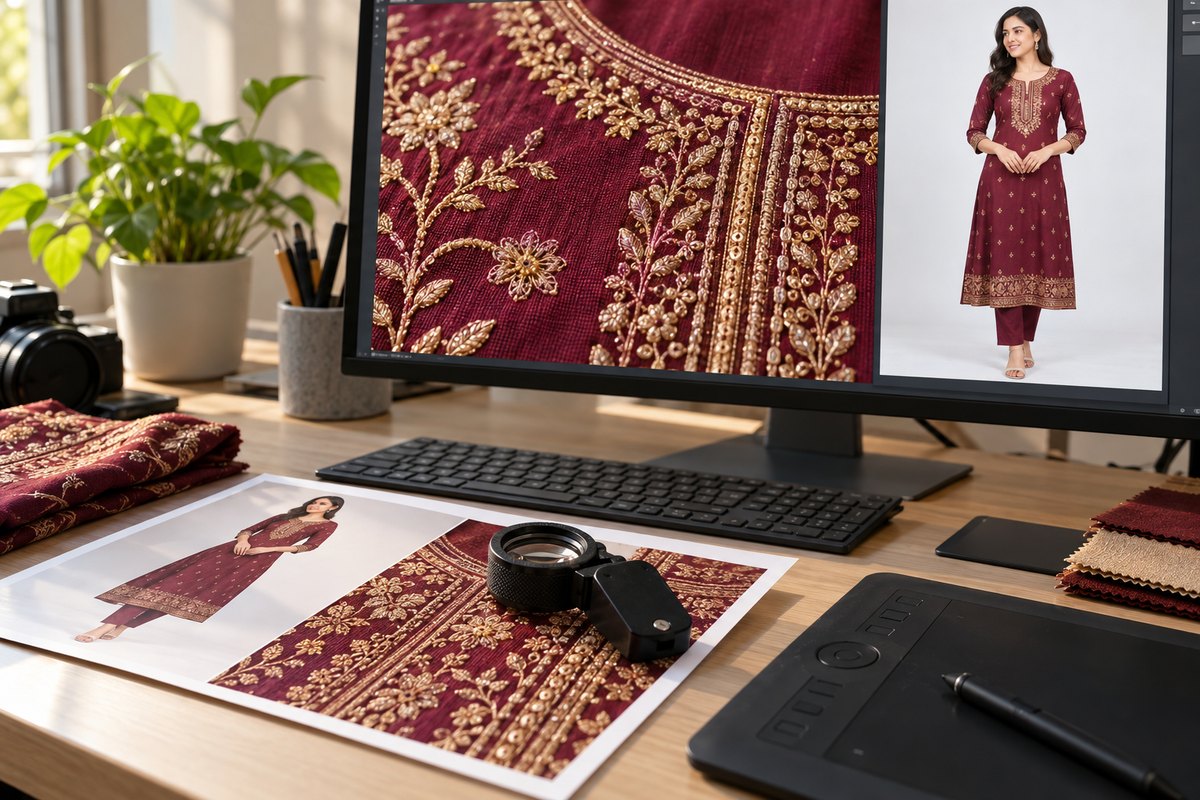
Every marketplace listing is a split-second audition. A buyer scrolling through dozens of identical-looking kurtis or sarees will stop on the one where the fabric looks real enough to touch. That happens when your image has enough resolution for the zoom to reveal thread-level detail — not pixelated mush.
Most sellers still upload HD images because that's what their tools generate. But marketplaces now support — and reward — much higher resolutions. CatalogX now lets you generate fashion mockups natively at 2K and 4K resolution, produced by our own engine. No upscaling, no interpolation artifacts — genuine high-resolution output from the start.
What Do 2K and 4K Actually Mean?
Resolution labels can be confusing because they're used loosely across industries. Here's what each tier means in the context of CatalogX product mockups, which use a 2:3 portrait ratio optimized for fashion e-commerce:
| Resolution Tier | Dimensions (px) | Total Pixels | Relative to HD |
|---|---|---|---|
| HD | 1024 x 1536 | ~1.6 million | 1x (baseline) |
| 2K | 2048 x 3072 | ~6.3 million | 4x more pixels |
| 4K | 4096 x 6144 | ~25.2 million | 16x more pixels |
The jump from HD to 2K isn't just "a bit sharper." With four times the pixel count, 2K images capture fabric weave, embroidery knots, and print edges that are completely invisible at HD. Going to 4K takes this further — individual threads, subtle color gradients in tie-dye, and the texture of handloom fabric all become visible.
Why Higher Resolution Sells More
Resolution isn't vanity — it's a conversion lever. Here's exactly how sharper images translate into sales:
- Zoom functionality on marketplaces: Amazon enables zoom-on-hover only when images are 1600px+ on the longest side (2000px+ recommended). Flipkart requires 1500px+ for zoom. Products without zoom see measurably lower engagement because customers can't inspect details before buying. A 2K image at 3072px tall activates zoom everywhere — with plenty of detail to show.
- Fabric detail visibility: For fashion, the product IS the fabric. Buyers want to see the weave of cotton, the sheen of silk, the texture of georgette. At HD resolution, these details flatten into uniform color blocks. At 2K and 4K, fabric looks three-dimensional and tactile.
- Customer confidence and reduced hesitation: When a buyer can zoom in and see that the embroidery is clean, the stitching is even, and the print is sharp, they feel more confident purchasing. The fewer unanswered questions a listing has, the higher the conversion rate.
- Reduced returns from "doesn't look like the photo": A significant portion of fashion returns happen because the product looks different in person than in the listing. Higher resolution images set more accurate expectations — the customer already knows exactly what the fabric and details look like, reducing post-purchase disappointment.
- Premium perception: High-resolution images signal that the seller is professional and invested in quality. This is especially important for D2C brands competing against established labels.
When HD Is Enough vs When You Need 2K/4K
Higher resolution isn't always necessary. Matching resolution to the use case saves credits and processing time without sacrificing quality where it matters:
HD (1024 x 1536) is sufficient for:
- Social media posts on Instagram, Facebook, and Pinterest
- WhatsApp Business catalogs and broadcast messages
- Quick product previews and internal approval workflows
- Thumbnail images on your own website
2K (2048 x 3072) is ideal for:
- Marketplace listings on Amazon, Flipkart, Myntra, and Ajio — enables full zoom functionality
- Primary product images on your Shopify or D2C store
- Carousel images where buyers swipe through multiple views
- Any listing where fabric detail is a selling point (embroidery, prints, handloom)
4K (4096 x 6144) is the right choice for:
- Premium D2C brand lookbooks and collection pages
- Print catalogs, banners, and trade show materials
- Hero images and advertising creatives (Google Shopping, Meta Ads)
- High-end product lines where image quality differentiates you from competitors
How to Generate 2K and 4K Mockups on CatalogX
CatalogX generates 2K and 4K mockups natively — meaning the AI creates the image at the target resolution from the start, rather than upscaling an HD image after the fact. This produces genuinely sharper results with no interpolation artifacts.
- Upload your garment photo — take a flat-lay or mannequin shot of your product. A clear, well-lit source image produces the best results at any resolution.
- Select your model — choose from the model gallery or describe the model you want. The AI will drape your garment onto the selected model realistically.
- Choose your resolution — in the generation settings, select HD, 2K, or 4K. The resolution picker shows the exact output dimensions and credit cost for each option.
- Generate — click Generate and wait for the result. 2K takes slightly longer than HD, and 4K takes a bit longer than 2K, but all complete within a minute.
- Download and use — download the full-resolution image directly. No further processing needed — it's ready for your marketplace listing, website, or print material.
The entire process is produced by our own engine, which understands fabric physics, draping, and garment construction. The result is a photorealistic mockup that looks like it came from a professional studio shoot — at a fraction of the cost.
Upload your garment, pick a model, choose your resolution. Studio-quality results in under a minute.
Try CatalogX Free →
Cost Comparison: 2K/4K Generation vs Professional Photography
CatalogX generates unlimited 2K and 4K mockups within your plan. You can try different models, poses, and backgrounds for every product without scheduling a single shoot. Even a month of CatalogX costs less than one afternoon in a studio.
The cost advantage becomes even more dramatic at scale. A catalog of 500 products might require 10+ shoot days in a studio, costing ₹1,50,000 or more. With CatalogX, you can generate all 500 products at 2K or 4K resolution in a day, from your laptop, at a fraction of the price.
Tips for Getting the Best Results at Higher Resolutions
- Start with good garment photos: The AI can only work with what you give it. A sharp, well-lit flat-lay or mannequin shot with visible fabric detail will produce dramatically better results than a dark, blurry phone photo — especially at 2K and 4K where every detail is amplified.
- Use 2K for standard product listings: For most marketplace use cases, 2K hits the sweet spot — it enables full zoom functionality on every platform while keeping file sizes manageable and credit usage reasonable.
- Save 4K for hero images and ads: Reserve 4K generation for your best-selling products, new collection launches, hero banners, and advertising creatives where maximum visual impact justifies the extra credits.
- Combine with background removal: Generate your mockup at 2K or 4K, then use CatalogX's background removal tool on the high-resolution output. More pixels mean cleaner edges, especially around complex garment outlines like dupattas and ruffles.
- Match resolution to the platform: Don't waste 4K on a WhatsApp catalog that compresses images to 1024px anyway. Check the platform's maximum supported resolution and match your generation accordingly.
- Test with one product first: Before generating your entire catalog at 2K or 4K, run a test with one product to verify the quality meets your expectations and the source image is good enough.
Frequently Asked Questions
HD images are 1024x1536 pixels (approximately 1.6 megapixels). 2K images are 2048x3072 pixels (approximately 6.3 megapixels) — four times the pixel count of HD. 4K images are 4096x6144 pixels (approximately 25.2 megapixels) — sixteen times the pixel count of HD. Higher resolution means more detail, sharper zoom, and better print quality.
Marketplaces like Amazon, Etsy, Shopify, Flipkart and Myntra automatically compress and serve optimized versions of your images to buyers. You upload the highest quality version, and the platform handles delivery. Higher resolution source images actually look better after marketplace compression because there is more detail to preserve. For your own Shopify or D2C store, use modern image formats like WebP and lazy loading to maintain fast load times.
Yes, higher resolution generations use more compute and therefore cost more credits. HD mockups use 1 credit, 2K mockups use 2 credits, and 4K mockups use 4 credits. Even at the higher credit cost, generating a 4K mockup on CatalogX is a fraction of the cost of a professional studio photoshoot.
Amazon India enables zoom-on-hover when images are at least 1600 pixels on the longest side (2000+ recommended). Flipkart enables zoom for images above 1500x1500 pixels. Myntra and Ajio also support image zoom for high-resolution uploads. Uploading 2K or 4K images ensures zoom works perfectly across all major platforms.
Not necessarily. 4K is ideal for hero images, advertising creatives, lookbook shots, and premium D2C brand pages where image quality is a differentiator. For standard marketplace listings, 2K provides an excellent balance of quality and file size. For social media posts and WhatsApp catalogs, HD is perfectly sufficient. Match the resolution to the use case to optimize your credit usage.