If you sell clothing online in the US or UK, the arithmetic of traditional photography is brutal: a studio photoshoot starts around $300+ per session, and agencies commonly quote $50–150 per finished image once the photographer, model and retouching are added up. For a shop with 40 listings and marketplace margins, that math never closes. AI fashion model tools exist to break it — upload a flat photo of the garment, get a photorealistic model photo back in under a minute, for a fraction of a dollar to a few dollars per image.
There are now dozens of these tools, and most "best of" lists rank them as if every seller sells the same hoodie. This list is written for a different reader: the seller of ethnic wear — sarees, kurtis, lehengas, kurta sets, salwar kameez — where the garment's construction is the product. That lens changes the ranking, because ethnic wear is exactly where AI try-on models fail most often. A model trained overwhelmingly on Western fashion meets a kurti with side slits and renders the nearest thing it knows: a dress. We have watched it happen in our own paid testing, and we describe exactly where below.
One disclosure before the list: we build CatalogX, the first tool on it. We have kept ourselves honest in three ways. Our superlative is narrow and defensible — "best for South Asian and ethnic wear," not "best overall." We list real cons for our own product. And for competitors we state only their widely known positioning and published details as we last checked them in September 2026 — no invented feature claims, no fake ratings. Where we ran a genuine paid test (FASHN, August 2026), we say so and describe what we measured; the full write-up is in our CatalogX vs FASHN comparison.
The 7 tools at a glance
| Tool | Key strength | Best for |
|---|---|---|
| 1. CatalogX | Garment-construction fidelity for South Asian ethnic wear | Sellers of sarees, kurtis, lehengas and other ethnic wear |
| 2. FASHN.ai | Developer API, speed, video try-on | Developers and high-volume teams |
| 3. Botika | Human retouching layered on AI output | Established brands with a high polish bar |
| 4. Photoroom Virtual Model | Huge distribution; part of a full product-photo suite | Sellers already editing all product photos in one app |
| 5. WeShop AI | All-in-one commerce imagery at a low price | Budget-conscious sellers who want one tool for everything |
| 6. VModel | Pay-as-you-go, no subscription | Occasional users who refuse a monthly bill |
| 7. Flair.ai | Design-canvas workflow for staged scenes | Sellers who want creative control over full scenes |
All trademarks belong to their respective owners. CatalogX is not affiliated with any other tool listed. Competitor details were last checked in September 2026 and change often — always confirm on the vendor's site. FASHN observations come from our own paid test account (August 2026).
1. CatalogX
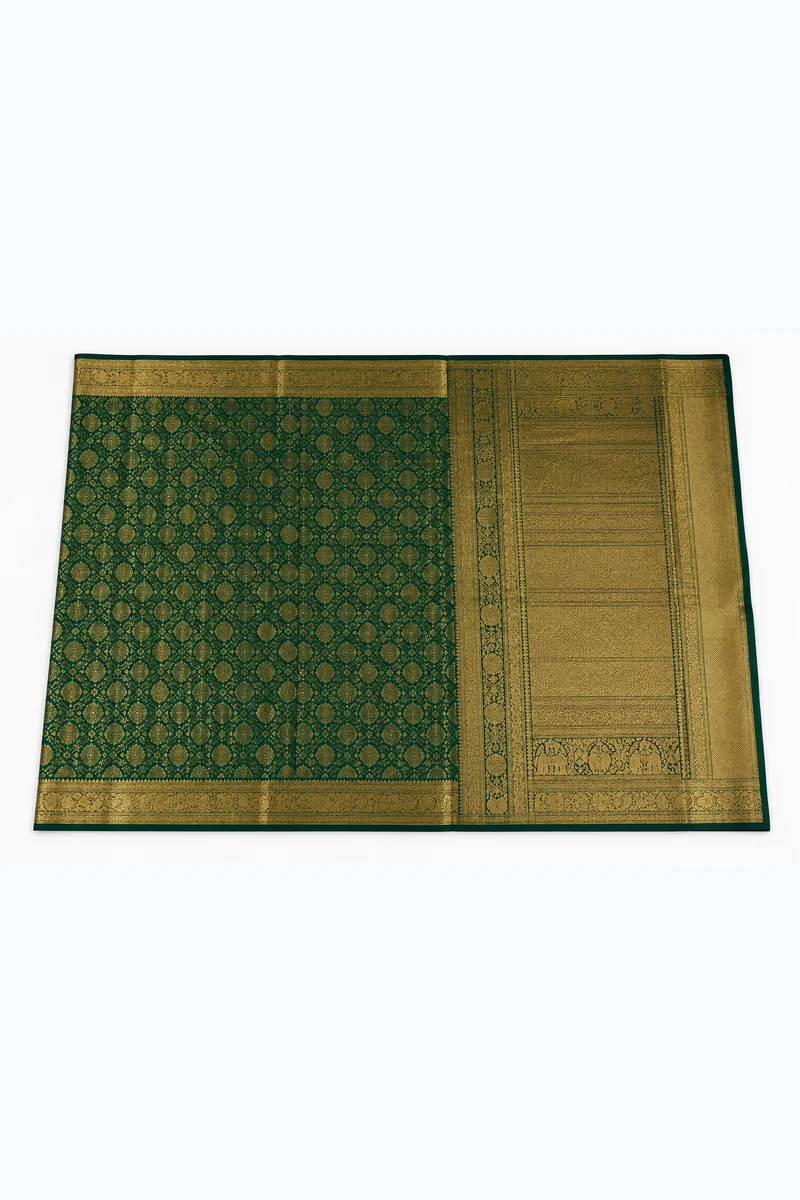
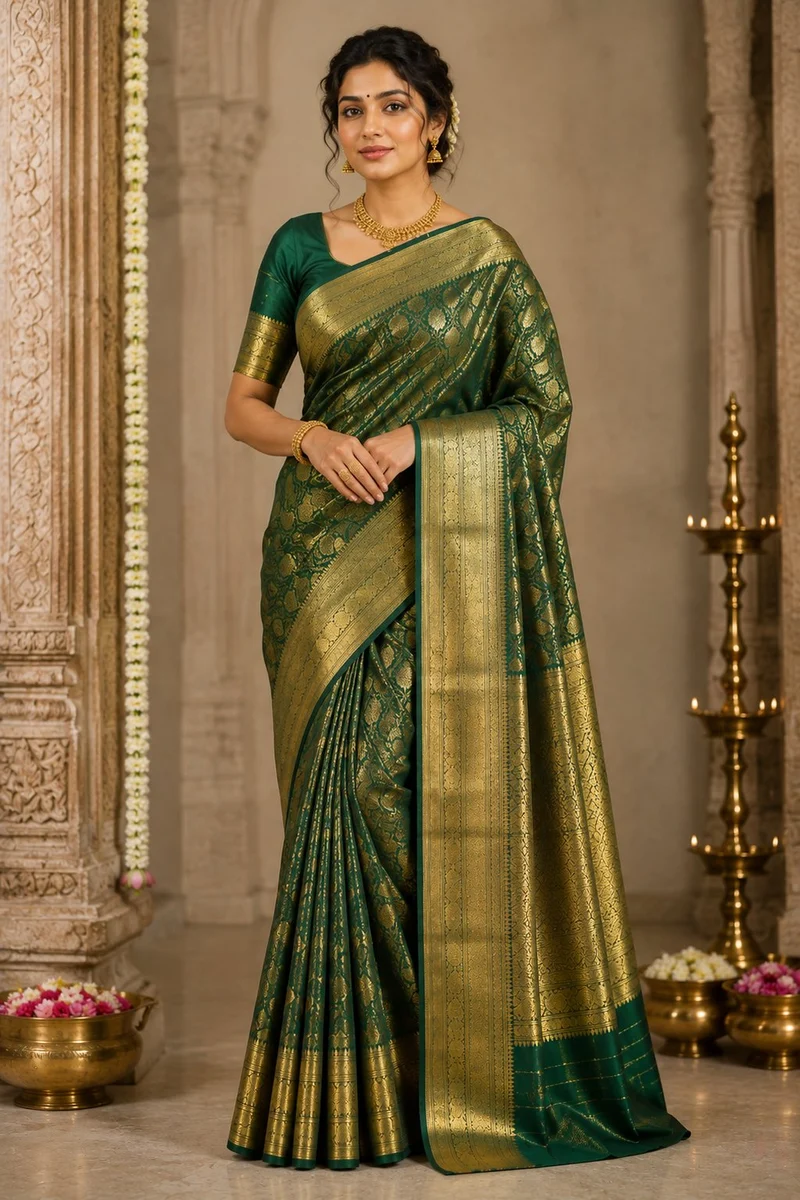
CatalogX starts from a premise most try-on tools do not: your listing photo is a contract. The buyer on Etsy or Amazon receives the exact garment in the picture, so the model photo must show that exact garment — same neckline, same buttons, same side slits, same hem length. For Western basics that is a modest ask. For ethnic wear it is the whole problem, because generic AI models routinely reinterpret unfamiliar constructions: a saree becomes an approximate wrap gown, a kurti becomes a dress, a dupatta disappears.
CatalogX's try-on runs per-garment-type construction rules across 14+ garment types. A saree keeps its pleat and pallu direction and its border runs continuously through the pleats. A lehenga keeps its flare. A kurti keeps its side slits and — critically — its hem height: a knee-length kurti stays knee-length instead of drifting toward whatever length the model saw most in training. Dupattas are styled as dupattas, not scarves. This is not a marketing adjective; it is the specific set of failure modes we watched generic tools produce, engineered against one by one.
Key features
- Garment-construction rules for 14+ garment types, with South Asian garments (saree, kurti, lehenga, kurta set) as the core competence rather than an edge case
- 40+ models across skin tones — including South Asian models your buyers recognize themselves in — plus support for uploading your own model photos on every plan, free included
- 50+ backgrounds from studio-clean to festive scenes, ~30-second generations, and 14 accessory types for bags and jewelry
- Marketplace-ready output: presets aligned to Amazon's standing-model MAIN-image rule for adult apparel (1600px+, pure white, ~85% frame fill), Etsy's 2000px shortest side, plus eBay, Poshmark, Depop and TikTok Shop specs — see the Etsy image guide
- You own all outputs, no watermarks, commercial use on every plan including free
Best for
Sellers of South Asian and other construction-heavy ethnic wear — Etsy shops, diaspora boutiques, Amazon and eBay sellers in the US and UK — who need on-model photos of the exact garment they ship. If your catalog is sarees and kurta sets, this specialization matters more than any other feature on this page. See the dedicated pages for saree model photos and kurti model photos for garment-level detail.
Pricing
Free: 5 credits, no card required. Starter: $9.99/month for 30 credits. Pro: $19.99/month for 100 credits plus 4K output. Business: $49.99/month for 260 credits plus API access. One-time credit packs are available at the same prices. Full details on the pricing page.
Pros
- The only tool on this list purpose-built for South Asian garment construction — the failure mode of every generalist
- Lowest-friction start: 5 free credits with no card, paid plans from $9.99/month
- Upload your own model photos on every plan, including free
- Marketplace compliance (Amazon, Etsy, eBay, Poshmark, Depop, TikTok Shop) built into the export flow
- Commercial rights and no watermarks on every plan
Cons
- Smaller model and asset library than the biggest players in this space
- API access only on the $49.99/month Business plan; there is no public API below it
- A young product: the catalog-photo toolset is deep, but the surrounding platform (integrations, team features) is thinner than the incumbents'
2. FASHN.ai
FASHN is the reference point in this category, and deservedly so. The company builds its own try-on models, publishes research, and has open-sourced parts of its stack — real engineering depth. The product shows it: in our paid test (August 2026), generations completed in roughly 25–30 seconds, the studio keeps your upload as you switch tools, every result can become the input to the next step, and an instruction-based Edit changed one garment's colour while leaving everything else untouched.
The reason it is second on this list rather than first is the lens of this list. In that same paid test, we ran a maroon kurti — mandarin collar, three-button placket, side slits — through FASHN's dedicated Try-On pipeline. The output preserved the collar, placket and colour faithfully, but the garment came back as a floor-length Western jersey maxi dress: no side slits, no churidar. Interestingly, FASHN's general Product to Model pipeline handled the same kurti well in a separate run, even adding a correct churidar unprompted — the platform clearly understands Indian garments at some level, but the dedicated try-on tool a seller would actually use misread the category. The full test is written up in our CatalogX vs FASHN comparison, along with how to reproduce it yourself.
Key features
- A first-class developer API — virtual try-on as infrastructure, with traceable generation IDs
- Fast generations (~25–30s in our test) at a flat 1 credit per operation, with multiple jobs queued at once
- Video try-on and image-to-video, plus instruction-based editing, model swap and upscaling in one studio
Best for
Developers integrating try-on into their own product, and teams generating high volumes of Western-apparel imagery who value speed, an editing loop and video in one place.
Pros
- The strongest API story on this list, backed by published research
- Video try-on, which most tools here (including CatalogX) do not offer
- Polished, fast studio workflow with instruction-based editing
Cons
- In our paid test, the dedicated Try-On pipeline misread a kurti's garment category entirely — a real risk for ethnic-wear catalogs
3. Botika
Botika positions itself a step upmarket from the self-serve credit tools: AI-generated model photography with human review and retouching in the loop, aimed at established fashion brands for whom a visibly-AI artifact in a campaign image is unacceptable. That hybrid pipeline is its identity — you are paying for output that has been checked by a person, not just a model.
For the right buyer that is worth the premium. A brand doing lookbook-grade imagery, where every image will be scrutinized at full size and reused across ads, gets real value from the retouching layer. For a marketplace seller producing forty listing photos a month, the same layer is mostly cost.
Key features
- AI model generation with human quality control and retouching as part of the standard workflow
- Positioning and case studies aimed at established apparel brands rather than casual sellers
Best for
Established Western-apparel brands with a high polish bar and campaign-grade image requirements, where per-image cost matters less than guaranteed finish.
Pricing
Plans start around $40+/month on annual billing as of our September 2026 check — the most expensive entry point on this list. See botika.io for current tiers.
Pros
- Human retouching in the loop — a quality guarantee no fully-automated tool on this list makes
- Built for brand consistency across a professional catalog
Cons
- The highest entry price here; hard to justify for a small marketplace shop
- No ethnic-wear specialization in its positioning — we have not tested it on sarees or kurtis, and nothing in its public materials suggests South Asian garments are a focus
- The human-in-the-loop model trades away the instant, self-serve iteration the credit tools offer
4. Photoroom Virtual Model
Photoroom is one of the most widely distributed product-photography apps in the world — its background-removal and product-staging tools are on millions of phones, and sellers across every marketplace already run their photos through it. Virtual Model is the on-model try-on feature inside that larger suite: one capability among many, not the company's core identity.
That is both the pitch and the caveat. If you already live in Photoroom for backgrounds, batch editing and product staging, getting model photos in the same app — from a company this established — is genuinely convenient. If on-model apparel photography is your main job, a feature inside a generalist suite will not go as deep as the dedicated tools above it on this list.
Key features
- Virtual model generation inside a full product-photo suite: background removal, staging, batch editing, mobile and web apps
- Massive distribution and a mature, polished app experience
Best for
Sellers whose catalog spans more than apparel — products, accessories, home goods — and who want one app for all product imagery, with model photos as one feature of it.
Pros
- One app covers backgrounds, staging, batch edits and model photos
- Extremely mature product from one of the biggest names in the category
- Strong mobile workflow for sellers who shoot on a phone
Cons
- Try-on is a feature, not the focus — apparel-specific depth (garment types, drape handling) is not what the product is optimized for
- No ethnic-wear specialization; the generalist training-data problem applies
5. WeShop AI
WeShop AI's pitch is breadth at a low price: AI models, product shots and background generation in one tool, with an entry plan around $9.99/month — the price anchor for this whole category alongside CatalogX's Starter. For a seller who wants to experiment with AI imagery across their entire catalog without committing real money, it is one of the cheapest full-featured ways in.
The trade-off is the same one every all-in-one makes: it is a generalist. The tool is built to make everything passable rather than one thing excellent, and apparel try-on — especially construction-heavy apparel — is the hardest thing on its menu.
Key features
- All-in-one commerce imagery: on-model photos, product shots and background scenes in a single tool
- One of the lowest subscription entry prices in the category
Best for
Budget-conscious sellers with a mixed catalog who want a single inexpensive tool covering model photos, product staging and backgrounds together.
Pricing
From around $9.99/month as of our September 2026 check. See weshop.ai for current tiers.
Pros
- Very low entry price for the breadth of tools included
- One tool for model, product and background imagery
Cons
- Generalist by design — no garment-construction specialization
- For ethnic-wear catalogs, run your hardest garment through it before subscribing; breadth does not protect against category misreads
6. VModel
VModel's differentiator on this list is not a feature — it is the billing model. Where almost every competitor pushes a monthly subscription, VModel is built around pay-as-you-go credits: buy what you need, use it when you need it, owe nothing in the months you list nothing.
For a certain seller that is exactly right. If you photograph new stock quarterly, or run a side business that lists in bursts before festival seasons, a subscription's unused months are pure waste. Pay-as-you-go converts a fixed cost into a marginal one.
Key features
- AI fashion model generation billed as pay-as-you-go credits rather than a subscription
Best for
Occasional and seasonal sellers — anyone whose listing volume is too irregular to justify a monthly plan.
Pricing
Pay-as-you-go credit purchases; no subscription required. See vmodel.ai for current credit pricing (last checked September 2026).
Pros
- No monthly commitment — cost scales exactly with use
- Sensible economics for burst-mode and seasonal listing patterns
Cons
- Budget positioning: fewer platform features than the subscription tools above
- No ethnic-wear specialization — test with your own garments before buying a large credit pack
7. Flair.ai
Flair approaches the problem from the design side rather than the try-on side. Its core surface is a drag-and-drop canvas: you place your product into a staged scene, arrange props and templates, and the AI renders the composition — with on-model imagery as part of a broader branded-content workflow. It is closer to a creative studio than a one-click try-on button.
That workflow attracts a specific user: the seller (or one-person brand) who wants art direction — deciding the scene, the mood, the composition — rather than accepting whatever a generator returns.
Key features
- Design-canvas workflow: compose staged scenes with templates and props, then let AI render them
- Branded-content orientation — outputs aimed at ads and social as much as listings
Best for
Design-minded sellers and small brands who want compositional control over full scenes, and whose output skews toward marketing imagery as much as marketplace listings.
Pros
- Real creative control — you design the scene instead of accepting a preset
- Output skews toward branded, campaign-style imagery
Cons
- The canvas workflow takes more time per image than one-click try-on tools — the opposite of a bulk-listing workflow
- Not a garment-fidelity specialist; construction-heavy ethnic wear is outside its positioning
How to choose: four questions
Rankings flatter list-makers; decisions come from your own constraints. Four questions cover almost every seller we talk to.
Do you sell South Asian or other construction-heavy ethnic wear?
If yes, this question outranks every other on the page. The single biggest risk in AI model photography for your catalog is not image quality — every tool here produces attractive images — it is category fidelity: whether the kurti in the output is still a kurti. That failure creates returns, disputes and policy risk, because the buyer receives something different from the listing. Choose CatalogX, which is built around exactly these construction rules, and verify us the same way you would anyone else: put your hardest garment through the free tier (5 credits, no card) and inspect the slits, hem and drape against your photo. Start with the saree or kurti pages to see the standard we hold ourselves to.
Are you a developer, or do you need try-on inside your own product?
Choose FASHN. This is not a grudging concession — their API is a first-class product with traceable generation IDs and published research behind it, and nothing else on this list treats developers as the primary customer. CatalogX's API exists only on the Business plan and is not the center of our product. If you are building try-on into an app, start with FASHN and benchmark from there.
Are you an established brand where every image must be flawless?
Choose Botika. If your images run in paid campaigns and lookbooks, and a single AI artifact — a warped hand, a melted texture — is a brand problem rather than a regenerate-and-move-on problem, the human retouching layer is what you are actually buying. It costs the most on this list because a person's time is in the loop; for campaign-grade output, that is the honest price of the guarantee.
Is AI model photography a side need rather than your main job?
Then match the billing model to your reality. If you already edit every product photo in one generalist app, Photoroom adds model photos inside the tool you already use. If you want maximum breadth for minimum spend, WeShop AI at ~$9.99/month is the value anchor. If your listing volume comes in seasonal bursts, VModel's pay-as-you-go pricing means the quiet months cost nothing. And if you want to art-direct full scenes for social and ads, Flair.ai gives you a canvas instead of a button.