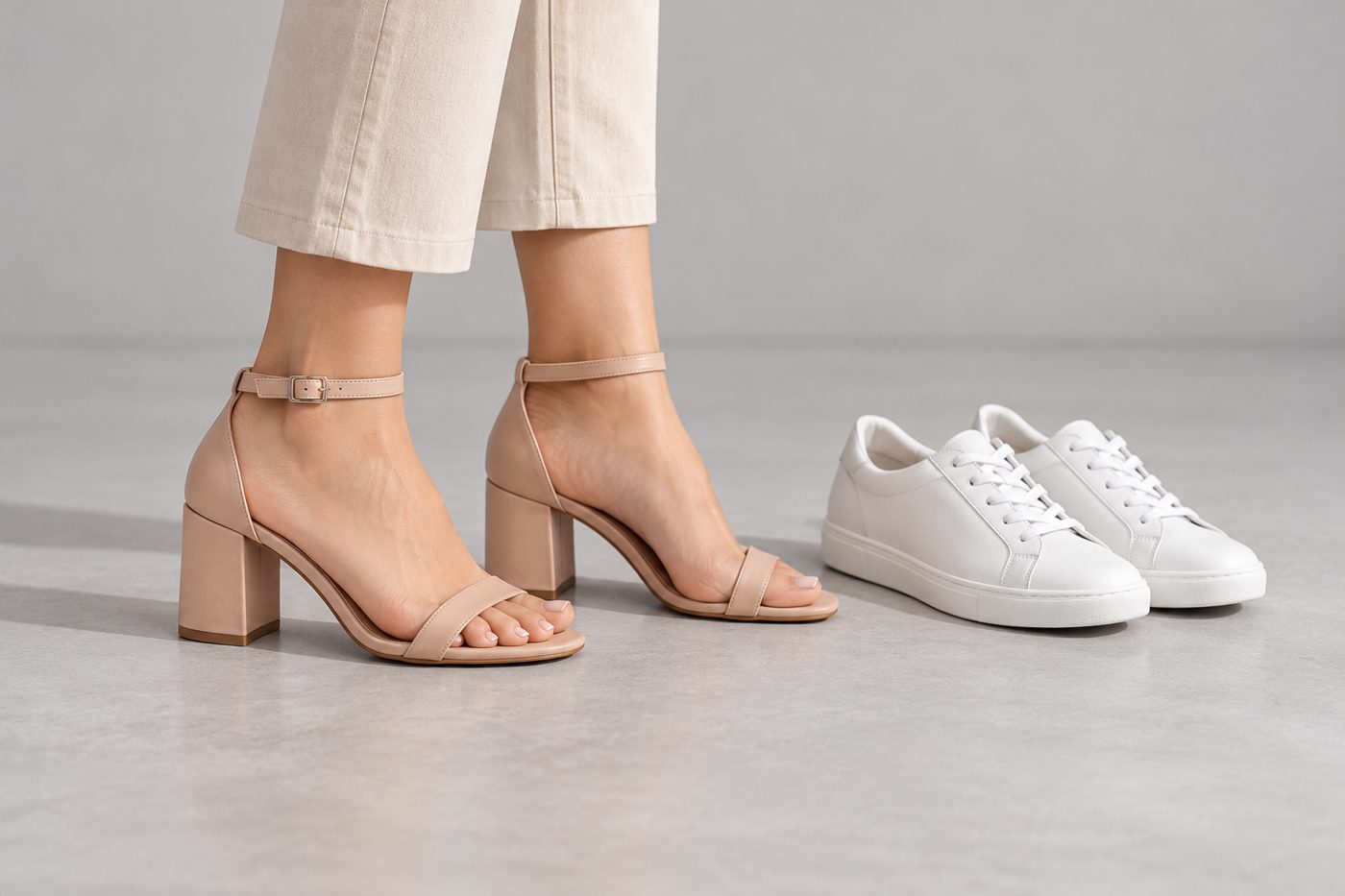
To make an AI on-feet photo of a shoe, upload a clear product photo — ideally including a true side profile — choose the footwear type, and check the render for a correctly mirrored pair, the real heel height and an unchanged sole and logo. CatalogX has three footwear types (heels, flats, sneakers). It renders the matching pair even when your photo shows one shoe, mirrored left and right and identical in every detail, keeps both feet and the lower legs in frame, and poses at least one shoe in side profile so the heel and sole read. Sneaker branding is reproduced exactly as photographed — never added, completed or removed. 1 credit per HD photo, 5 free.
What goes wrong, and how CatalogX handles it
| What goes wrong in AI shoe photos | How CatalogX handles it |
|---|---|
| One shoe uploaded, one shoe (or two left feet) rendered | The matching pair is rendered regardless, mirrored left and right and identical in every detail. |
| Heel height drifts — a block mid-heel becomes a stiletto | Heel height and shape are on the must-match list; an optional heel height in cm anchors it to the foot’s arch. |
| A maxi hem or the other leg hides the shoe | Both feet and lower legs stay in frame; any garment is short or lifted enough that the whole shoe, heel included, is visible. |
| Sneaker stripes or a logo invented, completed or removed | Only branding in your photo is reproduced, at its exact position and size — nothing added, nothing taken away. |
| Colour blocking and materials flattened | Each panel keeps its colour and material — leather, mesh, suede, knit — and suede stays matte, patent stays glossy. |
| Sole and midsole simplified | Midsole shape and colour, outsole tread and colour, and sole colour on heels are reproduced. |
Three footwear types, three checklists
Each type carries its own list of what must survive the render:
| CatalogX type | Reproduced from your photo | Pose rule |
|---|---|---|
| Heels | Heel height and shape, toe shape, upper material and sheen, strap configuration, buckle or hardware, platform, sole colour | At least one shoe in side profile so the heel reads |
| Flats | Toe shape, upper material and texture, strap, bow, buckle, embellishment or print, topline shape, sole | Top and side of at least one shoe visible |
| Sneakers | Silhouette, upper panels and colour blocking, each panel’s material, lacing pattern and lace colour, eyelets, tongue label, midsole, outsole tread, every logo and stripe | At least one sneaker in full side profile |
Boots, sandals and loafers are not separate types: pick the closest (heels for a heeled boot or sandal, flats for a flat sandal or loafer, sneakers for trainers) and check the result. Socks have their own type, sized by cuff height.
Heel height: the size a photo cannot state
A shoe’s overall size is the foot’s, so CatalogX’s footwear size control means profile, not length: from very low-profile through chunky to platform / dad-sneaker volume. The measurement box takes a heel height and anchors it to the foot:
| Stated heel height | Renders as |
|---|---|
| up to 2 cm | Essentially flat |
| 2–5 cm | Low heel, about two finger-widths of lift |
| 5–8 cm | Mid heel, the foot visibly arched |
| 8–11 cm | High heel, about the width of a palm |
| over 11 cm | Extreme platform or stiletto height |
The best fix is upstream: include one true side-profile shot. Heel height is read from your photo, and a top-down pair shot has no heel to read. CatalogX’s upload check flags a footwear photo with no side profile before you spend a credit.
Product-only shots and video
Not every listing image needs feet. Footwear also renders with no person: as a flat lay arranged as a neat pair with one shoe angled to show its profile, or standing as a pair on a plain display block. That is the format for most marketplace main images; the on-feet shot carries the fit and scale. See presented, not worn for those modes.
From Pro, a finished on-feet photo can become a 4, 6 or 8-second clip at 2 credits a second (720p). The catwalk preset walks the model a few steps toward the camera, heel-first, and the footwear lock keeps the upper, sole, heel, laces, colour blocking and logo unchanged, with both shoes an identical pair in every frame.
| Output | CatalogX credits | Plan |
|---|---|---|
| On-feet or product-only photo, HD | 1 | All plans, including free |
| Same at 2K / 4K | 2 / 4 | 2K all plans; 4K Business and above |
| Video, 720p, 4–8 s | 2 per second | Pro and above |
| Video, 1080p, 8 s | 4 per second | Business and above |
| Background removal, marketplace export | 0 | All plans |
Plans run from $9.99 for 30 credits (Starter) to $149.99 for 900 (Agency) — $0.15–$0.33 per HD photo — and new accounts get 5 free credits with no watermark.
Frequently asked questions
Yes. CatalogX renders the matching pair even when your product photo shows one shoe, mirrored left and right and identical in every detail. Check the inner side of the second shoe, which your photo never showed.
CatalogX reproduces only the branding in your photo, at its exact position and size, and never adds, completes, substitutes or removes a mark. Photograph the logo side clearly so there is something accurate to copy.
Upload a true side-profile photo and, if you know it, enter the heel height — “9 cm” renders as a high heel about a palm-width tall. On Pro and above CatalogX’s reviewer checks the render against the stated size.
CatalogX keeps both feet and the lower legs in frame and makes any garment short or lifted enough that the whole shoe is visible, heel included.
There is no separate boot or sandal type. Choose the closest of heels, flats or sneakers and check the result against your product.