Flat Lay In, On-Model Photo Out

The flat-lay is the photo every seller already has — off a phone, off a supplier, off a warehouse table. CatalogX turns it into the on-model photo buyers actually convert on.

Upload a flat lay — free →

The Problem

Flat-lays are cheap to shoot and honest about the product, but they lose the sale: buyers can't see drape, fit or where the hem lands on a body. Marketplaces know it too — Amazon requires adult apparel MAIN images on a standing human model, and on every other channel on-model photos simply out-click flat fabric.

The traditional fix is a model booking per garment. CatalogX's fix is 30 seconds per garment: the flat-lay is measured, the garment is placed on an AI model with its proportions anchored, and the result is reviewed against your original before you ever see it.

How the CatalogX Workflow Works

1

Upload your garment photo

A flat-lay, hanger, mannequin or supplier photo all work. CatalogX measures the garment's proportions from your photo before generating anything — hem length, sleeve length, neckline — and anchors the result to those measurements.

2

Choose the model and scene

40+ AI models across skin tones and body types, 50+ backgrounds, pose control — or train a custom model so your whole catalog shares one consistent face.

3

Generate, with the output checked

Each render is reviewed against your original photo. The model is generated. Your product isn't — the garment's color, print and construction come from your pixels, not from a prompt's imagination.

4

Export for your channel

Download in marketplace-ready sizes, run a whole collection through Projects with original SKU filenames preserved and a manifest.csv, or automate everything over the API.

Before / After

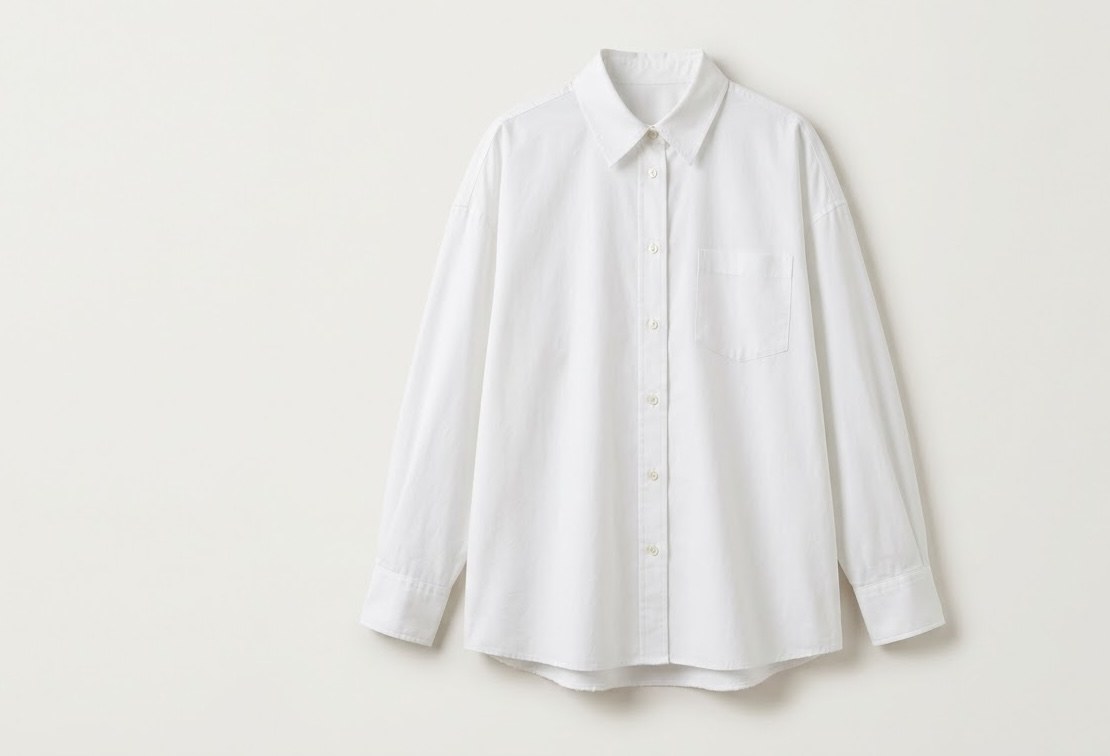
Flat photo of a white oxford button-down shirt before CatalogXBefore — your photo
The same white oxford button-down on an AI-generated model, made with CatalogXAfter — CatalogX

A white oxford shot flat, then worn — same buttons, same collar, same fabric. This exact transformation is the tool's whole job.

How to shoot a flat-lay that converts well

The output is anchored to your input, so a better flat-lay makes a better model shot. Three rules: even light (daylight or two soft sources — harsh shadows read as fabric folds); straight-on framing (shoot from directly above so the print isn't distorted); and the full garment in frame — CatalogX measures hem and sleeve length from your photo, so a cropped hem forces a guess. Smooth the garment flat, or don't bother: the Unwrinkle tool can de-crease it after upload. Tags and pins are removed automatically.

What You Get

30-second turnaround

One credit, about 30 seconds from flat-lay to finished on-model image.

Measurement anchoring

Hem, sleeves and proportions measured from the flat-lay and enforced on the model.

Any source photo

Flat-lay, hanger, mannequin or supplier photo — all are valid inputs.

Pose & scene control

Pick poses, upload a pose reference, or choose from 50+ backgrounds.

Amazon-ready output

Standing-model, white-background shots that meet apparel MAIN image requirements.

Bulk flat-lay runs

Feed a whole folder of flat-lays through one Project and export a manifest ZIP.

Simple USD Pricing

Free

$0

5 credits on signup — no card

Starter

$9.99/mo

30 images/month

Pro

$19.99/mo

100 images/month

Business

$49.99/mo

300 images, 4K, API

Agency

$149.99/mo

1,000 images/month

One credit = one generated image. Every plan is also a one-time pack at the same price — no subscription required. Unused credits roll over. Commercial use and no watermarks on every plan, free included. Full pricing & plan comparison →

Honest Limitations

Output quality is anchored to your photo

A sharp, straight-on, full-length source photo produces a sharp result. If the hem is cropped out of your photo, the AI has to guess where it lands — so don't crop it.

Back views need a back photo

CatalogX will not invent the back of your garment. Upload a back photo and you get a real back view; without one, back poses stay unavailable by design.

It reproduces your product, it doesn't restyle it

CatalogX is built for accuracy, not fantasy: it won't redesign a garment, change its cut or 'improve' the print. If you want a different product, photograph a different product.

Review before you publish

Automated review catches most defects, but marketplaces hold you responsible for images matching what ships — give every image a human look before it goes live.

Frequently Asked Questions

No — a phone photo in even daylight works. The rules that matter: shoot straight-on, keep the entire garment in frame including the hem, and smooth out heavy creases (or use Unwrinkle after upload).

Only if you photograph the back. CatalogX deliberately never invents the back of a garment — upload a back flat-lay and back poses unlock.

Upload pieces separately for accurate per-garment results — CatalogX does garment reproduction, not outfit invention, so each product is rendered exactly rather than restyled.

Every new account gets 5 free generations — no credit card. Paid plans are $9.99/month (Starter, 30 credits), $19.99/month (Pro, 100 credits), $49.99/month (Business, 300 credits with 4K output and API access) and $149.99/month (Agency, 1,000 credits). Each is also available as a one-time purchase at the same price, and one credit is one generated image. Commercial use is included on every plan, free included — no watermarks.

The model is generated. Your product isn't.

Upload one garment photo and see the result on your own product — 5 free generations, no card.

Start Free →

Keep Exploring

Flat lay to model — feature guide → Any clothing photo to model → AI fashion photography → Shopify fashion photography →