Walmart Dress Image Requirements
Selling dresses and gowns to value-focused US shoppers who compare on the product grid? Here is what Walmart expects from your dress images in 2026:
| Requirement | Walmart specification |
|---|
| Resolution | 2200×2200px recommended; 1500×1500px minimum to keep the zoom feature |
| Aspect ratio | 1:1 square |
| Background | Seamless white, RGB 255,255,255, on the main image |
| Format | JPEG, JPG, PNG or BMP under 5MB — no GIF |
| Gallery | At least four images per listing |
How to Shoot Dresses for Walmart
Dress shoppers on Walmart compare on the grid and decide on the detail page, where zoom matters: Walmart's zoom feature needs 1500×1500px minimum, and 2200×2200 is the recommendation. A dress photographed flat loses its length and fall; a dress on a model at 2200 pixels shows both and survives zoom. CatalogX renders the dress on a model with the hem where your photo puts it, exported at Walmart's size on seamless white.
Fill the four-image minimum with purpose: white-background main, on-model front, an angled view that shows the skirt's volume, and a fabric or closure close-up. Colour variants of the same dress come from one photo at one credit each, identical pose and lighting, which is what makes a variant grid on Walmart look like one product line.
One Flat Photo In, One Listing Shot Out
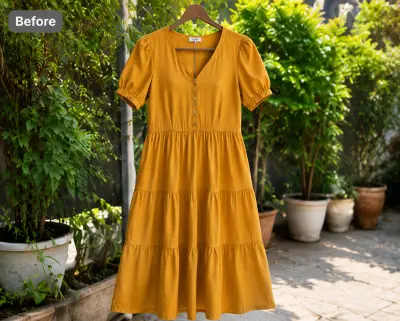 Before — flat photo
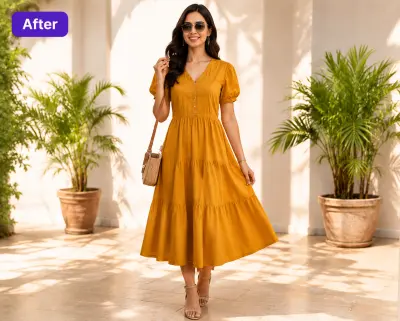 After — CatalogX
A mustard dress from our public gallery — flat photo in, on-model photo out, silhouette and hem length kept as photographed.
From Photo to Live Listing
1. Upload your dress — a flat-lay, hanger shot or supplier photo works. Tags and pins are removed automatically.
2. Pick a model — 40+ models across skin tones and body types. The AI respects your garment's construction; it doesn't guess.
3. Set the scene — seamless white for the main image, lifestyle scenes for the additional slots.
4. Generate and export — about 30 seconds per image, sized for Walmart's specs. You own every output; commercial use is included on all plans, no watermarks.
On cost: a US studio photoshoot runs $300+ per session, or $50–150 per finished image. CatalogX starts free (5 credits, no card) and paid plans start at $9.99/month — see USD pricing or the full AI vs studio cost breakdown.