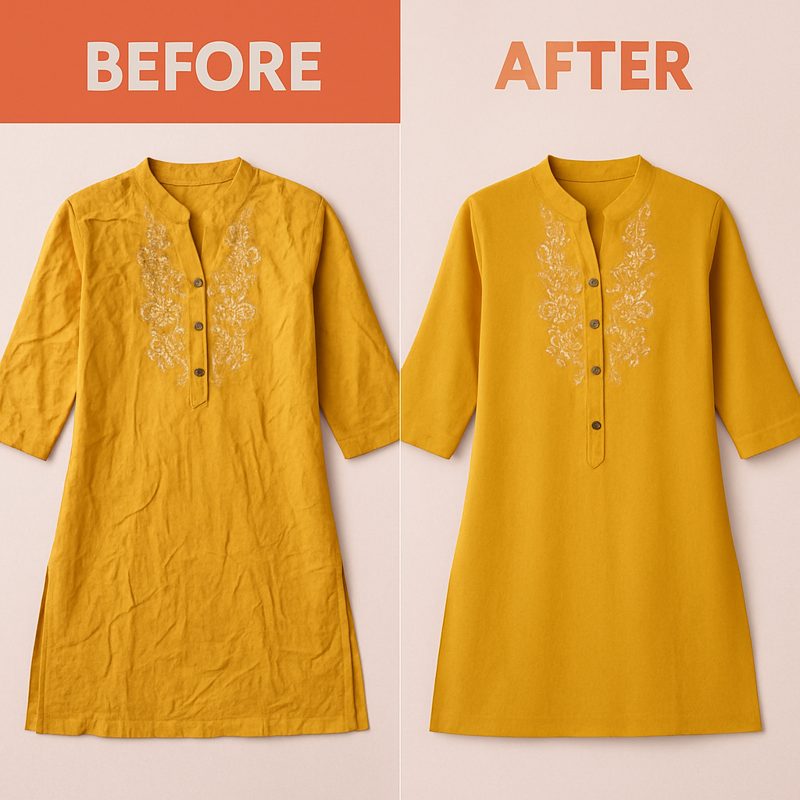
You have shot your product photos, uploaded them to your listing, and something looks off. The garment has creases across the front, fold lines from packaging, and wrinkles along the sleeves. It does not matter how good your camera is — wrinkled clothing photographs poorly, and customers notice immediately.
This is one of the most common problems for fashion sellers, especially resellers, small brands, and warehouse operations that cannot steam every garment before shooting. The product itself might be perfectly fine, but wrinkled photos tell a different story to shoppers.
AI wrinkle removal solves this without a steam iron, a Photoshop subscription, or hours of manual retouching. Here is how it works and when you should use it.
Why Wrinkled Clothing Photos Hurt Sales
Wrinkles in product photos create a perception problem that directly affects buying decisions:
- They make products look cheap: Even a premium garment looks like a bargain-bin item when the photo shows deep fold lines and creases. Shoppers associate wrinkled clothing with low quality, poor manufacturing, or items that have been returned.
- They reduce perceived value: Studies on e-commerce imagery consistently show that product presentation affects how much customers are willing to pay. A wrinkled shirt photographed on a flat surface looks like it is worth less than the same shirt photographed smooth and pressed.
- They increase return rates: When a customer receives a garment that looks different from the wrinkled photo — because they ironed it or it naturally falls better when worn — they lose trust in the listing accuracy. Ironically, the product being better than the photo can still trigger doubt.
- They signal carelessness: On marketplaces where shoppers compare multiple sellers offering similar products, the seller with crisp, wrinkle-free photos wins the click every time. Wrinkled images suggest the seller does not care about presentation.
The Traditional Fix: Steam, Iron, or Photoshop
Before AI tools existed, sellers had two options for dealing with wrinkled product photos:
Option 1: Physical preparation before the shoot
- Steam or iron every garment before photographing it
- Time cost: 3-5 minutes per garment for steaming, longer for stubborn fabrics like linen
- Requires a garment steamer or iron setup in the shooting area
- Not practical for high-volume operations shooting 50-200 products per day
Option 2: Post-production retouching in Photoshop
- Use the clone stamp tool to copy smooth areas of fabric over wrinkled areas
- Use the healing brush to blend wrinkle edges into surrounding fabric
- Use frequency separation to smooth texture while preserving color and pattern
- Time cost: 10-30 minutes per image depending on severity and editor skill
- Outsourcing cost: $1-$5 per image from professional retouching services
Both approaches work but neither scales well. If you are listing 100 products a week, steaming adds 5-8 hours and Photoshop retouching adds 15-50 hours or hundreds of dollars in outsourcing costs.
How CatalogX AI Unwrinkle Works
CatalogX includes a dedicated Unwrinkle tool that uses AI to smooth fabric in product photos. The process takes seconds instead of minutes:
- Upload your garment photo — drag and drop or click to browse. The tool accepts JPG and PNG images up to 10MB.
- The AI analyzes the fabric — it identifies the garment's texture, pattern, color, and structure, then distinguishes between intentional folds or natural drape and unwanted wrinkles or creases.
- Wrinkles are smoothed automatically — the AI removes creases while preserving the original pattern, print, embroidery, and weave texture of the fabric. Colors remain accurate.
- Download your result — the processed image is ready to use in your marketplace listing, social media post, or product catalog.
Each unwrinkle operation costs 1 credit. There is no batch minimum, no lock-in — cancel anytime, and no waiting for a retoucher to deliver results the next day.
Upload a wrinkled product image and get a clean, press-ready result in seconds. No Photoshop skills required.
Unwrinkle Your Product Photos →
When to Use AI Wrinkle Removal
The Unwrinkle tool is designed for specific scenarios where physical preparation is impractical or impossible:
- Reseller and thrift inventory: If you buy garments in bulk from wholesalers or source secondhand items, they arrive folded, compressed, and creased. Steaming hundreds of items before shooting is not feasible. AI wrinkle removal lets you photograph them as-is and fix the fabric digitally.
- Sample and pre-production shots: Brands often photograph samples that have been shipped in poly bags from the factory. These samples have deep fold lines that do not represent how the final product will look. AI smoothing produces listing-ready images from these imperfect samples.
- Warehouse and inventory photography: High-volume operations that shoot products on flat surfaces or hangers in a warehouse setting rarely have time to steam each piece. The AI tool processes the wrinkles after the fact, keeping the photography workflow fast.
- Old photos that need refreshing: If you already have product photos with visible wrinkles and do not want to reshoot, the Unwrinkle tool can improve existing images without starting over.
- Flat-lay photography: Garments laid flat for overhead shooting often show fold lines and creases that are hard to eliminate physically. The AI handles these particularly well since the fabric is fully visible in one plane.
Tips for Best Results
AI wrinkle removal works well across a range of conditions, but you can improve the output quality by following these guidelines:
- Use good, even lighting: Soft, diffused light ensures the AI can clearly distinguish between wrinkles (shadows in the fabric) and the garment's actual pattern or texture. Harsh directional lighting creates confusing shadows that can make wrinkle detection less accurate.
- Avoid extreme wrinkling: The tool handles normal shipping creases, fold lines, and light-to-moderate wrinkles well. If a garment is severely crushed, balled up, or has permanent damage wrinkles, the AI may not be able to fully smooth it. Give the garment a rough shake-out before shooting.
- Keep the full garment visible: The AI works best when it can see the complete garment outline and fabric surface. Cropped or partially hidden garments give the tool less context to work with.
- Shoot against a clean background: A solid, uncluttered background helps the AI focus on the garment fabric. Busy backgrounds with patterns or textures can reduce the tool's accuracy at identifying what is fabric and what is background.
- Higher resolution inputs produce better results: More pixel data means the AI can make finer distinctions between wrinkles and intentional texture. Aim for at least 1000px on the shorter side of your image.
AI Unwrinkle vs Other Retouching Approaches
Here is how the approaches compare side by side:
Physical steaming/ironing:
- Best results on thick fabrics like cotton and linen
- 3-5 minutes per garment, requires equipment and space
- Does not scale for high-volume operations
- Handles all wrinkle severity levels
Photoshop clone stamp / healing brush:
- 10-30 minutes per image by a skilled editor
- Risk of visible repetition artifacts on patterned fabric
- Precise control over specific areas
- Cost: $1-$5 per image if outsourced, 24-48 hour turnaround
CatalogX AI Unwrinkle:
- Processes in seconds, no manual work
- Preserves patterns, texture, and color automatically
- 1 credit per image, instant results
- Best on light-to-moderate wrinkles with good lighting
For most fashion sellers processing product images at any scale beyond a handful per week, AI wrinkle removal delivers the best balance of quality, speed, and cost.
Frequently Asked Questions
Yes. Modern AI wrinkle removal tools analyze the fabric texture, pattern, and color of the garment and selectively smooth out creases while preserving the original design details. The AI distinguishes between intentional folds or draping and unwanted wrinkles, so prints, embroidery, and weave textures remain intact in the output image.
The Photoshop clone stamp and healing brush require you to manually paint over each wrinkle, sampling from a nearby clean area of fabric. This takes 10-30 minutes per image and demands skill to avoid visible repetition artifacts. AI unwrinkling processes the entire garment in one pass, automatically identifying and smoothing wrinkles across the full image in seconds without any manual brushwork.
The tool works best on flat-lay photos, hanger shots, and mannequin images where the garment is clearly visible. It handles cotton, linen, silk, polyester, and denim well. Photos with good, even lighting produce the best results. Extremely crushed or balled-up garments with severe wrinkling may not fully smooth out, so starting with a reasonably laid-out garment gives the best outcome.
When done correctly, no. The AI smooths wrinkles while keeping natural fabric drape and subtle shadows that make the garment look real. The result looks like a properly steamed and pressed garment, not an artificial rendering. The goal is to match what the product actually looks like when new and well-presented, not to create an unrealistic image.
Professional photo retouching services charge $1 to $5 per image for wrinkle removal, with turnaround times of 24-48 hours. CatalogX's AI Unwrinkle tool costs 1 credit per image and delivers results in seconds. For sellers processing dozens or hundreds of product images, the time and cost savings are significant.