CatalogX vs Photoroom for Fashion Product Photos

Photoroom is a genuinely good generic photo editor used by millions of sellers worldwide. CatalogX does one thing instead: fashion catalog photography for Indian e-commerce — saree, kurti, and lehenga try-on, Indian AI models, native Flipkart/Myntra/Meesho export, and pricing in rupees.

Comparing from the US? Read the US edition of this comparison — USD pricing and a western-wear model set.

Try CatalogX Free →

Why Indian Sellers Choose CatalogX

Generic photo editor vs Indian fashion studio

Photoroom is built for every product category in every market. CatalogX is built for one: fashion sellers on Indian marketplaces.

🥻

Indian Garments, Handled Properly

Sarees drape with pleats and a pallu. Lehengas flare. Kurtis fall straight. CatalogX's try-on AI has garment-specific handling for Indian ethnic wear — Photoroom's AI Fashion Models are built around generic Western apparel.

🧍

Indian Models, Pose Control, Face Preservation

Pick Indian models your customers relate to, control the pose and angle per shot, and keep the same model face consistent across your whole catalog. Photoroom generates a model but gives you far less control over who and how.

🛒

Native Indian Marketplace Export

One-click presets sized and formatted for Flipkart, Myntra, Meesho, Ajio, and Amazon.in — dimensions, background, and framing rules built in. Photoroom offers generic resize; you look up each marketplace's specs yourself.

🔍

Reviewed Against Your Original

Every render is checked against your garment photo — print, colour, border, drape. On Pro and above, Quality mode re-shoots below-bar images free, so a near-miss never reaches your listing.

📦

Catalog-First Workflow

Built for the "50 new SKUs before the sale" reality: bulk generation with consistent model, lighting, and background across an entire drop, not one-image-at-a-time editing.

🆓

The Basics Are Covered on Both

Background removal, AI shadows, and ghost mannequin are table stakes — both tools do them well, and CatalogX offers them free. The difference is everything that happens after the background is gone.


Feature Comparison

CatalogX vs Photoroom — side by side

An honest comparison for the specific job of fashion catalog photography for Indian marketplaces.

Feature CatalogX Photoroom
AI on-model try-on✓ Your actual garment✓ AI Fashion Models
Indian ethnic wear (saree, kurti, lehenga)✓ Garment-specific AI✗ Generic apparel only
Indian AI model library✓✗ Generic/global models
Pose & angle control✓ Full control✗ Limited
Consistent model face across catalog✓ Face preservation✗
Flipkart / Myntra / Meesho / Ajio export presets✓ Native, one click✗ Generic resize
Background removal✓✓
AI shadows✓✓
Ghost mannequin✓✓
Output reviewed against your original photo✓ Quality mode re-shoots below-bar images free (Pro+)✗ Manual review
Separate saree body, pallu, border & blouse uploads✓✗
Native mobile apps (iOS/Android)✗ Web app✓ Polished apps
Breadth of editing tools✗ Fashion-focused✓ Large general toolset
Public API maturity✗ Early✓ Mature API
Non-fashion products (food, electronics, cosmetics)✗✓ Any category

In Depth

Where each tool actually wins

What Photoroom is genuinely great at

Credit where it's due: Photoroom is one of the best general-purpose product photo tools in the world. Its background removal is fast and clean, its iOS and Android apps are polished enough that many sellers do their entire workflow on a phone, its template system produces attractive backgrounds for any product category — food, cosmetics, electronics, furniture — and its public API is mature enough that platforms build on it. If you sell across many categories, or you edit on mobile, or you need an API today, Photoroom is a strong, safe choice, and this page will not pretend otherwise.

The question for a fashion seller on Indian marketplaces is narrower: which tool produces better on-model catalog images of your garments, for your customers, true to your product? That is where a specialist beats a generalist.

Generic AI models vs Indian fashion try-on

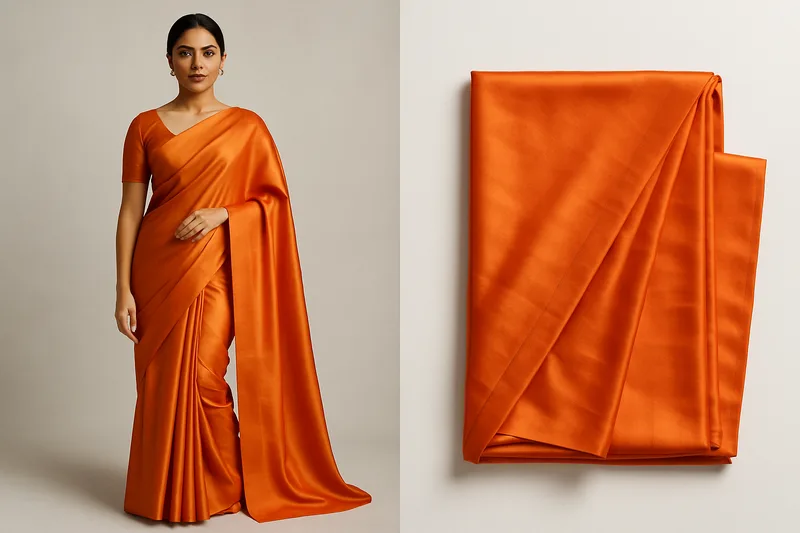
Photoroom's AI Fashion Models feature generates a model wearing your garment — a real capability, and for a plain t-shirt or hoodie it does a reasonable job. But its models and garment handling are generic and global. It has no concept of how a saree is draped — the pleats at the waist, the pallu over the shoulder — or how a lehenga's flare should hold its volume, or how a kurti falls differently from a dress. It also gives you limited say over who the model is and how they stand.

CatalogX was built the other way around: starting from Indian garment categories and working backwards. The try-on AI has garment-specific pipelines for sarees, kurtis, lehengas, and other ethnic and western wear, so the generated photo respects how each garment is actually worn. You choose from a library that includes Indian models, control the pose and camera angle per shot, and face preservation keeps the same model's face consistent across fifty SKUs — so your storefront looks like one professional photoshoot, not fifty random generations. For a customer browsing Myntra for a kurti, a photo of an Indian model wearing it correctly is not a cosmetic detail; it is what converts.
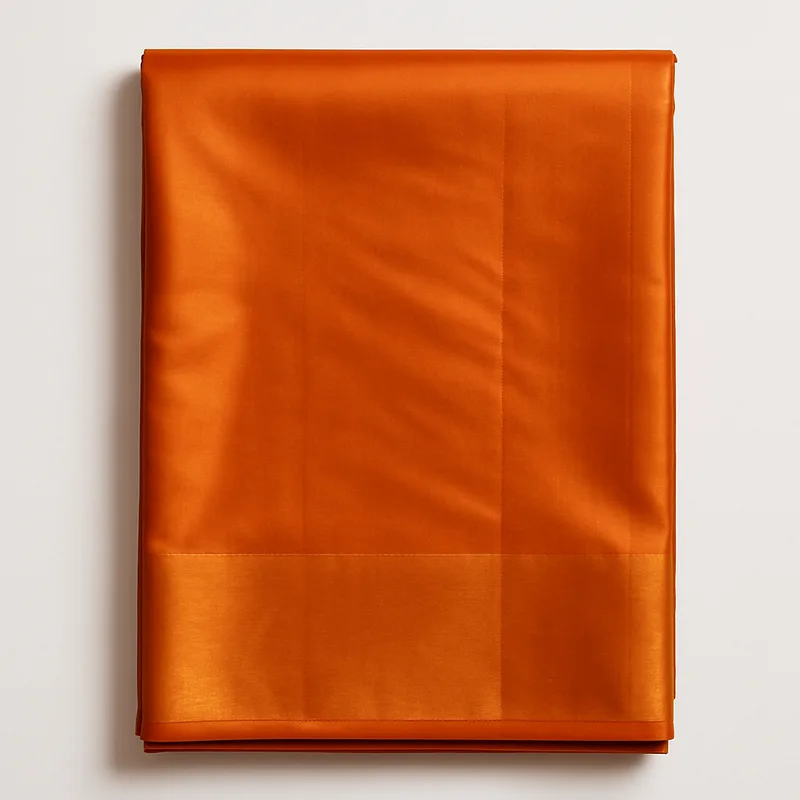
Flat saree product photo — the input a fashion seller uploads to CatalogX
Flat saree input
CatalogX AI try-on result — Indian model wearing the saree with drape-accurate pleats and pallu
CatalogX drape-accurate result

Marketplace export: presets vs resize

Flipkart, Myntra, Meesho, Ajio, and Amazon.in each enforce their own image dimensions, background rules, and framing before your listing goes live. Photoroom can resize an image to any dimensions — but you are the one looking up each marketplace's current spec and applying it, image by image, platform by platform. CatalogX ships native export presets for Indian marketplaces: pick the platform, and the output comes back sized, framed, and background-compliant for that marketplace's requirements. For a seller listing on three or four platforms at once, this is the difference between an evening of resizing and a single click.

Quality you can check, at catalogue scale

A listing photo is a promise: the buyer receives the garment they saw. CatalogX renders your real garment — print, colour, border and zari preserved — and reviews every output against your original photo; on Pro and above, Quality mode re-shoots any image below the bar at no extra credit. Sarees take separate uploads for the body, pallu, border and blouse so each zone lands where it belongs. And because new stock arrives in drops, you can batch up to 20 garments at once, keep them in projects, and export with marketplace presets included.

The honest recommendation

If you sell many product categories, live in the Photoroom mobile app, or need a mature API, use Photoroom — it is excellent at being a generalist. If you are a fashion seller listing on Indian marketplaces, CatalogX will produce better on-model images of Indian garments, with more control, exported correctly for each platform. Try both and compare the output on your own garments; that comparison is the one that matters.


FAQ

Frequently asked questions

Yes, for fashion e-commerce specifically. Photoroom is an excellent general-purpose product photo editor used worldwide. CatalogX focuses on one job: fashion catalog photography for Indian marketplaces — with AI try-on that understands sarees, kurtis, and lehengas, Indian AI models, native Flipkart, Myntra, Meesho, and Ajio export presets, and INR pricing starting at ₹299.

Photoroom's AI Fashion Models feature is built around generic Western apparel and does not offer garment-specific handling for Indian ethnic wear. CatalogX has dedicated AI pipelines for sarees (drape, pleats, pallu), kurtis, lehengas, and other Indian garments, with pose control and face preservation across a catalog.

Every render is reviewed against your original garment photo — print, colour, border and drape. On Pro and above, Quality mode re-shoots any image that falls below the bar at no extra credit. Sarees take separate uploads for the body, pallu, border and blouse, so each zone lands where it belongs, and you start with 5 free generations, no credit card required.

Photoroom has polished iOS and Android apps, a broader set of general editing tools, a mature public API, and template-based instant backgrounds for any product category — food, cosmetics, electronics, furniture. If you sell non-fashion products or edit primarily on your phone, Photoroom is a strong choice. CatalogX is the better fit specifically for fashion catalogs aimed at Indian marketplaces.

Yes. Every new CatalogX account gets 5 free image generations with no credit card required. Free tools like background removal are available without an account. Paid plans start at ₹299/month.


📚 Related Guides & Tools

CatalogX vs Ayna: AI Photoshoot Pricing Compared → 7 Best AI Virtual Try-On Tools for Indian Fashion Sellers (2026) → CatalogX vs Canva for Fashion Product Photos → CatalogX vs FASHN.ai: AI Virtual Try-On Comparison → CatalogX vs Placeit: Best Fashion Mockup Generator → AI Virtual Try-On — Studio-Quality Model Shots in 30 Seconds → CatalogX Pricing — Credit Packs from ₹299 →

Built for Indian fashion sellers, priced like it

Upload a saree, kurti, or lehenga and get a marketplace-ready on-model photo in 30 seconds. 5 free credits, no card required.

Try CatalogX Free → Talk to Sales
5 free credits No credit card required Plans from ₹299 — cancel anytime Trusted by 1,000+ sellers