AI Product Photography for Fashion & Accessories

Everything a fashion listing needs — on-model photography, ghost mannequin, clean white backgrounds, detail crops and accessory shots — generated from the product photos you already have.

Shoot your products with AI — free →

The Problem

General-purpose AI product photography tools are excellent at soap bottles and skincare jars: rigid objects on pretty backdrops. Fashion breaks them, because clothing has fit, drape and construction — the product changes shape the moment a body wears it, and the photo buyers trust is the one on the body.

CatalogX comes from the opposite direction: fashion first. Garments get measured, on-model generation is anchored to those measurements, and accessories — bags, jewelry, footwear, 15 types — run on their own pipeline with their own review rules instead of being treated as oddly shaped clothing.
How the CatalogX Workflow Works

1

Upload your garment photo

A flat-lay, hanger, mannequin or supplier photo all work. CatalogX measures the garment's proportions from your photo before generating anything — hem length, sleeve length, neckline — and anchors the result to those measurements.

2

Choose the model and scene

40+ AI models across skin tones and body types, 50+ backgrounds, pose control — or train a custom model so your whole catalog shares one consistent face.

3

Generate, with the output checked

Each render is reviewed against your original photo. The model is generated. Your product isn't — the garment's color, print and construction come from your pixels, not from a prompt's imagination.

4

Export for your channel

Download in marketplace-ready sizes, run a whole collection through Projects with original SKU filenames preserved and a manifest.csv, or automate everything over the API.

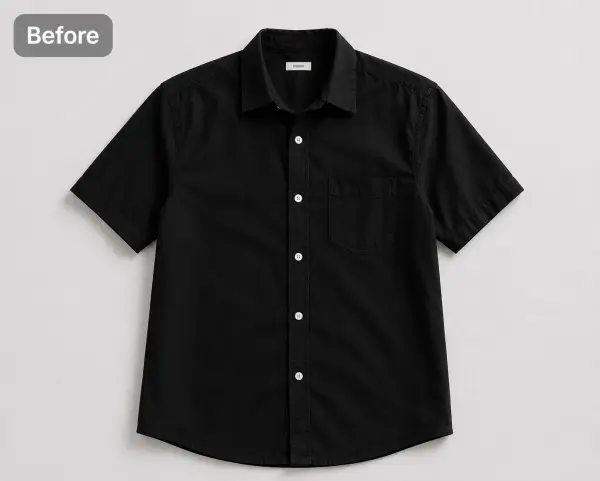
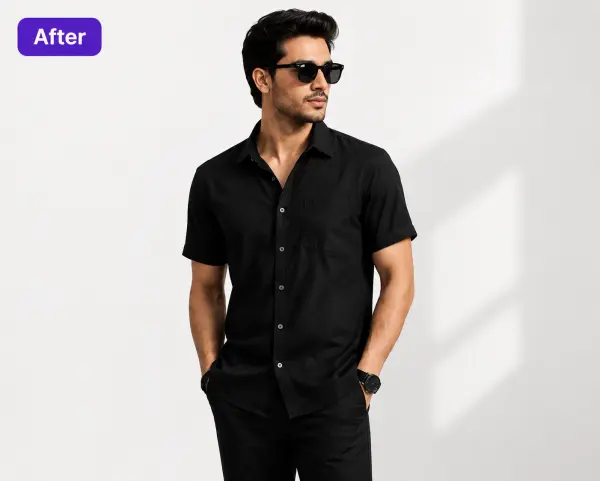
Before / After

Flat photo of a black shirt before CatalogXBefore — your photo
The same black shirt on an AI model, generated by CatalogXAfter — CatalogX

From product photo to listing photo in one generation — the same black shirt, print untouched.

The full product-photography toolkit

Beyond the on-model hero shot: ghost mannequin for the invisible-form look apparel PDPs use; pure white backgrounds that meet Amazon's RGB 255,255,255 MAIN-image rule; AI shadows so cutouts don't float; unwrinkle to steam the fabric digitally; color variants to produce every colorway from one photo; and accessory shots — a handbag on a model's shoulder, jewelry worn at correct scale. Each is one credit or free, and each starts from the same uploaded photo.

What You Get

On-model photography

The conversion driver: your garment on a photorealistic model in 30 seconds.

Ghost mannequin

Invisible-mannequin shots without the mannequin or the compositing.

White-background compliance

Standing-model, pure-white shots sized for Amazon apparel MAIN images.

15 accessory types

Bags, jewelry, watches, footwear — a dedicated pipeline, correct wearing scale.

AI shadows & unwrinkle

Grounded, pressed-looking product shots from imperfect sources.

Color variants

One photo becomes the entire color range, same pose and model.

Simple USD Pricing

Free

$0

5 credits on signup — no card

Starter

$9.99/mo

30 images/month

Pro

$19.99/mo

100 images/month

Business

$49.99/mo

300 images, 4K, API

Agency

$149.99/mo

1,000 images/month

One credit = one generated image. Every plan is also a one-time pack at the same price — no subscription required. Unused credits roll over. Commercial use and no watermarks on every plan, free included. Full pricing & plan comparison →

Honest Limitations

Output quality is anchored to your photo

A sharp, straight-on, full-length source photo produces a sharp result. If the hem is cropped out of your photo, the AI has to guess where it lands — so don't crop it.

Back views need a back photo

CatalogX will not invent the back of your garment. Upload a back photo and you get a real back view; without one, back poses stay unavailable by design.

It reproduces your product, it doesn't restyle it

CatalogX is built for accuracy, not fantasy: it won't redesign a garment, change its cut or 'improve' the print. If you want a different product, photograph a different product.

Review before you publish

Automated review catches most defects, but marketplaces hold you responsible for images matching what ships — give every image a human look before it goes live.

Frequently Asked Questions

Both. 15 accessory types — handbags, clutches, jewelry, watches, belts, sunglasses, footwear — run on a dedicated accessory pipeline with its own AI review, including on-model wearing shots at correct scale.

Yes — standing human model, pure white background, high resolution, garment filling the frame. Amazon requires adult apparel MAIN images on a standing model, which is exactly what the tool outputs.

An Ecommerce Pack (front, angle, close-up, white-background) runs 3–8 credits — well under a dollar of any plan's allowance, versus $50–150 per finished studio image.

Every new account gets 5 free generations — no credit card. Paid plans are $9.99/month (Starter, 30 credits), $19.99/month (Pro, 100 credits), $49.99/month (Business, 300 credits with 4K output and API access) and $149.99/month (Agency, 1,000 credits). Each is also available as a one-time purchase at the same price, and one credit is one generated image. Commercial use is included on every plan, free included — no watermarks.

The model is generated. Your product isn't.

Upload one garment photo and see the result on your own product — 5 free generations, no card.

Start Free →

Keep Exploring

AI fashion photography → AI catalog photography → CatalogX vs Photoroom → Accessories photography guide →