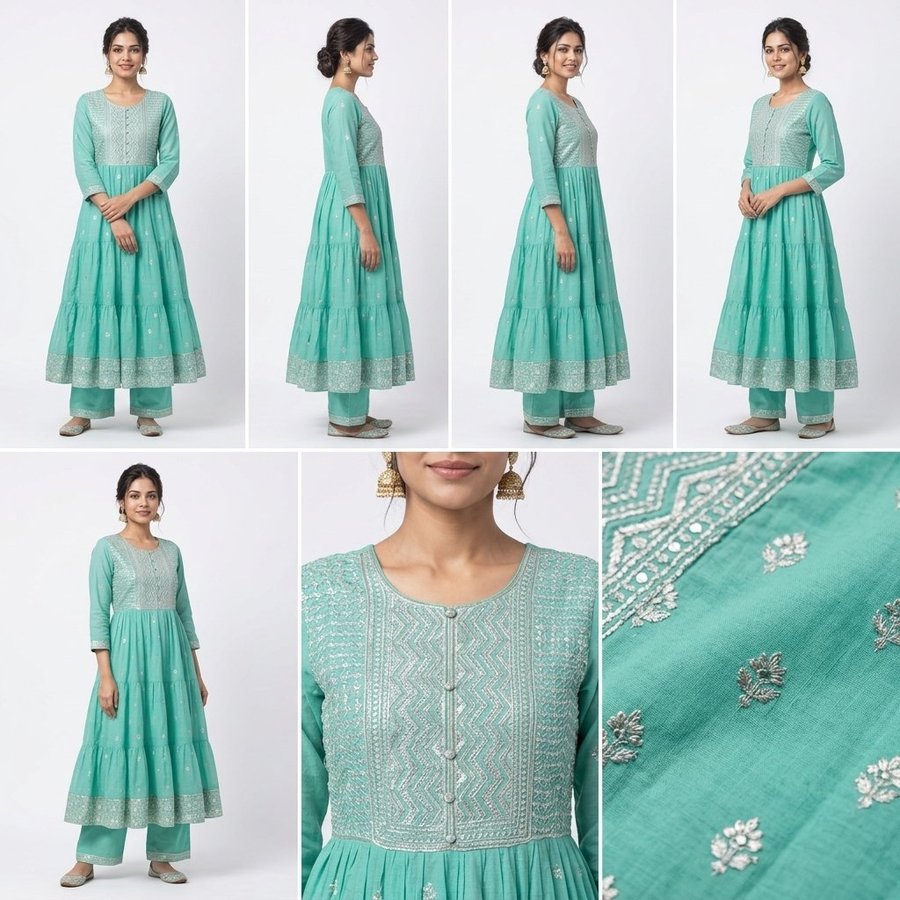
CatalogX catalog shots turn one photo of a garment into a single image showing every angle: the same model in front, side and three-quarter views, the back when you upload a back photo, a close-up of the detail work and a fabric texture shot. It costs 1 credit at HD (2 at 2K), the same as one model photo. Choose Output → Catalog shots in Try-On, the catalog shots button in the Ecommerce Pack, or ask the Agent for "all angles in one image".
Why sellers asked for this
Before this feature existed, CatalogX sellers were already asking for it. In one week, two separate sellers pasted the same shot list into the free-text box — front, full length; side profile; back; 3/4 angle; close-up detail; fabric texture — hoping for six images. What they got was one image with every angle in it, and they downloaded it 8 times out of 10.
That is the format a buyer actually wants when deciding on a kurti or a shirt: the whole garment, how it falls from the side, the back, and the work up close, in one look. Catalog shots makes it a deliberate option instead of a lucky accident.
What one catalog shots image contains
| View | What it shows the buyer | What you need to upload |
|---|---|---|
| Front, full length | The whole outfit, the hero view | One front photo — flat, on a hanger or worn |
| Side profile | Fit, flare and how the length falls | Nothing extra |
| Three-quarter views | Shape and drape at an angle | Nothing extra |
| Back, full length | Back neck, yoke, closures and print | A back photo (without one, CatalogX never invents the back) |
| Detail close-up | Neckline, embroidery, buttons or trim | Nothing extra |
| Fabric texture | Weave, sheen and the work at macro scale | Nothing extra |
Every view comes from the same shoot: one model, one garment, one background and one lighting setup. The image is square, so it fits a WhatsApp catalogue, an Instagram post and a website lookbook without cropping.
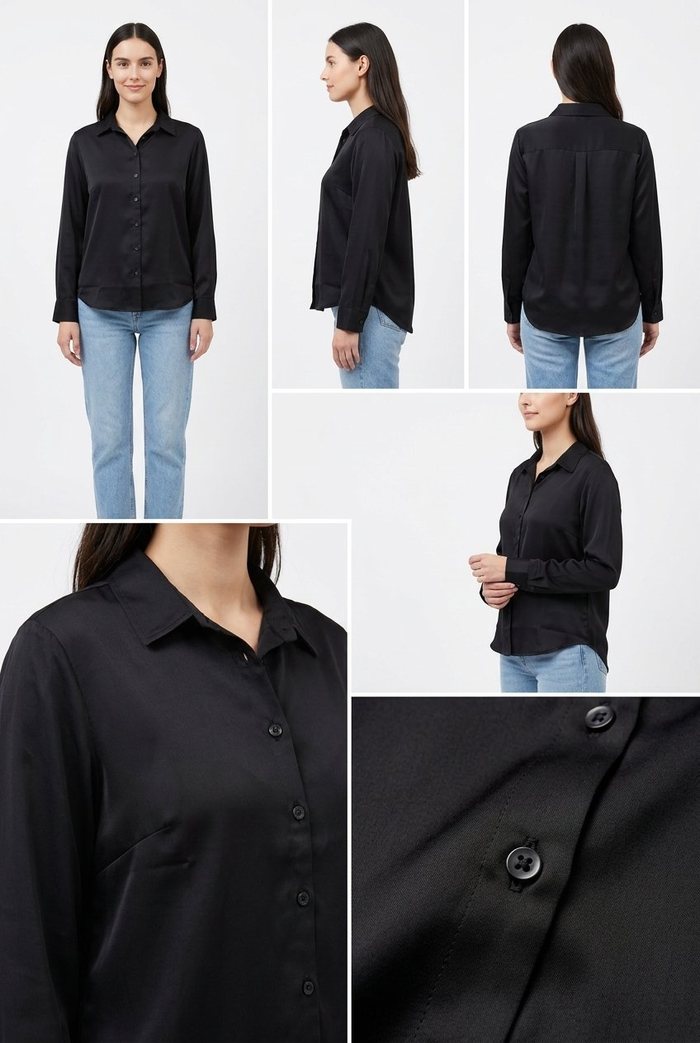
Accurate before it is quick
A multi-angle image is only useful if every angle shows the real product. CatalogX checks the photo before it spends your credit:
- It asks instead of guessing. If a kurti set has no dupatta in the photo, CatalogX asks whether the set comes with one before generating, so a dupatta is never invented. If a shirt is photographed with trousers you don't sell, it asks whether to keep them or dress the model in something else (light blue jeans, black trousers or a plain neutral).
- It keeps the construction. The neckline is copied as shown and closures such as buttons stay where they are, so a closed round neck with a button placket stays exactly that.
- It never fakes a back. The back view appears only when you upload a back photo.
Catalog shots or the Ecommerce Pack?
| Catalog shots | Ecommerce Pack | |
|---|---|---|
| Output | One square image with every angle | A separate photo per angle |
| Credits | 1 at HD, 2 at 2K | 1 per shot at HD (3–7 shots) |
| Best for | WhatsApp catalogues, Instagram, lookbooks, reseller previews | Marketplace listings that need each angle as its own image |
| Marketplace main image | No — Amazon, Myntra and Flipkart want one view per image | Yes, resized per marketplace with the free Listing Pack |
Many sellers use both: catalog shots to show a new design to customers on WhatsApp the same day, and the Ecommerce Pack once the design goes live on a marketplace.
How to make catalog shots
- Upload the garment photo. Spread it out flat or hang it, in daylight. Add a back photo if you want the back view.
- Pick a model and background, or let the Agent choose.
- Choose Output → Catalog shots in Try-On, tap Generate Catalog Shots in the Ecommerce Pack, or tell the Agent "show all angles in one image".
- Answer any quick question CatalogX asks about the photo (no credit is spent until you do).
- Download the image and share it.
If you type a shot list such as "6 images: front, side, back…" into the instructions box, CatalogX now asks whether you want one catalog shots image or separate photos, instead of guessing.
Frequently asked questions
In CatalogX, upload one photo of the garment and choose Catalog shots. You get one square image with the same model in front, side and three-quarter views, the back if you upload a back photo, a detail close-up and a fabric texture shot.
1 credit at HD and 2 credits at 2K — the same as a single model photo. New accounts get 5 free credits.
Yes, when you upload a photo of the back. Without one, CatalogX shows a second three-quarter view instead, because it never invents a back it has not seen.
No. Marketplace main images must show one view of the product. Use catalog shots for WhatsApp, Instagram and lookbooks, and the Ecommerce Pack for marketplace listings.
It works for garments worn by a model — kurtis, kurti sets, dresses, shirts, tops and more. It is not offered for accessories or flat product shots.